
Boost Sales Email Deliverability: Expert Tips for B2B
Boost Sales Email Deliverability: Expert Tips for B2B
TL;DR:
- Deliverability is crucial for B2B outreach success, affecting whether emails reach inboxes or spam.
- Proper authentication, list hygiene, and ongoing monitoring are essential for optimal inbox placement.
- Treat deliverability as a sales KPI to prevent revenue loss from poor email delivery.
Your sales team spent hours crafting the perfect outreach sequence, your AI platform identified the right decision-makers, and your messaging is sharp. Then nothing. No replies, no opens, no pipeline movement. The emails landed in spam. This scenario plays out thousands of times daily for B2B sales and marketing teams running automated outreach, and the revenue cost is staggering. Deliverability is not a technical footnote. It is the foundation that determines whether your pipeline grows or stalls, and the teams that treat it seriously consistently generate more qualified leads from the same volume of outreach.
Table of Contents
- Understanding sales email deliverability challenges
- Essential tools and setup for maximizing inbox placement
- Step-by-step: Proven techniques for better sales email deliverability
- Monitoring, troubleshooting, and optimizing your campaign
- Why most B2B sales teams overlook deliverability: The real barrier to better results
- Ready to maximize your email deliverability?
- Frequently asked questions
Key Takeaways
| Point | Details |
|---|---|
| Keep complaints low | Aim for a spam complaint rate under 0.1% to avoid inbox blocking. |
| Use proper tools | Set up Google Postmaster Tools and others to consistently monitor deliverability. |
| Authenticate emails | Ensure SPF, DKIM, and DMARC records are correctly configured. |
| Prioritize list hygiene | Regularly scrub and validate your contact list for optimal results. |
| Act on feedback quickly | Honor unsubscribe requests immediately to maintain sender reputation. |
Understanding sales email deliverability challenges
Deliverability and open rates are not the same thing, and confusing them is one of the most expensive mistakes a B2B sales team can make. Open rate measures the percentage of delivered emails that get opened. Deliverability measures whether your email reached the inbox at all, rather than being filtered to spam or blocked entirely before it even arrives. You can have a 40% open rate on emails that only reach 20% of your list. That means 80% of your outreach effort is invisible.
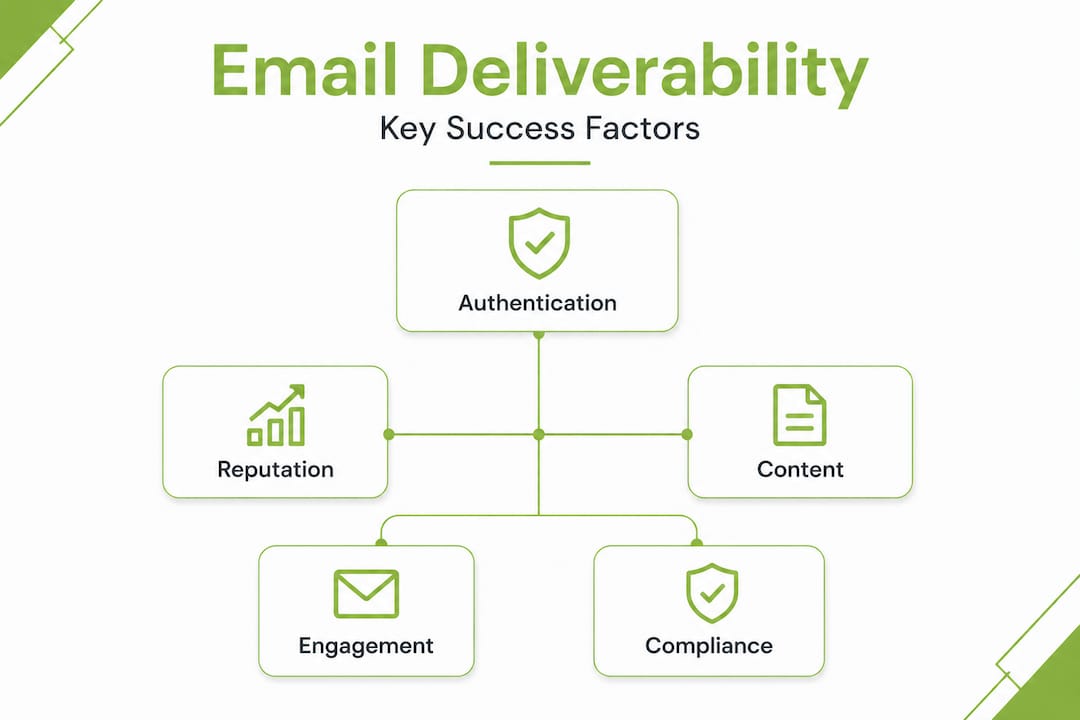
The factors that determine deliverability fall into a few major categories. First is authentication: your sending infrastructure must be properly configured with SPF (Sender Policy Framework), DKIM (DomainKeys Identified Mail), and DMARC (Domain-based Message Authentication, Reporting, and Conformance) records. These protocols tell receiving mail servers that your emails are legitimate and authorized. Without them, even a perfectly written message looks suspicious. Second is domain reputation, which is the score inbox providers assign to your sending domain based on your sending history, complaint rates, bounce rates, and engagement patterns. Third is spam complaints, which are the most damaging signal you can send to an inbox provider.
The benchmark matters here. Industry data shows you must keep complaints below 0.1%, and Gmail and Yahoo begin throttling or blocking senders once that rate climbs above 0.3%. That is a thin margin. For every 1,000 emails sent, even four complaints can start damaging your reputation.
Personalized outreach for B2B consistently drives lower complaint rates because recipients feel the message is relevant to them, not a blast sent to thousands of strangers. Relevance is a natural complaint deterrent.
| Deliverability blocker | Best-practice action |
|---|---|
| Missing SPF record | Publish a valid SPF record for your sending domain |
| No DKIM signature | Configure DKIM signing through your email provider |
| No DMARC policy | Set DMARC to “quarantine” or “reject” with reporting |
| High spam complaint rate | Segment lists, personalize messages, add one-click unsubscribe |
| Sending to stale lists | Verify and clean lists before every campaign |
| High bounce rate | Remove hard bounces immediately after each send |
| No warm-up on new domain | Gradually increase sending volume over 4 to 6 weeks |
Research on AI email open rates shows that proper authentication combined with relevant, personalized content produces measurably better inbox placement. And strong inbox placement is what makes messaging for B2B sales worth investing in at all. There is no point perfecting your copy if the message never arrives.
Essential tools and setup for maximizing inbox placement
Once you understand what breaks deliverability, the next step is making sure you have the right infrastructure and monitoring in place before you send a single campaign. This is where many teams skip ahead and pay for it later.
Authentication setup is non-negotiable. SPF, DKIM, and DMARC all need to be configured correctly for your sending domain. These are DNS records, and your IT team or email provider can usually handle them. The problem is that many sales teams inherit a sending setup they have never audited. A quick check on MX Toolbox will expose any authentication gaps in under two minutes.
Monitoring tools need to be part of your weekly routine, not a one-time setup task. Google Postmaster Tools is free and gives you domain reputation scores, spam rate tracking, and authentication pass rates directly from Gmail’s perspective, which covers a massive share of business inboxes. MX Toolbox lets you check whether your domain or IP appears on major blacklists. mail-tester.com lets you send a test email and get a detailed score showing every technical factor affecting your deliverability. Together, these three tools give you a complete picture of your sending health.
The AI outreach process built into modern B2B automation platforms often includes deliverability monitoring as a built-in layer, but even if you use a sophisticated platform, you should still run independent checks. Platforms can mask underlying domain issues until they become serious.
| Tool | What it monitors | Recommended frequency |
|---|---|---|
| Google Postmaster Tools | Domain reputation, spam rates, auth results | Weekly |
| MX Toolbox | Blacklist status, DNS records, mail server health | Weekly or after each campaign |
| mail-tester.com | Full deliverability score on test sends | Before each new campaign |
| Spamhaus lookup | Major blacklist check | Monthly minimum |
| Your ESP dashboard | Bounce rates, complaint rates, open rates | After every send |
The impact of B2B personalization on deliverability is often underestimated. When recipients consistently open, reply to, and engage with your emails, inbox providers read those positive engagement signals and reward your domain with better placement. It becomes a self-reinforcing cycle.
Pro Tip: Set up automated blacklist monitoring using MX Toolbox’s free alert service so you get an email notification the moment your domain appears on a blacklist. Catching a blacklisting within hours instead of weeks can save an entire campaign from collapse.
Step-by-step: Proven techniques for better sales email deliverability
With your setup in place, here is the process that actually moves the needle. Work through these steps in order, because each one builds on the last.
-
Verify and clean your list before every send. Use a list validation service to remove invalid addresses, role-based emails (like info@ or sales@), and known spam traps. A clean list is the single fastest way to reduce bounce rates and protect your domain reputation. Building your list the right way from the start reduces cleaning overhead dramatically.
-
Confirm authentication records are passing. Before any campaign goes live, run a quick check through mail-tester.com to confirm SPF, DKIM, and DMARC are all passing. A failed authentication record can cause an otherwise perfect campaign to be blocked entirely.
-
Warm up new sending domains gradually. Never start sending at full volume from a brand new domain. Start with 20 to 30 emails per day in week one and increase slowly over four to six weeks. Inbox providers need time to build trust in a new domain, and rushing this step is one of the most common reasons campaigns fail.
-
Segment your list and customize your messaging. Generic mass messaging is both a deliverability risk and a conversion killer. Tailor your opening line, your value proposition, and your call to action to the recipient’s industry, role, or known pain point. Lead gen messaging tips show that even small personalization improvements can significantly lower complaint rates and improve reply rates simultaneously.
-
Include a one-click unsubscribe in every email. Gmail and Yahoo now require this for senders above certain volume thresholds. More importantly, making it easy to opt out keeps frustrated recipients from clicking “Report spam” instead, which is far more damaging to your domain.
-
Honor unsubscribe requests immediately. Do not wait 24 hours or run a weekly suppression update. The moment someone opts out, remove them from all active sequences right away. Industry data confirms that failing to process unsubscribes quickly is a direct path to elevated complaint rates and eventual blocking.
-
Control your sending cadence. Sending too many emails too fast to a cold list is a reputation killer. Space your touches thoughtfully. A B2B outbound workflow built around realistic cadence windows performs better over time than one designed to maximize short-term volume.
-
Monitor your spam complaint rate actively after every send. Your target is below 0.1%. If you see a spike after a specific message, pull that variant, review the list segment, and investigate before continuing.
Pro Tip: Warm-up tools like Mailwarm or Lemwarm can automate the domain warm-up process by sending and engaging with emails between warm-up accounts. This builds a positive sending history faster and safely, especially for new dedicated sending domains.
Monitoring, troubleshooting, and optimizing your campaign
Execution is only the beginning. What separates high-performing B2B outreach operations from underperforming ones is their commitment to ongoing monitoring and fast problem resolution.

Reading your domain reputation dashboard in Google Postmaster Tools is a skill worth developing. The tool grades your domain as High, Medium, Low, or Bad. A High rating means you are in good standing. Medium is a warning sign. Low means significant inbox placement issues are already happening. Bad means you are likely being blocked. The key is to act at the Medium stage, not wait until you hit Low or Bad.
Red flags to watch for:
- A sudden drop in open rates of 15% or more over two consecutive sends
- An increase in bounce rates above 3% on a previously healthy list
- Feedback from prospects that they never received your email
- A domain or IP appearing on any major blacklist
- A spike in spam complaints above 0.08% on a single campaign
- Replies from mail servers rejecting your messages with a 550 or 421 error code
- Gmail Postmaster showing a shift from “High” to “Medium” domain reputation
When you spot one of these warning signs, the troubleshooting process follows a logical order. Start by checking authentication records again, then verify whether your domain or sending IP appears on a blacklist using MX Toolbox. Review the most recent campaign for anything that could trigger spam filters: attachments, link-heavy formatting, overly promotional language, or misleading subject lines. Check whether the list segment you sent to was recently verified or might contain stale data.
Pro Tip: Schedule a dedicated monthly deliverability review on your team calendar. Pull your Google Postmaster data, run MX Toolbox checks, and review complaint and bounce trends across the past four weeks. Teams that do this consistently catch issues early and rarely face the full damage of a domain reputation collapse.
Honoring opt-out requests is a monitoring issue as much as a compliance one. Every day a suppressed address remains on an active sequence is another day it might generate another complaint. Automate your suppression list sync so it runs in real time, not on a schedule.
Strategic follow-up campaigns can actually improve deliverability over time when done correctly, because positive engagement signals from interested prospects counterbalance any neutral or negative signals from earlier touches. Follow-up done well signals to inbox providers that your outreach generates real conversations.
Why most B2B sales teams overlook deliverability: The real barrier to better results
Here is something most deliverability guides will not say directly: the reason most B2B sales teams have poor deliverability is not technical ignorance. The authentication steps are well documented. The tools are free. The thresholds are public. The real reason is organizational. Deliverability is treated as an IT responsibility while sales leadership focuses on volume, pipeline, and quota. Nobody owns it as a revenue metric, so nobody prioritizes it until something breaks badly enough to be impossible to ignore.
The mindset shift required is significant. Deliverability is a sales discipline, not a technical one. When a campaign’s emails land in spam, the result is exactly the same as if the campaign never ran. You spent the budget, burned the list, and generated zero pipeline. That is a revenue problem, not a server configuration problem. Sales leaders who frame it this way, and report domain reputation alongside open rates and reply rates in their weekly reviews, build teams that catch issues early and protect their outreach capacity.
The comfort of automation makes this worse. When an AI-driven outreach platform is running campaigns automatically, it is easy to assume the platform is handling everything. But no platform guarantees inbox placement. The infrastructure, the list quality, the complaint rate management, and the monitoring are still your responsibility. Automation scales your output. It also scales your mistakes if deliverability fundamentals are not in place.
We see this pattern consistently: companies invest heavily in B2B personalization strategy and message quality, then launch at high volume before their domains are warmed up, and wonder why results are poor. The message quality was never the issue. The delivery infrastructure was not ready.
Organizations that treat deliverability as a leadership-level KPI consistently outperform peers on the same tools and lists. The difference is not technology. It is ownership and accountability.
Ready to maximize your email deliverability?
If this article made it clear that deliverability requires ongoing investment, the right infrastructure, and a disciplined monitoring process, you are in the right place.
At Lickfold Digital, we build and manage the entire outbound email infrastructure for B2B companies, including dedicated sending domains, warm-up accounts, authentication setup, reputation monitoring, and AI-driven personalized outreach that keeps complaint rates low and reply rates high. Our approach treats deliverability as a revenue discipline, not an afterthought. If your current outreach is not producing the pipeline volume you expect, the issue is likely infrastructure, not messaging. Reach out to our team to find out exactly where your deliverability is falling short and what it takes to fix it.
Frequently asked questions
What is a good spam complaint rate for sales emails?
Keep your spam complaint rate below 0.1% at all times. Gmail and Yahoo begin throttling or blocking senders once rates reach 0.3%, so staying well below that threshold protects your domain reputation and inbox placement.
Which tools help monitor email deliverability?
Google Postmaster Tools, MX Toolbox, and mail-tester.com are the three essential tools for weekly deliverability checks, covering domain reputation, blacklist status, and full technical scoring on test sends.
How often should I check for domain blacklisting?
Check major blacklists like Spamhaus at least once per month, and immediately after any campaign that shows unexpected drops in open rates or unusual bounce spikes.
Why is honoring unsubscribe requests immediately important?
Every delayed opt-out is an opportunity for that contact to file a spam complaint instead, and rising complaint rates directly damage your domain reputation and can trigger blocks from major inbox providers like Gmail and Yahoo.