
Step-by-step guide to improving B2B email delivery
Step-by-step guide to improving B2B email delivery
TL;DR:
- Most B2B email deliverability issues stem from neglecting continuous infrastructure maintenance, not just initial setup. Ensuring all authentication protocols are properly configured and regularly monitored is essential for maintaining inbox placement. Ongoing oversight of technical health and engagement signals prevents missed opportunities and protects revenue streams.
Every B2B sales or marketing email that lands in spam is a missed conversation, a dead opportunity, and invisible revenue walking out the door. For outbound teams running high-volume campaigns, even a 10% drop in inbox placement can quietly kill an entire quarter’s pipeline before anyone notices. The good news is that most deliverability failures follow predictable patterns with known fixes. This guide walks you through the technical foundations, content practices, and monitoring habits that consistently separate teams who fill their calendars from teams who wonder why nobody responds.
Table of Contents
- What impacts email deliverability for B2B campaigns?
- Preparing your B2B tech stack: Tools, authentication, and compliance
- Best practices for crafting deliverable outreach emails
- Troubleshooting and monitoring: How to spot and fix B2B deliverability issues
- What most B2B teams miss about email delivery rates
- Ready to ensure your outreach gets results?
- Frequently asked questions
Key Takeaways
| Point | Details |
|---|---|
| Set up authentication | Use SPF, DKIM, and DMARC for secure, trusted B2B email delivery. |
| Optimize content and timing | Personalized, relevant emails sent at the right frequency achieve better inbox rates. |
| Monitor and adapt | Proactively test and verify deliverability, as technical or policy changes can break what worked yesterday. |
| Handle edge cases | DMARC and provider changes require ongoing checks even if your setup hasn’t visibly changed. |
What impacts email deliverability for B2B campaigns?
Deliverability is not a single setting you toggle on. It is the combined result of technical authentication, sender behavior, domain history, and how recipients actually interact with your emails. Understanding each layer gives you the leverage to diagnose problems and prevent them before they drain your pipeline.
The four core pillars of B2B deliverability:
- Sender authentication: SPF (Sender Policy Framework), DKIM (DomainKeys Identified Mail), and DMARC (Domain-based Message Authentication, Reporting, and Conformance) tell mailbox providers that your emails genuinely originate from your domain. As the email deliverability overview from Sitepoint confirms, SPF, DKIM, and DMARC materially affect whether messages are accepted and placed in the inbox.
- Sender reputation: Internet service providers and mailbox providers maintain a rolling score for every sending domain and IP. High bounce rates, spam complaints, and low engagement all damage that score quickly.
- Domain age and history: A brand-new domain sending 500 emails per day looks exactly like a spammer. Gradual warmup over weeks tells providers your behavior is legitimate.
- User engagement signals: Opens, replies, forwards, and clicks tell providers that recipients want your mail. Low engagement over time signals the opposite.
Here is a snapshot of the major factors and their relative impact on inbox placement:
| Factor | Impact level | What to watch |
|---|---|---|
| SPF authentication | High | Authorized sending IPs listed correctly |
| DKIM signing | High | Cryptographic signature valid on all sends |
| DMARC policy | High | Alignment between SPF/DKIM and From domain |
| Sender reputation score | Very high | Complaint rate, bounce rate, spam traps |
| Engagement rate | High | Opens, replies, unsubscribes |
| Sending volume ramp | Medium | Daily send limits respected during warmup |
| Content quality | Medium | Spam trigger words, link density, images |
| List hygiene | Medium | Invalid, duplicate, or unverified addresses removed |
Policy reality check: Google and Yahoo’s 2024 bulk-sender rules require all senders over 5,000 emails per day to have SPF, DKIM, and DMARC in place and maintain complaint rates below 0.1%. For B2B outbound teams, this is not optional best practice. It is the baseline requirement for staying out of the junk folder. Falling short of these thresholds means your entire sending domain risks being throttled or blocked.
For a deeper look at the nuances that affect B2B specifically, the expert deliverability tips from Lickfold Digital are worth bookmarking as a reference you return to regularly.

Preparing your B2B tech stack: Tools, authentication, and compliance
Understanding the factors is only the start; now you need the technical foundation. A clean technical setup removes the most common reasons your emails get filtered before a human ever reads them.
What you need before you start:
- DNS access for your sending domain (usually via your domain registrar or hosting panel)
- Admin access to your ESP (email service provider) such as Google Workspace, Microsoft 365, or a dedicated outreach platform
- At least two test inboxes across different major providers (Gmail, Outlook, and Apple Mail at minimum)
- A DMARC reporting inbox or a third-party monitoring service to receive aggregate reports
Here is how the three authentication protocols compare in function and setup complexity:
| Protocol | What it does | Where it lives | Complexity |
|---|---|---|---|
| SPF | Authorizes which IP addresses can send on behalf of your domain | DNS TXT record | Low |
| DKIM | Adds a cryptographic signature that verifies message integrity | DNS TXT record + ESP key generation | Medium |
| DMARC | Enforces alignment between SPF/DKIM and your From address; sends reports | DNS TXT record | Medium to high |
As mailbox placement research confirms, providers decide placement based on authentication and compliance with bulk-sender requirements. Skipping any one of these three creates a gap that filters actively exploit.
Implementation checklist:
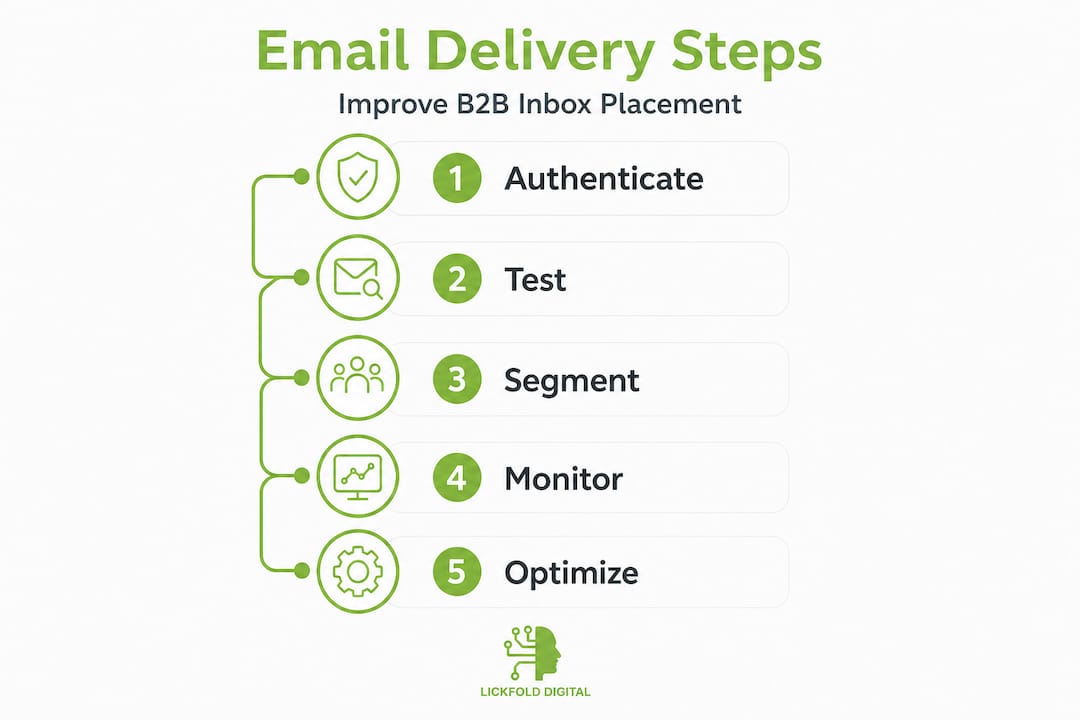
- Log into your DNS provider and create a TXT record for SPF. List every IP and ESP you use to send email. Use a validator tool to confirm syntax is correct before saving.
- Generate a DKIM key pair inside your ESP settings. Copy the public key and paste it into a DNS TXT record at the subdomain your ESP specifies (often "default._domainkey
orselector1._domainkey`). - Verify DKIM is signing outbound mail by sending a test email and checking the raw headers for
dkim=pass. - Create a DMARC TXT record at
_dmarc.yourdomain.com. Start withp=noneto collect reports without rejecting mail. After two weeks of reviewing reports, advance top=quarantine, thenp=reject. - Monitor your DMARC aggregate reports weekly. Look for unknown sending sources, alignment failures, and forwarding issues that can silently break delivery.
- Test your full setup using a tool like Mail Tester or a technical B2B deliverability pitfalls checklist before launching any campaign.
Pro Tip: Document every DNS change in a shared log with dates, what changed, and why. When deliverability drops suddenly, this log is the fastest way to identify whether a configuration change caused the problem. ESP migrations and domain moves are two of the most common sources of silent authentication failures.
Best practices for crafting deliverable outreach emails
With your technical stack set, the emails themselves and how they’re sent play a decisive role. Authentication gets your email to the door. Content and behavior determine whether it is welcomed inside.
Content and template best practices:
- Use a real, recognizable sender name rather than a generic company alias. “David from Lickfold” performs better than “[email protected]” because recipients recognize and trust it.
- Personalize beyond the first name. Reference the recipient’s role, company, industry, or a recent event. The more specific and relevant your message, the higher your reply rate and the stronger your engagement signal to providers.
- Keep HTML minimal in cold outreach. Plain-text or lightly formatted emails look like human messages. Heavy templates with logos, multiple images, and tracking pixels look like bulk marketing, which is exactly what spam filters are built to catch.
- Avoid known spam trigger words in subject lines and body copy. Phrases like “guaranteed,” “free offer,” “act now,” and “limited time” still reliably trip content filters in 2026.
- Write subject lines that are specific and honest. Vague or clickbait subject lines generate spam complaints when recipients feel misled.
For templates and frameworks that actually drive responses, the personalized B2B outreach guide walks through message structure in detail, and for data on why personalization is non-negotiable, the cold email personalization strategies article lays out the numbers clearly.
Sending pattern rules:
- Warm new domains gradually. Start at 20 to 30 emails per day and increase by no more than 20% per week. Rushing volume on a new domain is one of the fastest ways to get flagged.
- Space sends throughout the day rather than batch-sending all at once. Natural human sending patterns look irregular, not perfectly scheduled.
- Clean your list before every major campaign. Remove bounced addresses, unsubscribes, and emails that have not engaged in 90 days.
- Maintain opt-in hygiene. Even in B2B cold outreach, only contact people with a legitimate business reason to hear from you.
Engagement is a deliverability lever. Mailbox providers factor in user engagement and sender practices when determining inbox placement. If a meaningful percentage of your recipients open, reply, or click, providers treat your domain as one that sends wanted mail. If they ignore, delete, or mark as spam, your reputation erodes quickly.
Pro Tip: Run A/B tests on subject lines, sender names, and send times across small segments before scaling. Even a 5-point improvement in open rate compounds significantly across a full campaign sequence, and the engagement lift protects your deliverability for future sends.
Troubleshooting and monitoring: How to spot and fix B2B deliverability issues
Even with best practices, things can go wrong. Here’s what to watch for and how to act quickly.
Warning signs of a deliverability problem:
- Hard bounce rate above 2% signals your list has significant invalid addresses
- Spam complaint rate above 0.1% on any campaign
- Open rates dropping suddenly without a change in content or audience
- Replies going to the wrong inbox or not being received at all
- Contacts reporting they never received your email despite it showing as delivered
Here is a quick reference table for diagnosing the most common issues:
| Symptom | Likely cause | Fix |
|---|---|---|
| High hard bounce rate | Invalid or outdated addresses | Run list through email verification tool |
| Emails landing in spam | SPF/DKIM/DMARC failure or poor reputation | Check authentication records, review complaint rate |
| Sudden drop in open rate | Domain blacklisting or ISP filtering | Check domain against blacklist databases, investigate reputation |
| DMARC failing despite setup | ESP change or misconfigured alignment | Re-verify DKIM selector in DNS, confirm From domain matches |
| Delivery delays | Sending volume too high for reputation level | Reduce daily volume, extend warmup period |
Mailbox providers may block or junk messages if spam complaints or authentication failures occur, and the consequences compound. One bad week can take months of careful sending to reverse.
One critical nuance that catches even experienced teams off guard: DMARC alignment can fail even when DMARC is configured, particularly after switching ESP tools or migrating to a new sending infrastructure. The DMARC record exists in DNS, but if the new ESP uses a different DKIM selector or your SPF record was not updated to include the new provider’s IP range, alignment breaks silently. You will not know until your inbox rates tank.
For ongoing monitoring, use reply rate analytics to catch engagement drops early, and layer in structured follow-up campaign strategies to maintain active prospect conversations without over-sending.
Pro Tip: Build a weekly deliverability review into your campaign cadence. Check bounce reports, spam complaint rates, DMARC aggregate reports, and domain reputation scores every Monday before any new sends go out. Catching issues early is always faster than recovering from a blacklisting.
What most B2B teams miss about email delivery rates
Here is the uncomfortable truth: most B2B sales and marketing teams treat email deliverability as an IT task rather than a continuous business function. They set up SPF and DKIM once, pat themselves on the back, and move on. Then, six months later, pipeline dries up and everyone blames the messaging or the market. The real culprit is usually a quiet infrastructure failure nobody was watching.
The “set and forget” mindset is the single biggest deliverability risk we see across B2B outbound programs. Infrastructure is not static. Providers update spam algorithms. ESP vendors change their sending architecture. New team members add unauthorized sending tools that break SPF alignment without realizing it. As deliverability testing research shows, ESP changes can break deliverability even when your content and basic settings have not changed. Vigilance is not optional.
The teams that consistently maintain strong inbox placement treat deliverability the same way they treat CRM hygiene: as an ongoing operational responsibility, not a one-time setup task. They review sender domain health monthly. They test every new email sequence in live inboxes before scaling. They assign clear ownership so that when a problem surfaces, someone responds immediately rather than waiting for the next quarterly review.
The insight that often surprises people: fixing deliverability retroactively costs far more than preventing issues. Recovering a damaged domain reputation can take three to six months of disciplined, low-volume sending. In a B2B context where every qualified conversation has real dollar value, that kind of outage is genuinely painful. Proactive monitoring, integrated into every campaign review cycle, eliminates most of this risk entirely. For practical tactics you can implement this week, practical B2B deliverability insights walks through the specific checks our team recommends.
Ready to ensure your outreach gets results?
Fixing deliverability infrastructure takes expertise, attention to detail, and consistent follow-through across technical and content layers. If your team is spending time building outreach sequences but not confident your emails are actually reaching inboxes, the ROI on every campaign is at risk.
Lickfold Digital works with B2B sales and marketing teams to audit sending infrastructure, fix authentication gaps, and build outbound programs with industry-leading inbox placement rates. From custom DMARC monitoring setups to full AI-powered sequence strategies, the goal is measurable pipeline improvement. If you want a clear picture of where your deliverability stands and what it’s costing you, reach out for a tailored assessment. Connect with the team through deliverability support and start turning sent emails into real conversations.
Frequently asked questions
Why do my B2B sales emails go to spam even with DMARC set up?
DMARC existing in your DNS does not guarantee alignment. If your ESP changes its DKIM selector or sends from an IP not listed in your SPF record, DMARC alignment fails silently, so monitoring dmarc=pass in email headers regularly is essential.
Which authentication protocols should every B2B sender use?
All B2B campaigns need SPF, DKIM, and DMARC working together. As the authentication research confirms, these three protocols are the foundation mailbox providers use to decide whether your messages belong in the inbox.
How often should we check our email domain’s reputation?
Check your domain reputation at least once a month, and always immediately after any change to your sending infrastructure, ESP provider, or DNS configuration.
What’s a quick way to test email deliverability before launching a big campaign?
Send test emails to fresh inboxes on Gmail, Outlook, and Apple Mail, then check the raw headers for SPF, DKIM, and DMARC pass status. Mailbox placement decisions are based on these signals, so confirming they all pass before a full send protects your domain reputation.
Does content language affect deliverability?
Yes. Spam trigger words, excessive capitalization, misleading subject lines, and high image-to-text ratios all activate content filters, regardless of how strong your authentication setup is.