
Signal First Outbound Automation for B2B Teams: Nine Layer 2026 Plan
Signal First Outbound Automation for B2B Teams: Nine Layer 2026 Plan
The fastest route to a working outbound automation strategy is a signal-informed ICP paired with a nine-layer outbound stack, AI-drafted messaging reviewed by a human before it sends, and cadences that move across email, LinkedIn, video, and phone in sequence. Teams that build it this way get predictable qualified meetings and better deliverability than anyone still running volume-first blasts. This exact model is operated for B2B clients today.
TL;DR:
- A signal-informed ideal customer profile and a nine-layer outbound stack are essential for predictable, high-quality outbound results.
- Common failures stem from poor infrastructure, over-automation, and treating all contacts equally despite real-time signals indicating different priorities.
- Building a multi-channel cadence, using verified and warmed domains, and applying signal hierarchy significantly improves reply and meeting rates.
- Deliverability depends heavily on proper DNS configuration, dedicated domains, and gradual warm-up; neglecting these causes campaigns to fail.
- Outsourcing the system to specialists can accelerate implementation and avoid costly mistakes, especially for teams lacking in data ops and deliverability expertise.
Table of Contents
- Why Most Outbound Automation Projects Fail
- What Are the Nine Layers of an Outbound Automation Stack?
- How Do You Build a Signal Hierarchy for Outbound Timing?
- How Do You Personalize Outreach at Scale Without Sounding Robotic?
- What Does a Multi-Channel Outbound Cadence Look Like?
- How Do You Protect Deliverability When Sending at Volume?
- How Do You Close the Loop From Reply to Revenue?
- How Long Does It Take to Implement Outbound Automation?
- What Does This Look Like in Practice?
- Where Automation Helps Most, and Where It Doesn’t
- Ready to Automate Your Outbound Without Building the Stack Yourself
- Sources
- FAQ
Why Most Outbound Automation Projects Fail
Buyers have gotten better at spotting automation, and that changes the math on what “scale” means. Three shifts explain why: buyer tolerance for generic outreach has collapsed, AI-written personalization is now the baseline rather than a differentiator, and timing has become as important as the message itself. A prospect who just raised a funding round or posted a job opening for your exact buyer persona is worth ten times the attention of someone sitting in a static list, yet most automation tools still treat every contact the same way.
The failure modes are predictable once you’ve seen them a few times. Wrong sending infrastructure is the second: routing thousands of cold emails through a single domain without warm-up or authentication is the digital equivalent of shouting into a room that’s already muted you. The third is over-automation of the message itself. Teams plug a prospect’s name and company into a template and call it personalization, when actual buyers can tell the difference between a mail-merge field and a message that reflects something true about their business.
Here’s what that looks like in practice:
- A B2B SaaS company sends 5,000 emails from one unverified domain and watches its sender score collapse within two weeks, killing deliverability for months.
- An SDR team spends 15 hours a week manually researching prospects instead of having conversations, because their “automation” only handles the sending step.
- A campaign with a 0.3% reply rate gets blamed on the offer when the real problem is that half the list bounced or landed in spam.
- Sales reps ignore AI-generated first drafts because the copy reads like it was written by nobody in particular, so the personalization layer never actually gets used.
None of these are exotic problems. They’re the direct result of building the automation loop backward: starting with volume and speed, then trying to bolt on quality later. The nine-layer stack approach flips that order, and it’s worth walking through layer by layer.
What Are the Nine Layers of an Outbound Automation Stack?
A working outbound system is really nine connected systems, not one tool. Each layer has a specific job, and skipping one doesn’t save time, it just moves the failure downstream to a layer that’s harder to fix. This architecture, drawn from a widely cited AI outbound stack framework, gives you a checklist to audit whatever you’ve already got running.
- Data. The job is sourcing accurate firmographic and contact records. Success looks like a source list with under 5% duplicate or dead records; track your match rate against your defined ICP.
- Enrichment. The job is adding context, titles, tech stack, funding, headcount, that a raw contact record doesn’t include. Success means every record has enough context for a first line that isn’t generic; track enrichment completeness rate.
- Verification. The job is confirming an email address is live before you send to it. Success means bounce rates under 2%; track hard bounce percentage per send.
- Personalization. The job is turning enriched data into a message that reads like it was written for one person. Success means reply rates that beat your list average; track reply rate by personalization tier.
- Sending. The job is delivering the message without tripping spam filters. Success means consistent inbox placement; track spam complaint rate.
- Sequencing. The job is timing and ordering multi-touch outreach. Success means touches land on schedule without overlap; track sequence completion rate.
- Signals. The job is surfacing buying triggers that justify outreach timing. Success means outreach tied to a real event; track percentage of sends triggered by a signal versus a static list.
- CRM. The job is capturing every touch and reply in one system of record. Success means zero manual data entry; track sync latency.
- Measurement. The job is closing the loop between activity and pipeline. Success means attributable meetings booked; track cost per qualified meeting.
Pro Tip: Audit your stack from layer nine backward. If you can’t explain which layer produced your last booked meeting, you don’t have a measurement problem, you have a data problem three layers upstream.
Run through those nine questions honestly and most teams find the gap isn’t in sending or sequencing, the flashy layers, but in verification and signals, the boring ones nobody budgets for.
How Do You Build a Signal Hierarchy for Outbound Timing?
Not all buying signals deserve the same response speed, and treating them equally is one of the fastest ways to waste a sales team’s attention. A signal hierarchy sorts triggers into tiers based on how time-sensitive and how predictive they are, then attaches a response window to each tier.

Strong signals include a company posting a job opening in the exact function you sell into, a leadership change in a relevant department, a funding announcement, a technology switch detected through job postings or hiring signals, and website visits from a target account tracked through intent data. Weaker signals, like a general industry news mention or a broad “growth” indicator, still matter but shouldn’t trigger the same urgency.
A workable tiering structure looks like this:
- Tier 1: job change into a buying role, funding round closed, competitor churn signal.
- Tier 2: new job posting matching your ICP, technology adoption signal, executive LinkedIn activity on a relevant topic.
- Tier 3: firmographic fit alone, industry list membership, general content engagement.
Combining multiple weaker signals into a single trigger, sometimes called signal stacking, meaningfully raises conversion probability over acting on any one signal alone, according to the Autobound outbound playbook for 2026. A company that posts a relevant job opening AND shows a leadership change is a stronger trigger than either signal alone, and it should outrank a Tier 1 single-signal account in your queue.
The risk with signal-based prospecting is false positives, acting on noise that looks like a signal but isn’t. A job posting could mean backfilling a departure, not new budget. The fix is simple in practice: require at least two independent signals before triggering Tier 1 urgency, and treat single-signal triggers as Tier 2 by default. Starting with two or three high-conversion signal types, job changes and funding are common starting points, then expanding as data shows which signals actually convert for your specific ICP, keeps the system from getting noisy too fast.
How Do You Personalize Outreach at Scale Without Sounding Robotic?
AI drafting works when it’s fed the right inputs and reviewed before it ships, not when it’s left to run unsupervised. The inputs matter more than the model. Feed the AI three things for every prospect: the triggering signal (why now), the role and its likely priorities, and one specific, verifiable insight about the company, something pulled from a recent announcement, a job posting, or a public statement, not a generic industry observation.
The hand-off pattern that works best treats AI output as a draft, not a finished message. An SDR reviews the draft, checks that the specific insight is actually accurate (AI enrichment occasionally hallucinates details, so this step isn’t optional), and makes a quick edit if the tone doesn’t match how a human would actually talk. This copilot pattern, AI producing the first draft and signal-informed opening line while a rep does a fast quality pass, preserves the authenticity that makes personalization work while still saving the bulk of research time, a pattern documented in the same outbound playbook.
Pro Tip: Cap AI-drafted emails at 90 seconds of human review time. If a rep needs longer than that to fix a draft, the enrichment data feeding the AI is the actual problem, not the copy itself.
There are real limits here worth naming plainly. AI shouldn’t be making claims about pricing, contractual terms, or compliance-sensitive statements without a human check, and it shouldn’t be sending without a review step on any account above a certain deal-size threshold. A workable rule: the smaller and more numerous the accounts, the more automation can run with lighter review; the larger the account, the more human judgment belongs in the loop. Building narrower, more targeted lists rather than one giant blast also makes genuinely bespoke messaging realistic in the first place, a pattern that consistently outperforms broad list sends. For teams building this muscle, a personalized email outreach approach built around specific insight fields, not templates, is worth studying before you scale it.
What Does a Multi-Channel Outbound Cadence Look Like?
Coordinated sequences across email, LinkedIn, video, and phone consistently outperform single-channel campaigns, and the reason is straightforward: each channel does something the others can’t. Email carries the detailed message. LinkedIn builds familiarity and social proof. Video breaks through inbox fatigue with something harder to ignore. Phone escalates to a real-time conversation once interest is confirmed. Coordinated multi-channel sequences timed around buying signals produce meaningfully higher reply and meeting rates than any one channel running alone.
A reproducible nine-touch cadence, spread across roughly three weeks, looks like this:
- Day 1, Email: Signal-referenced opener with a specific insight, no ask beyond a soft question.
- Day 2, LinkedIn: Connection request with a one-line note referencing the same context.
- Day 4, Email: Follow-up with a relevant resource or proof point, still no hard pitch.
- Day 6, LinkedIn: Comment or engage on a recent post if the connection was accepted.
- Day 9, Video: A 60-second personalized video referencing their specific situation.
- Day 11, Email: Direct ask for a short call, tied back to the original signal.
- Day 14, Phone: First call attempt, timed to land after five touches of familiarity.
- Day 18, Email: Break-up style message with a clear, low-friction next step.
- Day 21, Move to nurture: No reply after nine touches moves the contact into a longer-cycle nurture track rather than getting dropped entirely.
Escalate to a human-led touch, a phone call or a personally recorded video, once a prospect engages with two or more automated touches. That’s the signal that the account is worth a rep’s direct time rather than another automated sequence step. Pacing matters just as much as sequence: never stack two touches on the same channel back to back, and always let a LinkedIn connection get accepted before commenting or engaging further, doing it before acceptance reads as intrusive rather than attentive.
How Do You Protect Deliverability When Sending at Volume?
Deliverability failures, not weak offers, explain most low-reply outbound campaigns, and the fix starts at the DNS level before a single email goes out. Three records need to be configured correctly: SPF authorizes which servers can send on your domain’s behalf, and Microsoft’s SPF configuration guidance walks through the setup for Office 365 environments. DKIM adds a cryptographic signature that proves a message wasn’t altered in transit, detailed in Microsoft’s DKIM setup documentation. DMARC tells receiving servers what to do when a message fails SPF or DKIM checks, and Microsoft’s DMARC guidance recommends rolling out policy enforcement gradually, starting in monitor mode before moving to quarantine or reject.
Sending from a custom domain, verified and warmed up, produces substantially higher reply rates than sending from a freemail address or an unauthenticated domain. That gap is the single biggest lever most teams underuse.
The practical checklist:
- Buy dedicated sending domains separate from your primary corporate domain, so a deliverability problem never touches your main brand’s email reputation.
- Warm up every new domain over 2 to 4 weeks, starting at low daily volume and ramping gradually as engagement stays healthy.
- Verify every email address before sending; treat a bounce rate above 2% as a hard stop signal, not a metric to shrug off.
- Cap daily send volume per mailbox, typically 30 to 50 emails per inbox during warm-up, scaling up only as sender reputation holds.
- Monitor spam complaint rates weekly; a spike is an earlier warning than a drop in replies.
How Do You Close the Loop From Reply to Revenue?
An outbound system that generates replies but doesn’t route them well is only half built. Every reply needs to hit your CRM automatically, tagged by intent, not sitting in an inbox waiting for someone to notice it.
A workable reply tag taxonomy has four or five buckets: interested (route to a rep within the hour), not now (move to a longer nurture track with a re-engagement date), not a fit (disqualify and remove from future sequences), referral (route to the named contact), and out of office (pause the sequence, don’t disqualify). Automation should handle the tagging on the first pass, but a human should still confirm intent before a deal record gets created, an unsupervised auto-classifier will occasionally read polite decline as interest.
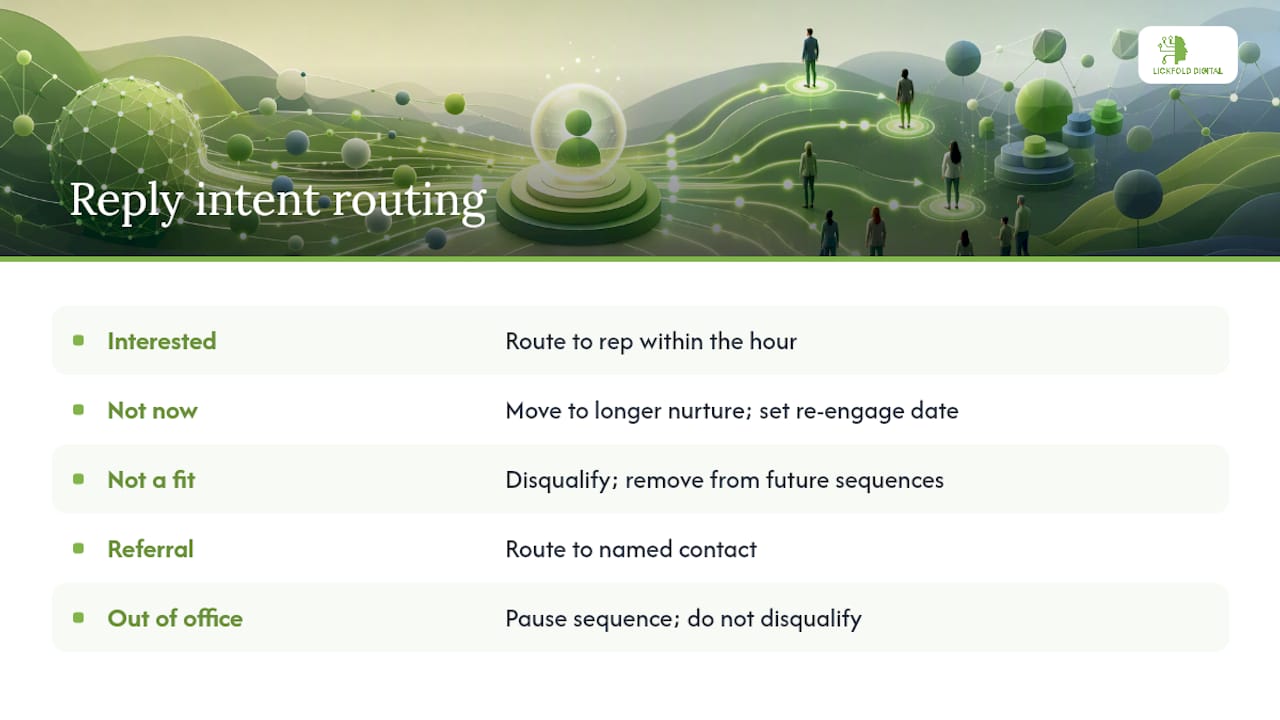
For auto-deal creation, require a minimum data set before a record generates: contact role, company size, the triggering signal, and the specific reply text. Skipping this step is how CRMs end up full of “opportunities” that are really just automated noise, which makes every later report unreliable. A structured lead qualification process applied at this exact hand-off point is usually the difference between a clean pipeline and a cluttered one.
Track four KPIs above everything else: reply rate by signal tier, meeting-booked rate per sequence, cost per qualified meeting, and time from first touch to booked meeting. The last one matters more than most teams realize, a lengthening time-to-meeting is often the earliest sign that a cadence has gone stale before reply rates even drop.
How Long Does It Take to Implement Outbound Automation?
Build in phases, and resist the urge to launch everything at once. A minimum viable launch needs a validated ICP, one enrichment source, verified sending domains that have completed warm-up, and a single three-touch cadence, not nine, running on one signal type.
- Weeks 0 to 2: Define ICP, select data and enrichment sources, register and begin warming dedicated sending domains.
- Weeks 2 to 4: Configure SPF, DKIM, and DMARC; build your first signal source and a single Tier 1 cadence; connect CRM sync.
- Weeks 4 to 6: Launch to a small test segment, 200 to 300 contacts; validate reply rates and bounce rates before scaling volume.
- Weeks 5 to 8 (overlapping): Expand signal sources, add channels to the cadence, and layer in AI-assisted personalization with human review.
- Week 8 onward: Scale send volume gradually, add a second cadence for a different signal tier, and formalize the reply tagging taxonomy in CRM.
Pro Tip: Don’t add a second signal source until your first one is converting predictably. Most teams that stall at scale added complexity before they’d validated the basics.
The most common gotcha is launching multi-channel before deliverability is solid. Fix the domain and authentication layer first; adding LinkedIn and video touches to a broken email foundation just spreads the same reputation problem across more channels. The autonomous pipeline approach documented by Workflow AI Advisors shows this sequencing clearly: research and personalization get automated early, but reply routing stays human-supervised through the entire ramp.
What Does This Look Like in Practice?
This exact architecture is run for B2B clients: dedicated AI agents handle market research and decision-maker mapping, warmed and authenticated sending infrastructure protects deliverability from day one, and every reply gets human qualification before it reaches a sales team. The system is built to reduce the manual research and cold-outreach burden that eats SDR time, while keeping message quality high enough that prospects don’t feel like they’re talking to a script. Teams adopting this model can expect a steadier flow of qualified conversations replacing the feast-or-famine pattern that volume-first outbound tends to produce.
Where Automation Helps Most, and Where It Doesn’t
Automation multiplies a process that already works and amplifies one that’s broken. Feed a bad list into a well-built cadence and you’ll get fast, well-authenticated failure instead of slow failure, that’s the trap teams miss. Sales and ops need to sit in the same room reviewing signal quality weekly, not just deliverability metrics. If you’re allocating budget, spend on data quality first, sending infrastructure second, and clever copy last. Copy is the easiest layer to fix and the one everyone fixes first.
— Duarte
Ready to Automate Your Outbound Without Building the Stack Yourself
Building the nine-layer system described above in-house means hiring for data ops, deliverability, AI prompting, and SDR review, then maintaining all four as domains age and signal sources shift. An outsourced service gives B2B teams that same architecture without the build: AI agents handle market research and decision-maker mapping, dedicated warm-up infrastructure protects sender reputation from the first send, and every reply gets human qualification before it lands in a pipeline.
Building internally makes sense if you already have dedicated data ops and deliverability staff and just need better tooling. For most sales-driven companies without that headcount, an outsourced pipeline closes the gap faster and avoids the domain-burn mistakes that cost months to recover from. If you want to see how this runs for a team like yours, visit Lickfold Digital to review case examples and get a plan built around your specific ICP and signal set.
Sources
For deeper technical implementation, Microsoft’s guidance on SPF, DKIM, and DMARC configuration covers the authentication layer in full detail. For stack architecture and signal frameworks, see the nine-layer outbound stack guide and the 2026 outbound sales playbook. Teams building broader automation workflows may also find value in this link-building workflow guide for adjacent process automation ideas.
- How to Build an AI Outbound Stack From Scratch (2026) | Vantaige
- The Outbound Sales Playbook for 2026 | Autobound
FAQ
What are some examples of outbound sales strategies?
Effective outbound sales strategies include signal-triggered email sequences, LinkedIn connection campaigns tied to job-change alerts, personalized video outreach, and cold calling reserved for prospects who’ve already engaged with earlier touches. The strongest results come from combining several of these into one coordinated cadence rather than running any single tactic alone.
What are five examples of automation in outbound sales?
Five common automation points are: enrichment (pulling firmographic and role data automatically), email verification (catching bad addresses before sending), AI-drafted first lines based on buying signals, multi-touch sequencing across channels, and automatic reply tagging that routes interested prospects into CRM.
What are some effective outbound marketing strategies?
The most effective outbound marketing strategies right now combine signal-based timing, meaning outreach triggered by a real event like funding or a leadership change, with multi-channel sequencing and AI-assisted personalization reviewed by a human before sending. Approaches like this that build around timing rather than volume, such as the model Lickfold Digital runs for clients, tend to outperform static list-based blasting.
How is an outbound automation strategy different from cold outreach?
Cold outreach sends the same message to a broad list regardless of timing. An outbound automation strategy uses buying signals to decide who gets contacted and when, then automates enrichment, sequencing, and reply routing while keeping personalization and qualification human-reviewed.
How long does it take to see results from outbound automation?
Most teams see initial reply data within 4 to 6 weeks, once domain warm-up is complete and a first cadence has run against a small test segment. Reliable, scalable pipeline typically takes 8 weeks or longer as signal sources and cadences get refined.