
Why dedicated email accounts boost B2B outreach success
Why dedicated email accounts boost B2B outreach success
TL;DR:
- Using dedicated email accounts in B2B outreach protects domain reputation and contains deliverability risks. They enable precise monitoring, testing, scaling, and operational flexibility, leading to more predictable pipeline growth and better engagement. Proper warm-up, list hygiene, and ongoing management are essential for sustained deliverability success.
Most B2B marketing and sales teams treat their primary company email domain like a Swiss Army knife — using it for everything from client communications to mass cold outreach. That’s a costly mistake. When your main domain takes a deliverability hit from aggressive prospecting, every transactional email, proposal, and contract you send gets caught in the crossfire. Dedicated email accounts exist precisely to prevent this scenario, and the teams using them correctly are seeing measurably better reply rates, fewer inbox placement issues, and far more predictable pipeline growth.
Table of Contents
- Core reasons to use dedicated email accounts in B2B outreach
- The role of account warm-up and reputation building
- Improving deliverability and measurement with separate accounts
- Operational nuances: scaling, rotation, and risk mitigation
- Common misconceptions and overlooked fundamentals
- Our perspective: What most teams miss about dedicated email accounts
- Optimize your team’s outreach with expert support
- Frequently asked questions
Key Takeaways
| Point | Details |
|---|---|
| Protect domain reputation | Dedicated accounts safeguard your main domain from outreach campaign risks and deliverability issues. |
| Enable precise measurement | Separating accounts makes outreach analytics, troubleshooting, and scaling far more effective. |
| Facilitate scaling safely | Multiple dedicated inboxes allow larger daily volumes and rotation without risking systemic suspension. |
| Don’t overlook list quality | Even the best technical setup cannot compensate for poor list quality or targeting. |
Core reasons to use dedicated email accounts in B2B outreach
With the risks clearly framed, let’s dig into the technical reasons top-performing B2B teams use dedicated accounts.
The most fundamental reason is domain reputation protection. Your primary brand domain carries years of trust signals, authentication records, and sender history. When you fire off hundreds of cold emails from that domain, every bounce, spam complaint, and low engagement signal chips away at that reputation. Mailbox providers like Google and Microsoft score your sending behavior continuously, and a damaged domain reputation means even legitimate sales follow-ups and client emails start landing in spam.
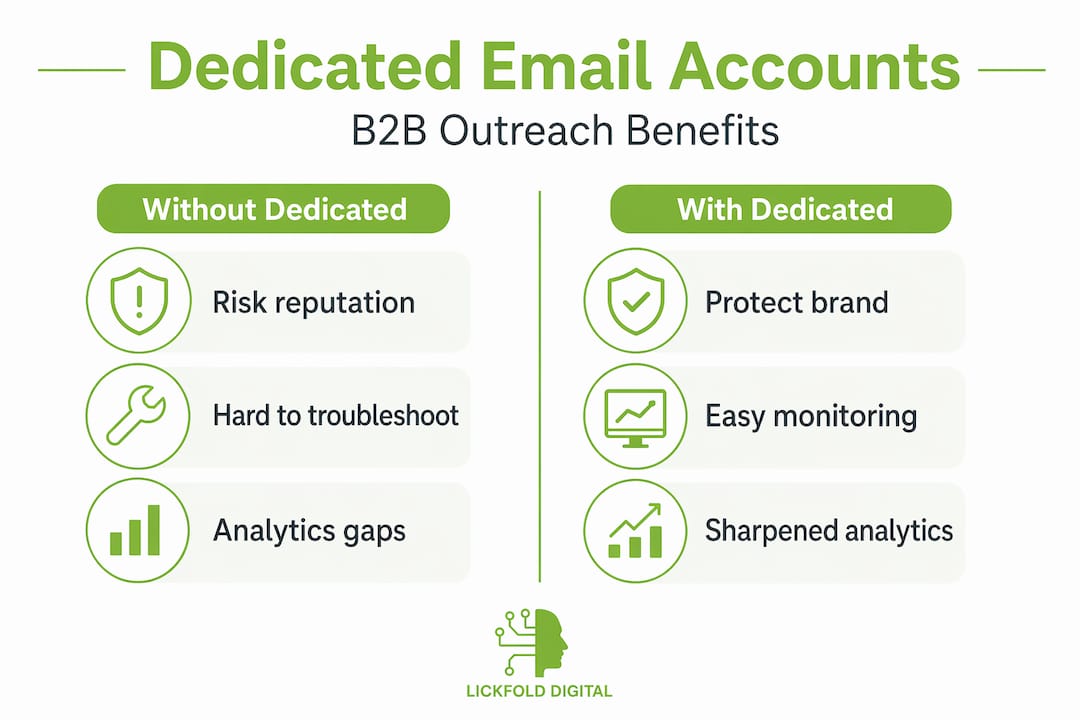
The second reason is what email deliverability specialists call blast radius containment. Think of it like a circuit breaker in an electrical system. If one dedicated account gets flagged or suspended, the damage stays isolated. Your main brand operations continue unaffected. As cold email prospecting experts note, dedicated sending identities are used primarily to protect sender and domain reputation and reduce the blast radius of a deliverability problem. This separation is not optional for serious outreach teams — it’s foundational infrastructure.
Here are the core operational advantages dedicated accounts deliver:
- Swap and rotate freely — if one account underperforms, replace or rest it without disrupting the whole campaign
- Monitor performance in isolation — see exactly which sending identity is causing issues
- Test messaging variants — assign different copy approaches to different accounts and measure directly
- Scale without risk — add new dedicated accounts instead of increasing per-account volume
The third reason is pure operational flexibility. When you need to test personalization in B2B outreach at scale, dedicated accounts let you isolate variables cleanly. One account can run a highly personalized sequence, another can test a shorter, more direct approach. You get real data without contaminating your brand’s primary email performance metrics.
“Dedicated sending identities separate from your main brand domain are used primarily to protect sender and domain reputation and reduce the blast radius of a deliverability problem.” — Cold Email Prospecting: Complete Guide 2026
The role of account warm-up and reputation building
Once you’ve set up dedicated accounts, mastering the warm-up process is the next vital step.
Mailbox providers are naturally suspicious of new sending identities. A brand new email account that immediately starts sending 200 messages a day looks exactly like a spam operation — because that’s often what it is. To overcome this, every new dedicated account needs a structured warm-up period where volume increases gradually and engagement signals are carefully cultivated.
Warm-up builds positive reputation with mailbox providers specifically to avoid spam filtering and blocks. Without it, even perfectly crafted, highly targeted outreach emails will land in junk folders by default, wasting your team’s effort before a single decision-maker ever reads a word.
Here’s a practical warm-up sequence for B2B teams:
- Days 1 to 7: Send 5 to 10 emails per day to known, engaged contacts — people who will open and reply. This begins building positive engagement history.
- Days 8 to 14: Gradually increase volume to 20 to 30 emails per day. Start mixing in a small percentage of actual prospects alongside warm contacts.
- Days 15 to 21: Scale to 50 emails per day. Monitor open rates, bounce rates, and spam complaints closely. Any red flags mean slowing down, not pushing through.
- Days 22 to 28: Reach your target daily sending volume, typically 80 to 150 emails per account per day for B2B prospecting. Maintain consistent send times and patterns.
- Ongoing: Continue monitoring reputation dashboards weekly. Reputation is not a one-time achievement — it degrades without maintenance.
Pro Tip: During warm-up, use real conversations rather than automation tools alone. Having actual back-and-forth replies with colleagues or friendly contacts during the first two weeks builds engagement history that automated warm-up tools often can’t replicate as effectively.
Reputation is built on several signals simultaneously: open rates, reply rates, spam complaint rates, unsubscribe behavior, and bounce percentages. Mailbox providers weigh all of these together. For AI-powered warm-up strategies that scale this process efficiently, teams are increasingly automating the early-stage warm-up with AI tools that simulate human engagement patterns.
Warm-up is not a one-time setup task. It’s an ongoing reputation maintenance practice that top outreach teams build into their regular operations calendar.
Improving deliverability and measurement with separate accounts
Beyond protection, dedicated accounts also unlock sharper analytics and troubleshooting power.

When deliverability problems surface, diagnosing the root cause is notoriously difficult if all your outreach runs through the same account or domain. Is it the list quality? The authentication setup? The sending behavior? When everything runs together, you’re guessing. Dedicated accounts isolate each variable, letting teams pinpoint whether the problem is list quality, authentication, or sending patterns.
Here’s what the measurement picture looks like with and without dedicated accounts:
| Measurement area | Without dedicated accounts | With dedicated accounts |
|---|---|---|
| Bounce rate attribution | Impossible to isolate source | Clear per-account visibility |
| Spam complaint tracking | Affects primary domain | Contained to specific account |
| Open rate accuracy | Mixed with transactional email data | Pure outreach data only |
| Authentication diagnostics | Tangled across campaigns | Clean per-domain records |
| Reputation monitoring | Single point of failure | Granular per-identity view |
Tools like Gmail Postmaster Tools and Microsoft SNDS (Smart Network Data Services) are far more actionable when you’re managing separate sending identities. Instead of a vague warning that your domain’s reputation is declining, you can see precisely which account is causing the problem and act immediately without touching everything else.
For teams integrating email analytics automation into their stack, dedicated accounts make that integration cleaner and more meaningful. You can set specific thresholds per account, trigger alerts when a single identity’s metrics decline, and route troubleshooting workflows to the right team member without a fire drill.
The B2B deliverability tips that matter most at this stage involve systematic monitoring rather than reactive fixes. Teams that check their dedicated account dashboards weekly catch issues before they escalate into full suspension events.
Key metrics to monitor per dedicated account:
- Bounce rate (keep below 2%)
- Spam complaint rate (keep below 0.1%)
- Open rate trends week over week
- Reply rate by sequence step
- Authentication pass rates (SPF, DKIM, DMARC)
Operational nuances: scaling, rotation, and risk mitigation
Scaling outreach brings additional operational complexity; here’s how teams navigate it safely.
The instinct most teams have when they want to send more emails is to increase volume per account. That’s exactly the wrong move. The key design parameter is emails per inbox per day plus rotation and warm-up, not raw total volume. Pushing one account beyond its safe daily ceiling is how teams trigger spam filters and lose months of reputation building overnight.
Instead, scale by adding accounts, not by increasing pressure on existing ones. A team sending 500 emails per day should run five or six accounts at 80 to 100 emails each, not two accounts at 250 each. This also gives you natural rotation capability — if one account needs to rest or recovers from a minor issue, the others maintain campaign continuity.
Here’s a practical scaling framework for mid-sized B2B teams:
- Start with three accounts for a new outreach program. This provides rotation flexibility from day one.
- Add one new account per month as volume demands increase, following full warm-up protocols for each.
- Rotate sending days across accounts so no single account sends seven days a week at full capacity.
- Set hard daily ceilings in your outreach platform — most experienced teams cap at 100 to 150 emails per dedicated account per day.
- Diversify sending infrastructure across providers rather than hosting all accounts on a single platform.
Pro Tip: Don’t use pixel-based open tracking on dedicated outreach accounts. Many mailbox providers have started filtering emails that use tracking pixels aggressively, and suspension risk increases when outbound is tied to fragile tracking patterns. Teams that drop open tracking often see deliverability improve immediately.
The suspension risk issue is often underestimated. One account getting suspended is an inconvenience. Five accounts on the same domain getting suspended simultaneously because they all triggered the same tracking flag is a campaign-ending event. The mitigation strategy is deliberate diversification: different domains, different infrastructure providers, and scalable business management frameworks that distribute risk intelligently across your outreach infrastructure.
For teams ready to operationalize this, reviewing scaling outreach strategies alongside the AI email process tips that apply specifically to automated prospecting environments is a smart next step.
Common misconceptions and overlooked fundamentals
Even with the best technical setup, foundational factors shouldn’t be ignored.
There’s a persistent temptation in B2B marketing operations to treat dedicated accounts as the primary solution to deliverability problems. Set up the accounts, warm them up correctly, monitor the dashboards — and expect the pipeline to flow. The reality is more complicated. List quality and targeting precision remain the most common bottlenecks when open and reply rates disappoint, not message copy or technical configuration.
Here’s how to tell the difference between a deliverability problem and an engagement problem:
- Deliverability problem: Emails aren’t reaching inboxes at all. Bounce rates are high. Open rates are below 10% even with a warm list. Spam folder placement confirmed through seed testing.
- Engagement problem: Emails are reaching inboxes. Open rates are reasonable. But reply rates are below 1 to 2%. Recipients are reading and ignoring. The issue is targeting or messaging relevance, not infrastructure.
Many teams misdiagnose engagement problems as deliverability problems and spend weeks rebuilding their technical setup when the real fix is refining their account-based marketing essentials — specifically, who they’re targeting and how precisely the message matches the prospect’s actual situation.
“If reply and open performance is poor, the bottleneck is commonly deliverability or list quality rather than message copy.” — Cold Email Benchmarks research
The most overlooked fundamental is list hygiene. Even perfectly warmed dedicated accounts will see reputation damage if they’re sending to outdated, purchased, or poorly verified lists. High bounce rates from bad addresses signal to mailbox providers that the sender doesn’t maintain list quality, which damages reputation regardless of how carefully the account was warmed up.
Our perspective: What most teams miss about dedicated email accounts
The mainstream advice around dedicated email accounts focuses heavily on technical setup. Warm-up protocols, SPF records, DKIM signing, DMARC policies — these are all genuinely important. But in practice, we see mid-sized B2B teams get all of that right and still underperform because they treat dedicated accounts as a static infrastructure decision rather than an active operational system.
The teams consistently outperforming their peers treat dedicated accounts the way a good financial advisor treats a portfolio: actively managed, regularly rebalanced, and responsive to changing conditions. An account that performed well three months ago might be showing early reputation degradation signals today. Without weekly monitoring and proactive rotation, teams discover problems only after they become serious.
Automation alone doesn’t solve this. AI-driven outreach systems, including ours, can optimize timing, personalization, and sequence logic at scale — but they still require human oversight of the underlying infrastructure. The expert deliverability insights that matter most in 2026 are about combining AI execution with human judgment on account health.
Another underappreciated truth: personalization best practices and dedicated account infrastructure work together, not independently. The best personalization strategy in the world fails if the email never reaches the inbox. Conversely, perfect deliverability infrastructure broadcasting generic copy is just organized spam. The teams winning at outbound treat both as inseparable parts of the same system, not separate workstreams managed by different people.
What large-scale outreach teams do differently is sync their account rotation schedules with their campaign calendars deliberately. They know which accounts are in active warm-up, which are at full capacity, and which need rest cycles — and they build campaign timing around that reality rather than forcing accounts to accommodate arbitrary launch dates.
Optimize your team’s outreach with expert support
Applying everything covered here takes more than a weekend project. Getting dedicated accounts right — from initial setup and warm-up through ongoing rotation, monitoring, and list hygiene — requires a systematic approach that most internal teams struggle to maintain alongside their regular responsibilities.

At Lickfold Digital, we handle the entire infrastructure layer for B2B outreach: dedicated account setup, warm-up management, reputation monitoring, and AI-driven prospecting sequences that reach the right decision-makers with genuinely personalized messaging. Our clients don’t just get better deliverability — they get a predictable, scalable outbound pipeline that operates continuously. For teams ready to stop guessing at B2B email deliverability tips and start implementing them with expert guidance, we’re the partner built for exactly that challenge.
Frequently asked questions
How many dedicated email accounts should a mid-sized B2B team use?
Most experts recommend between three and ten accounts, scaled based on outreach volume and your risk tolerance. Start with three, then add accounts as volume demands increase rather than pushing existing accounts beyond safe daily sending limits.
How long does warm-up typically take for new dedicated accounts?
Warm-up typically lasts two to four weeks depending on daily volume targets and the protocols of specific inbox providers. Rushing this process is one of the most common reasons new accounts fail early.
Can using dedicated accounts guarantee inbox placement?
Dedicated accounts significantly improve your inbox placement odds, but they don’t guarantee it. As cold email benchmarks research consistently shows, list quality and precise targeting remain the most common reasons outreach underperforms even with solid technical infrastructure in place.
What analytics tools help monitor dedicated email accounts?
Gmail Postmaster Tools and Microsoft SNDS are the most widely used platforms for reputation monitoring. As deliverability experts recommend, separating sending identities makes these tools far more actionable because you can isolate exactly which account is experiencing issues rather than troubleshooting a mixed-signal data set.