
Why Avoid Generic Email Templates in B2B Outreach
Why Avoid Generic Email Templates in B2B Outreach
Generic email templates lower reply rates, damage sender reputation, and shrink long-term inbox placement because both humans and email service providers detect them almost instantly. The fix isn’t complicated, but it does require discipline: stop sending identical message bodies to your full list, and instead write one real, prospect-specific sentence into every email before it goes out.
That single change addresses the two forces working against generic templates at once. On the human side, buyers filter out 6,000 to 10,000 marketing stimuli every day, and a message with no specific trigger gets sorted into that noise instantly. On the technical side, mailbox providers hash message bodies and cluster near-duplicates, so an identical email sent thousands of times gets treated as bulk mail even when your authentication records are clean.
Here’s what changes when you stop mass-sending identical copy:
- Reply rates climb because the message reads like it was written for one person, not five thousand.
- Sender reputation improves because your outbound stops fingerprinting as bulk mail.
- Inbox placement holds steady over months instead of degrading campaign by campaign.
Key Takeaways
Generic email templates fail because they get filtered out by both human attention and ESP content fingerprinting, and the fix is a skeleton structure with fresh, prospect-specific variable slots.
| Point | Details |
|---|---|
| Track reply rate, not open rate | Open rate hides the real damage; reply rate and qualified conversations show whether a campaign is working. |
| Rewrite the observation slot every time | The first sentence and reason for contact must be written fresh per prospect to pass both human and ESP filters. |
| Cap personalized sends per mailbox | Stay within 15 to 30 sends per mailbox per day to protect deliverability. |
| Refresh templates every 2 to 4 weeks | Rotate the skeleton based on reply-rate decay, not a fixed calendar. |
| Consider an automated workflow at scale | Lickfold pairs AI-driven research and outreach with human qualification and reputation management to run this process without added headcount. |
Table of Contents
- Why Avoid Generic Email Templates: What They Actually Cost You
- Why Generic Templates Fail: Attention, Filters, and ESP Detection
- What a Good Email Template Actually Looks Like
- Personalization Techniques That Actually Move Reply Rates
- Scaling Personalization Without Turning It Back Into Mail Merge
- Technical Deliverability Risks Hiding in Your Template
- Follow-Up Cadence and the Metrics That Actually Matter
- A Quick Audit Checklist Before Your Next Send
- An Outbound Practitioner’s Take: What Changed When We Cut List Size
- A Faster Way to Personalize Every Send Without Adding Headcount
- Sources
Why Avoid Generic Email Templates: What They Actually Cost You
The damage from generic templates rarely shows up where teams are looking. Open rate can hold steady while reply rate quietly collapses, and that gap is the real signal most sales teams miss.
Open rate tells you a subject line worked and a pixel loaded. It says nothing about whether the recipient read past the first line, and it says even less about whether your domain is heading toward the spam folder. Reply rate, qualified conversation rate, and complaint rate are the numbers that actually track business outcomes. It’s the default outcome of sending the same body to everyone on a purchased or scraped list.
The reputational side compounds quietly. Widely circulated free templates get reused by thousands of senders with barely any edits, and because the wording is so common, these messages are recognized and routed to spam at higher rates than custom copy. Once a domain starts collecting spam complaints and bounces from a blast, that damage doesn’t reset when the campaign ends. It follows the domain into your next campaign, and the one after that.
Picture two versions of the same outreach push:
- Version A: 5,000 identical emails to a purchased list, no research, one generic subject line. Result: a handful of opens, a spam complaint rate that trips ESP thresholds within days, and a domain that needs weeks to recover trust.
- Version B: 50 researched sends with one specific line per prospect, referencing something true about their business. Result: a smaller number of total emails, but a reply rate that’s an order of magnitude higher, and zero deliverability damage.
Version B isn’t slower in any way that matters. It’s the version that still works six months from now.
Statistic Callout: Sustainable, personalized cold sending tops out around 15 to 30 emails per mailbox per day. Beyond that volume, you’re not personalizing anymore. You’re blasting with a mail-merge veneer, and recipients notice the difference even when they can’t name it.
Ignored or reported messages don’t just fail quietly. Every complaint feeds directly into the reputation score mailbox providers assign your domain, and that score determines whether your next campaign lands in the inbox or the spam folder before a single recipient opens it.
Why Generic Templates Fail: Attention, Filters, and ESP Detection
Two separate systems reject generic templates, and most sales teams only think about one of them.
The first is human. Attention functions like a scarce currency, and buyers spend it selectively because they have no other choice. Researchers at Harvard Business School describe attention as the genuinely limited resource in modern marketing, not impressions or inbox space. When a message carries no specific, relevant trigger tied to the recipient’s actual situation, the brain’s relevance filter drops it into background noise before conscious reading even starts. This happens in under two seconds, often while the recipient is scanning subject lines rather than reading bodies.
Surface-level personalization doesn’t fool that filter. Dropping in a first name or company name is not the same as real relevance, and treating those tokens as personalization misses what buyers are actually screening for. They’re checking whether the sender understands their business, not whether a mail-merge field populated correctly.
The second system is technical, and it’s the one most marketers underestimate. Email service providers run content fingerprinting on inbound mail, hashing message bodies and clustering near-identical copies sent from the same domain or IP range. Fingerprint matching works independently of your SPF, DKIM, and DMARC records, which means a technically well-configured domain can still land in spam purely because the message body is identical across thousands of sends. Correct authentication protects you from being blocked outright. It does nothing to stop fingerprint-based filtering.
Templates should function as a structure, not a script. Define the slots that need fresh copy, and write those slots by hand, especially the first sentence, every single time.
Pro Tip: ESPs weigh three signals most heavily: near-duplicate message bodies across recipients, structural HTML similarity (same layout, same image placement, same footer), and rising bounce or complaint ratios on the sending domain. Audit all three before you touch subject lines or send times.
Recipients pick up on templated copy almost as fast as the algorithms do. A first paragraph that could apply to any company in any industry is the tell. If your opening line survives unchanged when you swap out the company name, the recipient will notice, even if they can’t articulate why the email felt off.

What a Good Email Template Actually Looks Like
The mistake isn’t using a template. It’s sending the template unchanged. A usable template is a skeleton with clearly marked slots, some of which must be written fresh for every single send and some of which can stay fixed.
Here’s a minimal skeleton that works across most B2B outreach:
- One-line observation specific to the prospect (must be written fresh)
- Reason for contact connecting that observation to your offer (must be written fresh)
- Single, specific ask (can be templated, with light variation)
- One-line sign-off (can be templated)
That structure gives you scale without giving you sameness. The observation and the reason for contact are the two slots doing the actual work of persuasion, and they’re also the two slots ESP fingerprinting is most sensitive to. Everything else can repeat with minor variation because it doesn’t carry the relevance signal the recipient is scanning for.
A few rules keep this from sliding back into mass-mail territory:
- Never repeat the exact same first paragraph across more than a handful of sends, even when swapping the company name.
- Avoid spintax (word-swap tools that generate “variations” of the same sentence) as your primary personalization method. Filters catch spintax almost as reliably as they catch verbatim duplicates, because the underlying sentence structure barely changes.
- Keep the ask singular. Two asks in one email split attention and lower the odds of either getting answered.
- Rewrite the observation slot from source material, not from a swipe file. If ten reps are pulling the same three observations from the same list, you’ve recreated the fingerprinting problem inside a “personalized” template.
On refresh cadence: rotate your skeleton every 2 to 4 weeks based on reply data, not on a fixed calendar. If reply rate on a given skeleton drops for two consecutive weeks while your list quality stays constant, that’s decay in the template itself, not the market. Track reply rate by skeleton version, not just by campaign, so you can isolate which structure is losing effectiveness before the whole campaign underperforms. Teams running cold outreach optimization at scale typically catch this decay within a week because they’re already segmenting metrics by list and by copy variant.
Personalization Techniques That Actually Move Reply Rates
Generic copy and personalized copy often differ by a single sentence, but that sentence determines whether the email gets a reply. Here’s what that difference looks like in practice.
Subject line:
- Bad: “Quick question for you”
- Good: “Noticed [Company] just opened a Denver office”
First sentence:
- Bad: “I hope this email finds you well. I wanted to reach out because…”
- Good: “Saw your team posted three open sales engineering roles this month, which usually means outbound volume is about to outpace your current process.”
Reason for contact:
- Bad: “We help companies like yours improve their sales process.”
- Good: “Companies scaling sales engineering headcount that fast usually hit a gap between lead volume and qualification bandwidth within a quarter, and that’s the exact problem we solve.”
Every “good” example above pulls from something publicly observable and recent. That’s the actual formula: find a fact, then connect that fact to your reason for reaching out. Neither half works without the other. A relevant fact with no connection to your offer reads as flattery. A reason for contact with no supporting fact reads as generic.
Four sources cover most of what you need to find that fact quickly:
- Recent funding announcements (signals budget and hiring pressure)
- Job postings (signals which function is under strain right now)
- Product releases or feature launches (signals what the company is prioritizing)
- Public content the prospect or their company has published (signals what they personally care about)
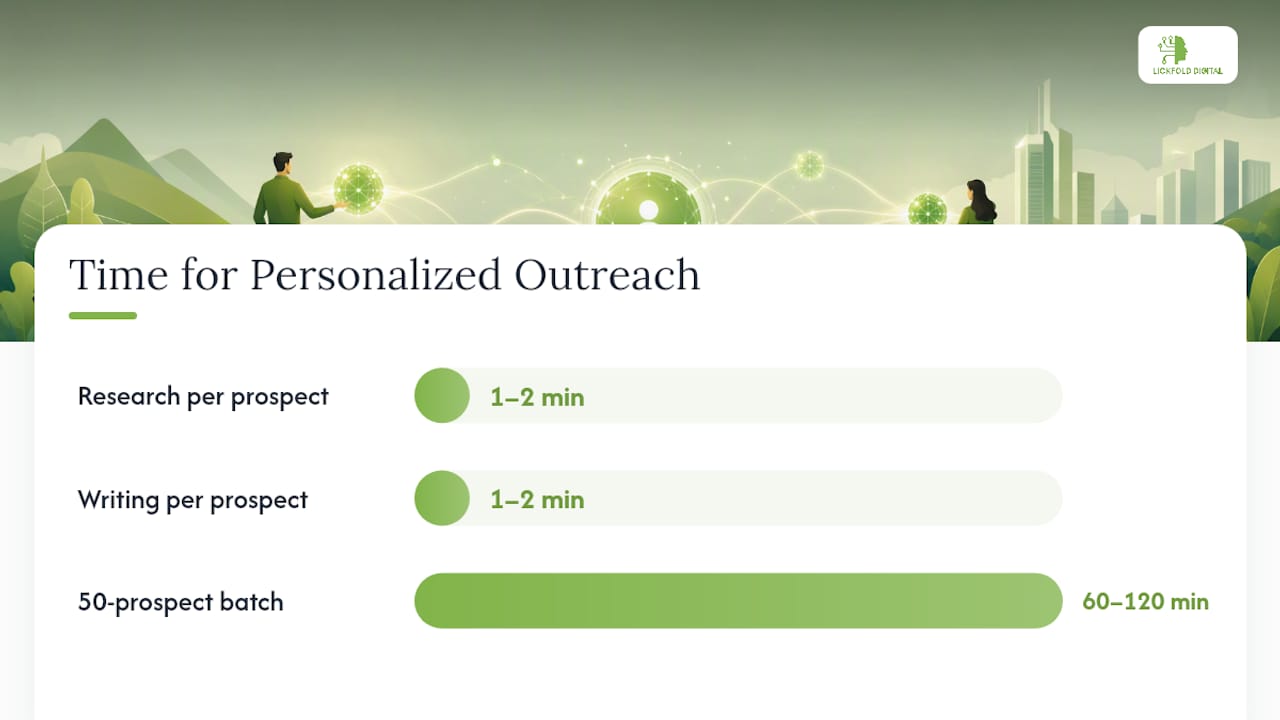
A researcher working through a batch of 50 prospects can usually find one usable fact per company in under two minutes once they know which of these four sources to check first. Job postings tend to be the fastest and most reliable, because they’re specific, dated, and directly tied to a business problem you can plausibly solve.
Quick formulas worth keeping on hand:
- Subject line formula: “[Recent, specific event] + [implied question or observation]”
- Opener formula: “[Specific fact] + [what that fact usually means for a company like theirs]”
- Ask formula: One question, answerable in a single sentence, tied directly to the reason for contact.
Pro Tip: When you A/B test outreach copy, split by reply rate and qualified-conversation rate, never by open rate alone. A subject line can lift opens by making a bigger promise while lowering replies because the body doesn’t deliver on it. If you’re only watching opens, that test looks like a win when it’s actually a loss. This is one of the clearest cases where teams see measurable lift from personalization once they start isolating the right metric.
Scaling Personalization Without Turning It Back Into Mail Merge
The tension every sales team hits eventually: personalization works, but it doesn’t obviously scale the way a blast campaign does. It scales fine. It just requires a workflow, not a bigger list.
Here’s the batch process that holds up at volume:
- Size the list. Cap batches at roughly 50 prospects. Anything larger and the research step starts getting rushed, which is where quality erodes first.
- Run the research pass. One person (or one AI-assisted research step, reviewed by a human) pulls the one usable fact per prospect described above.
- Write the variable slots. A human writes or heavily edits the observation and reason-for-contact lines. This is the step that cannot be fully automated without reintroducing sameness.
- Send in controlled volume. Stay within the 15 to 30 personalized sends per mailbox per day range to protect deliverability.
- Measure and route replies. A monitor tracks reply rate by batch and routes responses to qualification before they reach a closer.
Time and role estimates for a 50-prospect batch look roughly like this: research runs 1 to 2 minutes per prospect, writing the variable slots adds another 1 to 2 minutes, and sending plus monitoring is largely automated once infrastructure is set up. That’s an hour or two of focused human work per batch, not a full day, and it’s the human time that makes the batch outperform a blast.
Infrastructure matters as much as workflow. Before scaling any of this, get the following in place:
- Dedicated sending accounts, separate from your primary business domain, so a deliverability issue doesn’t touch internal or customer-facing email.
- A warm-up period on any new sending account before ramping to full volume.
- Ongoing reputation monitoring so bounce and complaint spikes get caught within a day, not a month.
- A defined escalation path for when reputation scores drop, so someone owns the fix immediately.
On the AI-versus-human question: AI is genuinely useful for the research pass, pulling job postings, funding news, and public content faster than a human scanning manually. It’s a poor fit for writing the final observation sentence unedited, because that’s exactly the slot that needs to sound like it came from a person who actually looked at the prospect’s business. Human-in-the-loop workflows that use templates as checklists, not scripts, consistently outperform either fully manual or fully automated approaches. Building the right prospect fit analysis into the list-sizing step also cuts wasted research time on companies that were never a good match to begin with.
Pro Tip: Refresh your skeleton on a 2 to 4 week cadence based on reply data, not a fixed schedule. If two consecutive batches using the same skeleton underperform your baseline, that’s your signal to rewrite the structure before sending another batch.
Technical Deliverability Risks Hiding in Your Template
Content fingerprinting is the mechanism doing the most damage, and it works whether or not your technical setup is correct. Mailbox providers hash message bodies and flag near-duplicates sent in volume, and that detection operates independently of SPF, DKIM, and DMARC. You can have flawless authentication and still get filtered because the body text is identical across five thousand recipients.
Structural HTML similarity compounds the problem. Widespread, unedited HTML templates create a layout fingerprint (same header, same image placement, same footer structure) that correlates with known spam campaigns even when the body copy varies slightly. Filters trained on millions of messages recognize that structural pattern regardless of the words inside it.
Run this checklist before scaling any outbound campaign:
- Confirm SPF, DKIM, and DMARC are correctly configured on your sending domain.
- Warm up any new sending account gradually before reaching full volume.
- Monitor bounce rate and complaint rate daily, not weekly, during active campaigns.
- Vary HTML structure meaningfully across sends, or default to plain text where a heavily designed layout isn’t earning its complexity.
On the HTML-versus-plain-text question: heavily designed templates with images and complex layouts increase spam risk when they’re not implemented carefully, and in cold outreach specifically, plain-text often outperforms polished design because it reads as personal rather than promotional. Save the designed HTML for nurture sequences to warm audiences. Cold outreach is a different job.
Statistic Callout: Sustainable personalized volume stays in the 15 to 30 sends per mailbox per day range. Push past that consistently and reputation damage tends to follow within weeks, not months.
If your domain already shows signs of damage (rising bounce rates, complaints, or landing in spam despite clean authentication), pause the campaign, cut volume to the low end of that range, and rebuild trust with a smaller, more heavily personalized batch before ramping back up. Reputation recovers slower than it degrades.
Follow-Up Cadence and the Metrics That Actually Matter
Most follow-up sequences fail for one of two reasons: they’re too long, or they’re tracked against the wrong metric. See how optimizing your follow-up with pay-for-results introductions to high-intent buyers can improve your qualification and outreach workflows efficiently.
A cadence that holds up across most B2B outreach:
- First follow-up at 3 to 4 days, 30 to 60 words, adding a new piece of information rather than repeating the ask.
- Second follow-up at 5 to 7 days, shorter still, reframing the value from a different angle.
- Third follow-up at 7 days, direct and brief, essentially a permission-to-close-the-loop message.
- Optional fourth touch if the prospect engaged (opened, clicked) without replying, spaced another 7 days out.
Three to four follow-ups total, each one shorter than the last, tends to outperform longer sequences that start to feel like pressure rather than persistence.
On metrics: reply rate and qualified-conversation rate are the numbers to optimize. Open rate is useful only as a directional signal on subject lines, and it can actively mislead when a subject line lifts opens without lifting replies. Deliverability signals (bounce rate, complaint rate, spam placement) matter just as much because they determine whether your next campaign even has a chance to be read.
When designing a test, isolate one variable per batch, subject line, opener, or ask, and measure the lift in reply rate specifically, not opens. It’s a sign the new subject line is over-promising relative to the body. Shorter sales cycles tend to follow directly from better early-stage reply rates, since pipeline stalls most often trace back to weak or generic first-touch messaging rather than problems later in the funnel.
A Quick Audit Checklist Before Your Next Send
Run this against your current campaign before you send another batch:
- List hygiene: Is every prospect on this list a genuine fit, or did volume take priority over relevance?
- First-sentence uniqueness: Does the opening line reference something true and specific about this one company?
- Sending infrastructure: Are you using a dedicated, warmed-up account, or your primary business domain?
- Monitoring: Is someone checking bounce and complaint rates daily during active sends?
Five mistakes show up again and again in underperforming campaigns:
- Reusing the same first paragraph across hundreds of sends. Fix: rewrite the observation slot per prospect, even if it takes longer.
- Optimizing for open rate instead of reply rate. Fix: track reply and qualified-conversation rate as your primary KPIs.
- Sending from the main business domain. Fix: set up dedicated sending accounts with a proper warm-up period.
- Using spintax as personalization. Fix: replace automated word-swapping with a human-written observation slot.
- Ignoring complaint and bounce signals until deliverability collapses. Fix: monitor daily and cut volume the moment either metric ticks up.
After making fixes, validate with a small batch of 50 prospects before returning to full volume. Track reply rate specifically, and only scale back up once that batch performs above your prior baseline.
An Outbound Practitioner’s Take: What Changed When We Cut List Size
The instinct in most sales organizations is to fix a bad reply rate by sending to more people. That instinct is almost always backward. Cutting list size and adding one human-written line per prospect produces better results, faster, than any volume increase ever does, and it does it while protecting the sending infrastructure that volume increases quietly destroy.
The clearest shift happens when a team moves from thousands of identical sends to smaller batches with a genuine first-sentence observation. Reply rates that were sitting near flat move meaningfully higher within the first two or three batches, and the change shows up before any deliverability metrics even move, because it’s the human filter responding first. The technical benefits (lower complaint rates, stable domain reputation) tend to show up a few weeks later, once the fingerprinting patterns have had time to reset.
For a team starting from a generic-template setup today, here’s a starter plan:
- Days 1 to 30: Cut list size to batches of 50. Set up dedicated sending infrastructure and begin warm-up. Rewrite the observation and reason-for-contact slots by hand for every send.
- Days 30 to 60: Track reply rate by batch and by skeleton version. Rotate the skeleton once you see two consecutive underperforming batches.
- Days 60 to 90: Scale batch frequency, not batch size, once reply rate stabilizes above your prior baseline. Add a second follow-up variant and test it against your current cadence.
The pattern holds across industries. Whether the buyer is in industrial supply or professional services, the mechanism is the same: relevance filters out noise, and fingerprinting filters out sameness. Beat both, and the rest of the funnel gets easier.
A Faster Way to Personalize Every Send Without Adding Headcount
Everything above works, but it takes real operational discipline to run manually at scale: research, writing, warm-up, monitoring, and reply qualification, batch after batch. Lickfold builds that entire workflow as an automated system rather than a manual process your team has to staff and manage every week.
The platform deploys dedicated AI agents to research decision-makers, surface the specific fact that makes an opener genuinely relevant, and run multi-touch outreach without ever sending an identical body twice. Dedicated warm-up accounts and ongoing reputation management handle the infrastructure side, and every reply gets qualified by a human before it reaches your sales team, so what lands in your pipeline is a real conversation, not a bounce-back. This setup fits teams that need to scale outbound volume but don’t have the in-house bandwidth to run research, writing, and deliverability monitoring as separate full-time functions.
If your current outreach relies on templates that haven’t changed in months, or you’re watching open rates stay healthy while replies dry up, see how Lickfold’s AI-driven prospecting handles the research and writing work your team doesn’t have time for.
Sources
- Harvard Business School: Attention economy research
- Cold Email Templates: When They Help and When They Hurt — Email Almanac (ReviewMyEmails)
- Why personalized communication sells but templates are ignored — Skenderovic