
What Is Email Deliverability? A 2026 Guide
What Is Email Deliverability? A 2026 Guide
TL;DR:
- Email deliverability measures the percentage of emails that reach the recipient’s primary inbox rather than spam folders, affecting visibility and campaign success. It depends on proper domain authentication, sender reputation, and list quality, with inbox placement being more meaningful than server acceptance alone. Ongoing monitoring of key metrics and infrastructure maintenance are essential for consistent inbox placement above 90 percent.
Email deliverability is defined as the ability of an email to land in the recipient’s primary inbox rather than a spam folder, promotions tab, or any other filtered location. This is a different measure from simple email delivery, which only confirms that a mail server accepted the message. Inbox placement is what actually determines whether your audience sees your message. For email marketers and business owners, understanding this distinction is the foundation of every campaign decision you make.
What is email deliverability and why does it matter?
Email deliverability is the measure of how reliably your messages reach the primary inbox after a mail server accepts them. Mailbox providers like Gmail, Microsoft Outlook, and Yahoo Mail run their own filtering systems that evaluate every inbound message using authentication signals, sender reputation, and recipient engagement history. A message can be “delivered” to a server and still end up in spam. That gap between server acceptance and inbox placement is where most email marketing performance problems originate.

The stakes are direct. If your messages land in spam, your open rates collapse regardless of how strong your subject line is. Deliverability drives visibility, and visibility drives revenue. For B2B outreach in particular, where a single reply can be worth thousands of dollars, poor inbox placement is not a minor inconvenience. It is a broken pipeline.
A strong benchmark for inbox placement is above 95% for transactional emails, though marketing emails operate in a wider acceptable range. Inbox placement thresholds differ by email type, so applying a single universal target to every campaign can mislead your diagnosis. The right number depends on your email category, your industry, and your sending history.
What are the main factors affecting email deliverability?
Four core factors determine where your email lands after a server accepts it.
Sender authentication is the technical proof that you are who you say you are. The three protocols that form this stack are:
- SPF (Sender Policy Framework): Specifies which IP addresses are authorized to send email on behalf of your domain.
- DKIM (DomainKeys Identified Mail): Attaches a cryptographic signature to each message so receiving servers can verify it was not altered in transit.
- DMARC (Domain-based Message Authentication, Reporting, and Conformance): Ties SPF and DKIM together and tells receiving servers what to do when a message fails both checks.
DMARC alignment requires that the domains used in SPF and DKIM match your From domain. When they do not match, deliverability suffers even if the individual checks pass. This is the fastest troubleshooting step when authentication looks fine on the surface but inbox placement is still poor.
Sender reputation is the score mailbox providers assign to your sending domain and IP address based on your history. High complaint rates, frequent bounces, and low engagement all drag this score down. Google Postmaster Tools tracks domain reputation in real time and is one of the most direct signals available to senders using Gmail infrastructure.
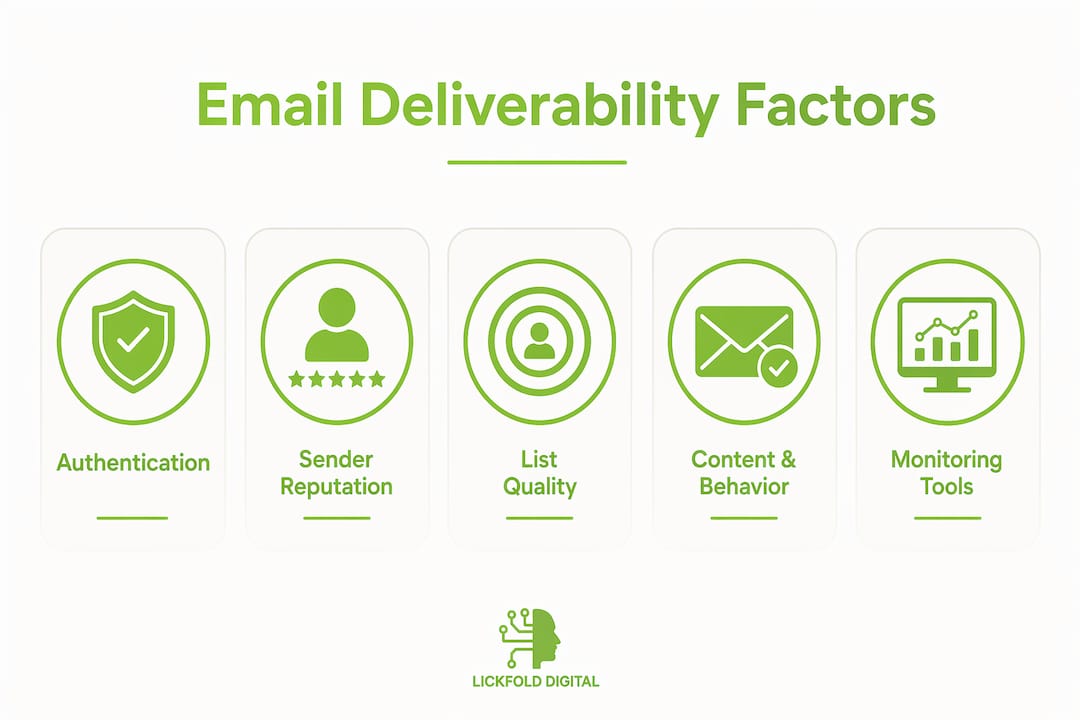
List quality directly feeds your reputation. Sending to outdated, purchased, or unengaged lists generates bounces and spam complaints that damage your standing with every major mailbox provider. Engagement metrics, including open rates, click rates, and reply rates, signal to providers that recipients want your mail.
Content and sending behavior round out the picture. Sudden volume spikes, inconsistent sending patterns, and spam trigger words in subject lines all contribute to filtering decisions. These factors matter, but infrastructure and reputation account for roughly 80% of inbox placement outcomes.
Pro Tip: Set up Google Postmaster Tools before your next campaign. It gives you domain reputation data directly from Gmail, which processes a significant share of business email globally.
How does email deliverability differ from email delivery?
The terms sound interchangeable, but they measure entirely different things at different points in the email journey.
| Metric | What it measures | Where it happens |
|---|---|---|
| Delivery rate | Server acceptance of the message | Mail server level |
| Inbox placement rate | Message landing in the primary inbox | Folder level inside the mailbox |
| Spam complaint rate | Recipients marking the message as spam | Recipient action, reported via ISP feedback loops |
| Bounce rate | Messages rejected or undeliverable | Mail server level |
Delivery rate measures server acceptance including messages that land in spam, while inbox placement is a folder-level metric and the more meaningful number. An ESP dashboard can report a 99% delivery rate while 40% of your messages sit unread in spam folders. That scenario is common, and it explains why teams with high delivered rates still see poor open rates.
The practical implication is that optimizing for delivery rate alone is chasing the wrong target. ESP dashboards often report delivered but not inbox placement, which leads to misguided optimizations. You might spend weeks testing subject lines when the real problem is a misconfigured DMARC record or a damaged sending domain.
For a deeper look at how this distinction plays out specifically in professional outreach, Lickfold’s guide on B2B deliverability breaks down the mechanics in a sales context.
How can you measure and monitor email deliverability effectively?
Measuring deliverability requires tracking metrics at both the server level and the folder level. Relying on one without the other leaves blind spots.
Key metrics to track:
- Inbox placement rate: Emails reaching the primary inbox divided by total delivered. A healthy rate sits at 90% or higher for most sending programs.
- Spam complaint rate: Complaint rates above 0.3% significantly increase the risk of future messages landing in spam. Keeping this below 0.1% is the advised target.
- Bounce rate: Hard bounces indicate invalid addresses and should be removed immediately. Soft bounces signal temporary issues but need monitoring.
- Open rate and reply rate: These are engagement proxies. Sustained low engagement tells mailbox providers that recipients do not want your mail, which feeds back into reputation scoring.
Tools that give you real data:
Google Postmaster Tools provides domain and IP reputation data directly from Gmail’s infrastructure. DMARC aggregate reports, delivered to an address you configure in your DNS, show authentication pass and fail rates across all sending sources. Your ESP’s deliverability dashboard adds volume and bounce data. For inbox placement testing before a send, tools like GlockApps and MXToolbox let you see where a test message lands across major providers.
Spam complaint metrics are more reliable from ISP feedback loops than from ESP reports alone, because emails that land in spam are never seen by recipients, which artificially reduces the complaint numbers your ESP records. Always cross-reference both sources.
Pro Tip: Run a seed list test before any large campaign. Send to a set of test addresses across Gmail, Outlook, and Yahoo to see actual folder placement before your real list receives the message.
What practical steps improve email deliverability?
Improving inbox placement follows a clear sequence. Start with infrastructure, then list quality, then content and sending behavior.
-
Authenticate your sending domain completely. Configure SPF to include all authorized sending sources. Set up DKIM with a 2048-bit key. Publish a DMARC record starting with a monitoring policy (p=none) and move to enforcement (p=quarantine or p=reject) once you have reviewed the aggregate reports. DMARC misalignment is the fastest troubleshooting check when authentication appears to pass individually but deliverability still fails.
-
Warm up new sending domains and IPs. Start with low daily volumes and increase gradually over four to eight weeks. Mailbox providers have no prior relationship signals for new senders, so they rely entirely on authentication and early engagement data. Lickfold’s approach to dedicated email accounts for B2B outreach follows this exact logic.
-
Clean your list before every major send. Remove hard bounces immediately. Suppress addresses that have not opened or clicked in six to twelve months. Use an email verification service like ZeroBounce or NeverBounce to validate new subscribers before they enter your active list.
-
Segment by engagement level. Send your most important campaigns to your most engaged segment first. Strong early engagement signals improve your reputation score for subsequent sends to less active segments.
-
Avoid content patterns that trigger filters. This means balanced image-to-text ratios, no URL shorteners from shared domains, and avoiding excessive capitalization or exclamation points in subject lines. Content matters less than infrastructure, but it still contributes to filtering decisions.
-
Monitor continuously and adjust. Sender reputation changes over time as engagement signals shift. Set a weekly review of your Google Postmaster Tools data, DMARC reports, and ESP bounce logs. Deliverability is not a one-time setup. It is an ongoing system.
For a step-by-step walkthrough of the full technical setup, Lickfold’s B2B email delivery guide covers each stage in detail.
Key takeaways
Email deliverability requires correct authentication, a strong sender reputation, a clean engaged list, and continuous monitoring to achieve consistent inbox placement above 90%.
| Point | Details |
|---|---|
| Deliverability vs. delivery | Delivery confirms server acceptance; deliverability measures primary inbox placement. |
| Authentication is the foundation | SPF, DKIM, and DMARC must all align correctly or inbox placement suffers regardless of content quality. |
| Reputation drives outcomes | Infrastructure and reputation account for roughly 80% of inbox placement results, not content. |
| Track the right metric | Inbox placement rate, not delivery rate, is the number that reflects actual audience visibility. |
| Monitoring is ongoing | Sender reputation and engagement signals shift continuously, requiring regular review of Postmaster Tools and DMARC reports. |
The metric most teams are measuring wrong
Most email teams I work with arrive with the same problem. Their ESP shows a 98% delivery rate, their open rates are declining, and they have spent three months testing subject lines. The authentication stack has not been touched since the domain was set up two years ago. The DMARC record is in monitoring mode and nobody has read a single aggregate report.
Authentication is the price of entry for inbox placement, but it is not a guarantee. What I have found is that teams treat it as a checkbox rather than a system. They set up SPF and DKIM once, declare it done, and move on. Then a new sending tool gets added, a third-party integration starts sending on their domain, and suddenly SPF is failing for a portion of sends without anyone noticing.
The second mistake is focusing on subject lines or copy to fix spam folder placement. Content matters at the margins. Infrastructure and engagement metrics have far greater impact. If your domain reputation is damaged, no subject line will save you.
What actually works is treating deliverability as an operational discipline. That means weekly reviews of Postmaster Tools data, monthly list hygiene passes, and a clear owner for authentication records when infrastructure changes. The teams with consistently strong inbox placement are not the ones with the best copy. They are the ones who built a monitoring habit and stuck with it.
— Duarte
How Lickfold can support your outreach success

Lickfold Digital builds outbound email infrastructure for B2B companies where deliverability is not an afterthought. Every client engagement starts with dedicated sending domains, full authentication setup, and a structured warm-up process before a single prospect receives a message. The AI-driven system then manages reputation monitoring, list quality, and personalized multi-touch sequences continuously, so your pipeline does not stall because of a damaged sender score or a misconfigured DNS record. If you want a predictable outbound system built on a foundation that actually reaches inboxes, contact Lickfold to start the conversation. You can also explore the full range of Lickfold’s AI services to see how the platform fits your growth goals.
FAQ
What is email deliverability in simple terms?
Email deliverability is the measure of whether your emails land in the recipient’s primary inbox rather than spam or another filtered folder. It goes beyond server acceptance and reflects actual inbox placement.
What is a good inbox placement rate?
A healthy inbox placement rate is 90% or higher for most sending programs, with transactional emails often reaching 95% or above. Marketing emails have a wider acceptable range depending on industry and list quality.
How do SPF, DKIM, and DMARC affect deliverability?
SPF, DKIM, and DMARC authenticate your sending domain and tell mailbox providers your messages are legitimate. Misconfiguration or misalignment between these records causes filtering or outright rejection even when content is clean.
Why is my delivery rate high but my open rate low?
A high delivery rate confirms server acceptance but includes messages that land in spam. If your inbox placement rate is low, recipients never see your messages, which collapses open rates regardless of subject line quality.
How often should I monitor email deliverability?
Deliverability requires ongoing monitoring, not a one-time setup. A weekly review of Google Postmaster Tools, DMARC aggregate reports, and ESP bounce logs catches reputation shifts before they become serious problems.