
What is deliverability in B2B outreach: a guide
What is deliverability in B2B outreach: a guide
TL;DR:
- A 98% delivery rate can mask poor inbox placement, which is crucial for generating replies and revenue.
- Measuring inbox placement directly through seed testing provides real insights, unlike general delivery metrics or Postmaster Tools.
If your email outreach reports show a 98% delivery rate but your campaigns generate almost no replies, you have a deliverability problem, not a delivery problem. Understanding what is deliverability in B2B outreach is the difference between a pipeline that grows and one that quietly stalls. Deliverability is not whether the receiving mail server accepted your message. It is whether your email actually reached the recipient’s inbox where a human can open and act on it. Most B2B marketing managers never make this distinction, and that gap costs them real revenue.
Table of Contents
- Understanding deliverability versus delivery in B2B outreach
- Measuring inbox placement: tools and techniques for B2B marketers
- Critical factors influencing deliverability in B2B outreach
- Practical deliverability improvement strategies for B2B marketing teams
- Reframing deliverability: beyond common misconceptions in B2B email outreach
- Explore Lickfold Digital’s expertise in optimizing your B2B email deliverability
- Frequently asked questions
Key Takeaways
| Point | Details |
|---|---|
| Deliverability vs delivery | Deliverability means emails reach the inbox, while delivery means server acceptance only. |
| Measure inbox placement | Use seed testing tools along with reputation dashboards for accurate deliverability insight. |
| Ongoing deliverability system | Successful email outreach requires continuous authentication, hygiene, and monitoring. |
| Watch engagement signals | Low engagement lowers inbox placement even if delivery rates are high. |
| Beware of common misconceptions | High delivery rate alone does not guarantee campaign success or visibility. |
Understanding deliverability versus delivery in B2B outreach
These two terms sound nearly identical, but they describe completely different outcomes. Delivery rate measures the percentage of emails a receiving server accepted without bouncing. That number can look great on a dashboard while your messages pile up unread in spam folders.
Inbox placement is the metric that actually matters. It measures what percentage of your sent emails land in the primary inbox, where a decision-maker will see, open, and respond to your outreach. A 98% delivery rate can hide a 60% inbox placement rate, meaning 40% of emails your email service provider counts as “delivered” are sitting in spam. Your ESP’s delivered metric confirms server acceptance only, not inbox placement.
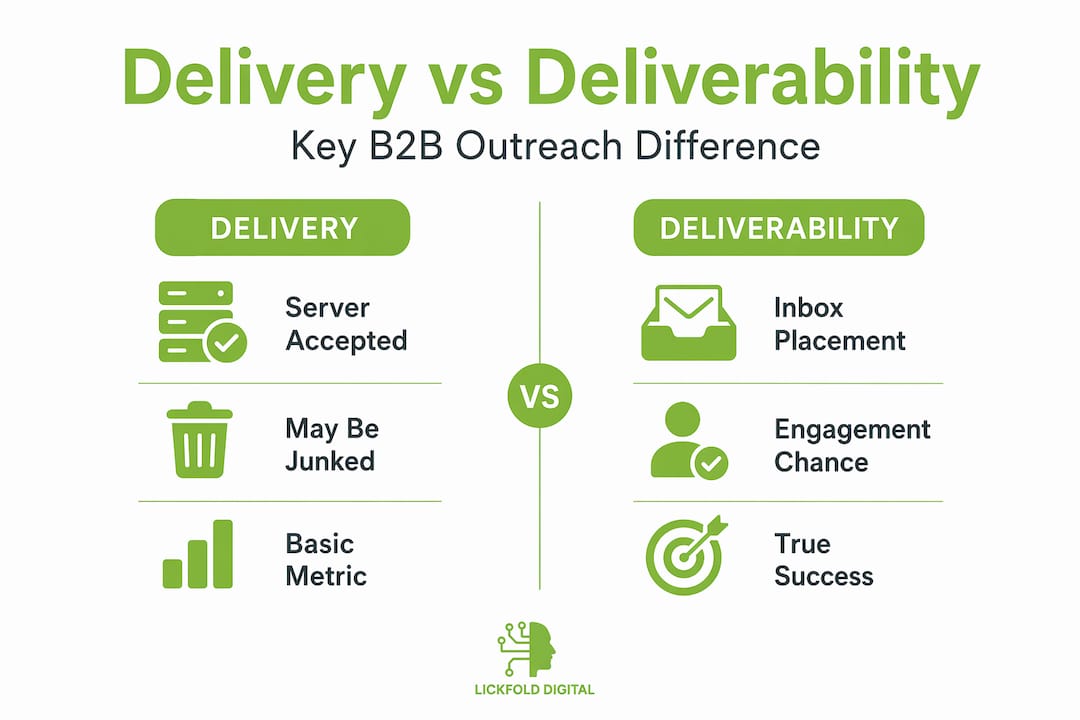
Here is how the confusion plays out in practice. A marketing team sends 10,000 outreach emails. Their ESP dashboard shows 9,800 delivered. They see a 2% open rate and assume the campaign underperformed. What they do not know is that 3,900 of those emails went directly to spam, and their actual inbox placement rate was closer to 55%. Fix the placement problem, and the same 10,000 emails could generate four to five times the opens without changing a word of the copy.
Key distinctions between delivery and deliverability:
- Delivery rate: Server accepted the email (no hard bounce returned)
- Inbox placement rate: Email appeared in the recipient’s primary inbox
- Spam placement rate: Email was filtered into junk or spam before the recipient saw it
- Missing or deferred rate: Email was delayed or silently dropped after acceptance
Improving your email copy, your subject lines, and even your targeting will not rescue a campaign if the emails never reach the inbox. That is why boosting sales email deliverability is a prerequisite, not an afterthought. Strong professional copywriting cannot compensate for emails that never get seen.
Measuring inbox placement: tools and techniques for B2B marketers
Once you understand the distinction, the next question is: how do you actually measure where your emails land? The two main approaches are reputation monitoring and seed-based inbox placement testing.
Seed testing works by sending your campaign to a set of known seed email addresses spread across major email providers (Gmail, Outlook, Yahoo, and others). After sending, a tool checks each seed inbox and reports what folder the email landed in. This gives you folder-level truth, not just SMTP acceptance.
Google Postmaster Tools is the most commonly referenced free monitoring tool in B2B circles, but its role is widely misunderstood. Postmaster Tools provides Gmail-specific signals like domain reputation, spam rate, and authentication status, but it is not an inbox placement test. It cannot tell you whether any specific email landed in the inbox, the Promotions tab, or spam. Postmaster Tools does not show folder-level placement for individual emails; it only surfaces aggregate reputation and spam rate data across your domain’s sending history.
Using Postmaster Tools alone is like checking your car’s oil warning light and calling it a full engine diagnostic. It catches serious issues, but misses the detail you need to run an outreach program at scale.
Best practices for ongoing deliverability monitoring:
- Run seed tests before launching any new outreach sequence, not after you notice problems
- Monitor Google Postmaster Tools and Microsoft SNDS (for Outlook domains) weekly during active campaigns
- Track complaint rates separately from bounce rates because they signal different problems
- Segment your sending by campaign type and audience to isolate reputation issues faster
- Flag any seed test showing more than 5% spam placement as requiring immediate investigation
Pro Tip: Run a seed test on a small batch (200 to 500 emails) before scaling volume on a new domain or IP address. Reputation lag means problems may not appear in Postmaster Tools until days after they started, but a seed test shows folder placement in real time.
Understanding B2B decision-maker targeting matters here too. Sending to tightly defined, verified lists is not just a relevance strategy, it directly affects your complaint rate and engagement signals, both of which feed back into your sender reputation.
Critical factors influencing deliverability in B2B outreach
What affects deliverability is not one thing. It is a system of interconnected signals that mail servers and security filters evaluate before deciding where your email goes.

Authentication: the foundation
SPF (Sender Policy Framework), DKIM (DomainKeys Identified Mail), and DMARC (Domain-based Message Authentication, Reporting, and Conformance) are the three authentication layers every B2B sender needs configured correctly. SPF tells receiving servers which IP addresses are authorized to send on behalf of your domain. DKIM adds a cryptographic signature that proves the email was not altered in transit. DMARC tells receiving servers what to do when SPF or DKIM checks fail, and sends reports back to you. Missing or misconfigured authentication is the fastest path to the spam folder.
Sender reputation: earned, not assumed
Your sending domain and IP address each carry a reputation score that inbox providers reference when routing your email. New domains and IPs start with no reputation, which is treated as suspicious. Volume spikes on a cold domain trigger filters immediately. Building reputation requires a deliberate warm-up process with low volumes and high engagement signals before scaling.
The factors that most directly affect deliverability:
- SPF, DKIM, and DMARC configuration and alignment
- Domain age and sending history
- IP reputation (shared vs. dedicated)
- Hard bounce rate (should stay below 2%)
- Spam complaint rate (should stay below 0.1% on Gmail)
- Recipient engagement (opens, replies, and forward signals)
- List quality and recency of contact data
- Content relevance and link reputation
Improving deliverability is an ongoing system combining authentication, reputation, list hygiene, and monitoring. There is no one-time fix. The moment you stop managing these signals, they degrade.
B2B-specific filtering: a hidden problem
Enterprise environments add a layer of complexity that consumer email providers do not. Corporate mail servers often use asynchronous post-acceptance filtering, meaning a security gateway like Proofpoint or Mimecast accepts your email at the SMTP level and then routes it to spam or quarantine in a separate process. Your logs show “delivered.” The recipient never sees it. Standard SMTP diagnostics cannot catch this. Seed testing with B2B-specific seed addresses is the only reliable way to detect it.
| Factor | Consumer email impact | B2B email impact |
|---|---|---|
| Authentication (SPF/DKIM/DMARC) | High | Critical |
| Sender domain reputation | High | High |
| IP reputation | Medium | High |
| Content filtering | Medium | High (gateway-level) |
| Post-acceptance filtering | Low | High (Proofpoint, Mimecast) |
| Engagement signals | High | Medium (lower open rates typical) |
A personalized email outreach approach directly addresses several of these factors at once. Relevant, specific messages generate fewer complaints and higher engagement, both of which protect your sender reputation. Your B2B outbound workflow should treat deliverability as a built-in operational requirement, not a post-launch concern.
Practical deliverability improvement strategies for B2B marketing teams
Theory only gets you so far. Here is how to translate the factors above into an operational routine that protects and improves inbox placement over time.
Step-by-step deliverability control loop:
- Verify authentication before sending a single email. Confirm SPF, DKIM, and DMARC are correctly configured and aligned to your sending domain.
- Warm up new domains and IPs gradually. Start at 20 to 50 emails per day and increase volume by no more than 20% per week over four to six weeks.
- Clean your list before launch. Remove hard bounces, role-based addresses (info@, support@), and contacts with no engagement in the past 12 months.
- Segment by engagement level. Send to your most engaged contacts first. High open and reply rates on early sends improve your domain reputation before you reach colder segments.
- Run a seed test on each new sequence before scaling. Confirm inbox placement is above 90% on primary inbox providers before increasing volume.
- Monitor Postmaster Tools and SNDS weekly. Watch domain reputation (should be “High”) and spam rate (below 0.10%) as ongoing health signals.
- Suppress hard bounces and spam complaints immediately. Do not wait for your weekly review. Automated suppression rules should remove these addresses the moment they trigger.
- Retest after any major content or template change. Subject lines, link additions, and content shifts can all affect filtering.
Treating deliverability as an operational control loop with pause and suppress actions on bounces and complaints, verified by seed testing before scaling volume, is the approach used by teams that consistently hit inbox rather than spam.
Separate your reputation metrics from your placement metrics to diagnose problems accurately. Postmaster Tools tells you about reputation. Seed testing tells you about placement. You need both to understand what is actually happening.
Pro Tip: Build a deliverability review into your campaign launch checklist. A 30-minute check covering authentication, seed test results, bounce suppression rules, and Postmaster Tools data will catch 90% of issues before they become expensive.
Pairing these practices with expert tips to boost deliverability and strategic follow-up campaigns creates compounding benefits. Better placement generates more replies, which further strengthen engagement signals and reputation.
Reframing deliverability: beyond common misconceptions in B2B email outreach
Here is the uncomfortable truth most deliverability guides skip. The reason so many B2B outreach programs fail has nothing to do with the quality of their messaging. It is that teams are measuring the wrong thing and calling it success.
The “98% delivered” metric is the most dangerous number in email marketing. It masks poor inbox placement that quietly destroys engagement and revenue potential, while giving teams false confidence that their program is working. Campaigns get blamed for poor copy or bad targeting when the real problem is that most emails never had a chance to be read.
The second misconception is that deliverability is a technical setup you do once and move on from. You configure SPF, DKIM, DMARC, check the box, and assume you are covered. In reality, deliverability is a living signal. Every send either improves or damages your reputation. Complaint rates drift. List quality decays. Domain reputation shifts. B2B security gateways update their filtering rules. What worked in January may fail in July without any change from your side.
The third mistake is treating engagement and list hygiene as marketing concerns separate from deliverability. They are not separate. Sending to disengaged contacts, role-based addresses, or outdated lists directly lowers your sender score. The mail server does not care that the contact was on your list for two years. It cares that the email bounced, was ignored, or triggered a complaint.
The teams that consistently win in B2B outreach treat deliverability the way a pilot treats preflight checks, not as a formality, but as the non-negotiable condition for the mission to proceed. That mindset shift, from checkbox to operational system, is what separates teams that generate pipeline from those that generate reports. Investing in B2B decision-maker targeting insights compounds this advantage because reaching the right inbox with the right message is a force multiplier, not just a nice-to-have.
Explore Lickfold Digital’s expertise in optimizing your B2B email deliverability
Deliverability is not a problem you solve once. It is a system you maintain. For B2B marketing managers running outreach at scale, that means having the right infrastructure, monitoring loops, and expertise in place before you send a single sequence.
At Lickfold Digital, we build and manage the full deliverability stack for B2B outreach programs: dedicated warm-up accounts, authentication setup, reputation monitoring, and seed testing built into every campaign. Our AI-driven outreach system is designed so that the personalized outreach strategies we deploy are backed by infrastructure that keeps inbox placement high. You can also explore our expert deliverability tips to start strengthening your program today. When you are ready to go further, contact Lickfold Digital and we will audit your current setup and build a deliverability system that scales with your pipeline.
Frequently asked questions
What exactly is deliverability in B2B email outreach?
Deliverability is the probability that your email lands in the recipient’s primary inbox, not just that the receiving server accepted it. In B2B outreach, deliverability determines whether your message is actually seen by a decision-maker or filtered before they ever get a chance to read it.
How does deliverability differ from delivery rate?
Delivery rate measures server acceptance of your email, while deliverability is about whether the email reaches the inbox where a human will actually see it. A high delivery rate with poor inbox placement means most of your outreach is invisible.
Can Google Postmaster Tools tell me if my emails landed in the inbox?
No. Postmaster Tools is not an inbox-placement test and does not show folder-level placement for individual emails. It reports on aggregate reputation and spam rate signals across your domain.
What are the most important actions to improve deliverability?
Set up SPF, DKIM, and DMARC correctly, clean and segment your list, monitor reputation dashboards weekly, and run seed tests before scaling. Deliverability improvement is an ongoing system that combines all of these practices continuously.
Why is inbox placement testing critical for B2B marketers?
Because it shows you actual folder-level truth that reputation dashboards cannot. Inbox placement testing tools reveal whether your emails are reaching the primary inbox, landing in spam, or being filtered by enterprise security gateways before your target recipients ever see them.