
Outbound Prospecting Playbook for B2B Teams in 2026
Outbound Prospecting Playbook for B2B Teams in 2026
Improving outbound lead generation comes down to three moves: sharpen your ICP with real buying signals, run a multi-channel 8-touch cadence over 10–14 business days, and deploy a tool stack that personalizes at scale while enforcing cadence discipline. Do those three things consistently, and you create a predictable pipeline engine instead of a spray-and-pray volume game.
- Signal-driven ICP + list hygiene: Work only accounts that recently triggered a buying signal (hiring surge, funding round, tech change). Stale territory lists kill reply rates before your first email lands.
- Multi-channel 8-touch cadence with a video touch: Combine email, LinkedIn, phone, and a personalized video message across 10–14 business days. Teams using AI-personalized video report 2–3x more replies and 40–50% more meetings booked versus text-only sequences.
- Tool stack that enables personalization at scale: A CRM, enrichment layer, sequencing platform, and deliverability infrastructure working together prevent the cadence from collapsing under volume.
Teams that execute all three consistently see measurable lifts in reply rate, connect rate, and meetings booked within the first 30 days.
Key Takeaways
A repeatable outbound system requires signal-driven account selection, a completed multi-channel cadence, and daily operational discipline — not just better messaging.
| Point | Details |
|---|---|
| Signal-first account selection | Work only accounts with a recent buying trigger; stale lists kill reply rates before the first email sends. |
| 8-touch multi-channel cadence | Span 10–14 business days across email, LinkedIn, phone, and video; stop the sequence the moment a prospect replies. |
| AI-personalized video | Teams using video personalization report 2–3x more replies and 40–50% more meetings booked versus text-only outreach. |
| Daily time-blocking | Protect 90 minutes each morning for prospecting before any other task; cadence completion depends on it. |
| Lickfold Digital | Handles signal sourcing, personalized multi-touch outreach, deliverability operations, and human qualification as a managed AI-driven service. |
Table of Contents
- What is outbound prospecting, and how does it differ from inbound?
- What are the four core components of a repeatable outbound system?
- How to build an 8-touch multi-channel cadence that actually gets replies
- How do you personalize outreach at scale without losing quality?
- Which metrics tell you if your outbound program is actually working?
- What tools does your outbound stack actually need?
- How should your team structure daily prospecting work?
- How do AI agents reduce manual work without killing personalization?
- Your 7–14 day checklist to start building a faster outbound system
- What top outbound teams do that most teams skip
- Lickfold Digital builds the outbound engine so your team can close
- Primary sources and recommended reading
- Sources
What is outbound prospecting, and how does it differ from inbound?
Outbound prospecting is seller-initiated outreach to targeted accounts or buyers who have not opted in. You go to them; they do not come to you. The seller identifies a fit, researches the account, and initiates contact through cold email, cold calling, LinkedIn, or video.
Inbound flips that dynamic. A prospect finds your content, fills out a form, and raises their hand. Inbound is efficient when it works, but it hands control of timing to the buyer. Outbound lets you target the exact accounts you want, when you want, regardless of whether they have ever heard of you.
The two motions complement each other in account-based and enterprise sales. Inbound signals (a prospect visiting your pricing page, downloading a whitepaper) become warm triggers for outbound follow-up. Marketing generates awareness; outbound converts it into pipeline on a schedule the sales team controls.
The four channels each play a distinct tactical role:
- Cold email: Highest ROI per touch when personalized correctly. Scales well with sequencing tools. Best for first contact and follow-up with a clear value hook.
- LinkedIn: Lower volume, higher signal. Connection requests with a research-anchored note and InMail for senior titles who rarely answer cold calls.
- Phone: Fastest path to a real conversation. Works best as a mid-cadence touch after email has established context, not as the cold opener.
- Video: Highest differentiation. A 60-second personalized video in touch 4 or 5 breaks through inbox noise in a way text cannot.
What are the four core components of a repeatable outbound system?
Techniques and tools only scale when the underlying system is sound. Four components are non-negotiable.
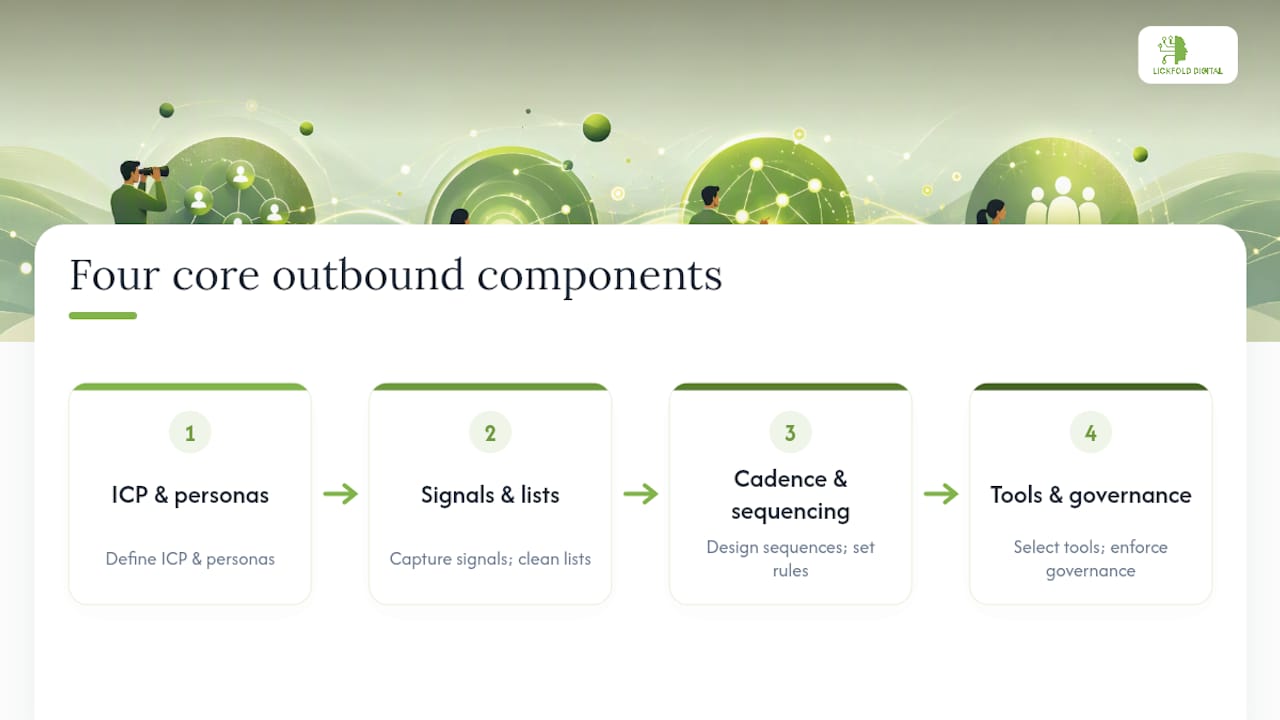
ICP and persona model
Your ideal customer profile defines the firmographic and technographic attributes of accounts most likely to buy: industry, employee count, revenue band, tech stack, geography, and growth stage. The persona layer adds the human dimension: the job title, the business problem, the trigger that makes them care right now.
An ICP that lives in a slide deck does nothing. Operationalize it by loading the criteria into your enrichment tool (ZoomInfo, Apollo) so every list you pull is pre-filtered. Review and tighten the ICP quarterly using closed-won data, not gut feel.
Signal layer and list hygiene
A signal is a recent, observable event that increases the probability a prospect needs what you sell. Hiring a VP of Sales, closing a Series B, switching CRMs, posting a job for a role your product replaces — these are buying signals. Working signal-triggered accounts instead of static territory lists is the single highest-leverage operational shift most teams can make.
List hygiene is the other half: verify emails before sending, remove bounces immediately, and suppress unsubscribes and existing customers. A dirty list destroys deliverability faster than any other variable.
Cadence design and sequencing rules
A cadence is a pre-defined sequence of touches across channels with specific timing, message purpose, and stop rules. The core rule: stop the cadence the moment a prospect replies, regardless of sentiment. A reply is a conversation; a cadence is a monologue.
Channel mix matters. Email alone is not a cadence. A real cadence mixes email, LinkedIn, and phone across 10–14 business days with 6–8 touches. Multi-channel programs that combine consistent follow-up with CRM intelligence consistently outperform single-channel approaches.
Tool stack and governance
The stack has five functional layers: enrichment, CRM, sequencing, deliverability, and analytics. Each layer must talk to the others. A contact enriched in ZoomInfo should flow into HubSpot, trigger a sequence in Apollo or a dedicated sequencing platform, and surface performance data in Gong or your BI layer. Governance means defining who owns each layer, what data quality standards apply, and who reviews deliverability metrics daily.
Representative tools mapped to roles: ZoomInfo and Apollo for enrichment and contact sourcing; HubSpot as CRM and signal hub; Vidyard, Loom, and Sendspark for video personalization; Gong for call analytics and rep coaching; Lickfold Digital for AI-driven prospecting, deliverability operations, and human qualification at scale. The scalable lead generation strategies that compound over time always start with this foundation.
Pro Tip: Before adding a new tool, ask whether it solves a signal or a sequencing problem. Most teams that struggle with outbound have a signal problem, not a tool problem. Fix the signal layer first.
How to build an 8-touch multi-channel cadence that actually gets replies
A cadence is only as good as its execution. The template below spans 12 business days with 8 touches across email, LinkedIn, and phone. Every touch has a single purpose; the sequence stops the moment a reply arrives.
Channel mix rationale: Email anchors the sequence because it scales and leaves a paper trail the prospect can reference. LinkedIn builds social presence and warms the name before the phone call. The video touch on Day 10 is the highest-differentiation moment in the cadence; it arrives after enough context has been established that the prospect recognizes the sender.
Subject lines and first-line hooks
Cold email subject lines under seven words consistently outperform longer ones. HubSpot recommends pairing a short subject with a research-based first line and a single clear ask.
Two subject-line examples:
- “Quick question about [Company]'s hiring push”
- “Saw you’re expanding into [market]”
Two first-line hooks:
- “Noticed [Company] posted six SDR roles last week — that usually means pipeline pressure is real.”
- “Congrats on the Series B. Most teams at that stage are rebuilding their outbound motion from scratch.”
For LinkedIn connection requests, keep the note under 300 characters and anchor it to something specific: a shared connection, a post they published, or a company milestone.
Execution notes
Send emails between 7:00 AM and 9:00 AM in the prospect’s timezone, not yours. Never send two touches on the same day across different channels — a phone call and an email on Day 5 is a double-touch that reads as pressure. Rotate across multiple warm mailboxes to protect sender reputation as volume grows.
How do you personalize outreach at scale without losing quality?
Personalization at scale is a systems problem, not a creativity problem. The goal is to make every message feel researched without spending 20 minutes per prospect.
Manual techniques that still scale
Build modular message templates with clearly marked insert points for each anchor. A rep who fills in three fields per prospect is personalizing; a rep writing from scratch every time is not scaling.
The first line is the highest-leverage sentence in any cold email. It should reference something specific enough that the prospect knows you looked. “I saw your company recently” is not a first line. “Noticed you hired a VP of RevOps last month” is.
AI-personalized video at scale
Video personalization used to mean recording one video per prospect. AI tools have changed that. The workflow: record a single base video with a clear value message, then use a platform like Sendspark to generate personalized variants that swap in the prospect’s name, company, or a relevant detail at the opening frame. The result looks custom; the production time is a fraction of recording individually.
The performance case for video is strong. Teams using AI-personalized video prospecting report 2–3x more email replies and 40–50% more meetings booked compared to text-only outreach. That gap is large enough to justify the setup time even for small teams.
Statistic: Teams using AI-personalized video in their outbound cadences report 2–3x more email replies and 40–50% more meetings booked versus text-only sequences.
Use video at touch 4 or 5 in the cadence, after email has established context. A cold video as the first touch tends to feel intrusive; a video after two emails feels like a natural escalation.
For enrichment and sequencing, tools like ZoomInfo and Apollo handle contact data; Sendspark, Vidyard, and Loom handle the video layer. Connecting them through your CRM keeps the contact record current and the sequence on track. For teams looking to push further, AI-driven prospecting approaches can automate the research and personalization steps at a volume no manual workflow can match.
Which metrics tell you if your outbound program is actually working?
Five metrics define outbound health. Track them at different cadences: daily for activity, weekly for rep-level performance, monthly for program-level trends.
Benchmark note: Cold email reply rates in the 5–10% range signal a healthy, well-targeted program. Rates below 3% almost always point to a list quality or first-line problem, not a messaging problem.
Quick improvement actions by metric
Change one variable at a time. If subject-line tests don’t move the number, the problem is list quality or ICP fit.
Use local presence dialing if your dialer supports it. A voicemail that references the email you sent increases callback rates.
The issue is usually the offer (the ask is too big, too vague, or too early) or ICP fit (you’re reaching the right company but the wrong person).
This is a workflow and coaching problem. Weekly cadence audits and a morning signal queue fix most of it.
Reducing B2B lead costs is a direct downstream benefit of tightening these metrics. The strongest prospecting programs combine multi-channel consistency with CRM intelligence to prioritize which accounts get worked first.
What tools does your outbound stack actually need?
Every tool in the stack should solve a specific functional problem. Buy by function, not by feature list.
- CRM (HubSpot, Salesforce): The system of record. Every contact, every touch, every outcome lives here. If it’s not in the CRM, it didn’t happen.
- Enrichment (ZoomInfo, Apollo): Pulls verified firmographic and contact data against your ICP criteria. Keeps lists clean and current. ZoomInfo leads on data depth for enterprise accounts; Apollo is strong for SMB and mid-market with built-in sequencing.
- Sequencing/engagement platform (Apollo, HubSpot Sequences): Automates the cadence execution, enforces stop-on-reply rules, and surfaces which touches are performing.
- Dialer (integrated with CRM): Logs calls automatically, records voicemails, and enables local presence dialing. A dialer that doesn’t sync to the CRM creates a data gap that breaks pipeline reporting.
- Video personalization (Vidyard, Loom, Sendspark): Vidyard and Sendspark both support AI-personalized variants at scale. Loom is faster for one-off recordings. Use whichever integrates cleanly with your sequencing platform.
- Deliverability and warm-up: Dedicated sending domains, mailbox warm-up (tools like Instantly or Mailreach handle this), bounce thresholds below 2%, and spam-rate monitoring. This layer is invisible when it works and catastrophic when it doesn’t.
- Analytics/BI (Gong, CRM dashboards): Gong captures call and email data to surface what language, timing, and talk tracks correlate with meetings booked. CRM dashboards cover activity and pipeline metrics.
- AI-driven prospecting (Lickfold Digital): Handles signal ingestion, account research, contact selection, personalized multi-touch outreach, deliverability operations, and human qualification as a managed layer on top of the stack.
Integration and data flow
The minimal integration surface a small team needs: enrichment tool exports to CRM via CSV or API, CRM triggers sequences in the engagement platform, and call/email data flows back to CRM for reporting. Every additional integration point is a potential data gap. Keep the flow linear.
For email infrastructure, well-designed email campaigns separate sending domains from your primary domain, rotate across multiple warm mailboxes, and monitor bounce and spam rates daily rather than weekly.
Pro Tip: Set up a dedicated sending domain (not your primary company domain) before you send a single cold email. Warming a secondary domain protects your main domain’s reputation if deliverability problems arise.
How should your team structure daily prospecting work?
Consistency is the variable most teams underestimate. A great cadence template run inconsistently produces worse results than a mediocre template run every day without fail.
Daily time-blocking for SDRs and AEs
Block 90 minutes before anything else in the morning for prospecting. No meetings, no Slack, no email triage. That block covers: reviewing the morning signal queue, adding new accounts to sequences, recording any video touches due that day, and making call attempts on mid-cadence contacts.
If 90 minutes isn’t available, protect a hard 30-minute fallback. Thirty focused minutes beats zero. The ROI of consistent daily prospecting compounds quickly; skipping two days in a row breaks cadence momentum and drops completion rates.
Team processes and role responsibilities
- SDRs: Own research, sequence enrollment, and first-touch execution. Work from a signal queue each morning, not a static list. Prioritize accounts that triggered a buying signal in the last 7 days.
- Sales ops: Owns list hygiene, deliverability monitoring, and CRM data quality. Reviews bounce rates and spam flags daily. Runs weekly list audits to remove stale contacts.
- Sales manager: Runs a weekly 30-minute cadence audit with each rep. Reviews cadence completion rate, reply rate, and meetings booked. Coaches on specific touches that are underperforming, not just on total activity numbers.
The signal queue in practice
Replace the “work through the list from top to bottom” habit with a signal-triggered queue. Each morning, pull accounts that fired a relevant signal in the last 48 hours: a new hire in a target role, a funding announcement, a job posting that matches your ICP trigger. Work those accounts first. The rest of the list is secondary.

This shift alone tends to lift reply rates because the outreach arrives when the account is in motion, not when it’s convenient for the rep. A research-based hook tied to a recent event (“Saw you just brought on a new CRO”) lands differently than a generic value proposition.
How do AI agents reduce manual work without killing personalization?
The architecture of an AI-driven outbound system has five stages: signal ingestion, account research, contact selection, multi-channel sequence execution, and reply handling with human handoff.
Signal ingestion pulls from job boards, funding databases, technographic sources, and intent data. Account research uses AI agents to summarize the account’s recent activity, identify the relevant buying trigger, and draft a research-anchored first line. Contact selection matches the account to the right persona and verifies contact data before the sequence starts. Sequence execution sends touches on schedule, rotates mailboxes, and monitors deliverability thresholds. Reply handling routes positive responses to a human for qualification; out-of-office and wrong-contact replies are handled automatically.
Autonomy boundaries and governance
AI SDRs are agentic systems that can run research, sequencing, and reply handling for signal-triggered accounts when governed correctly. The governance decision is how much autonomy to grant at each stage. Start with draft-and-approve: the AI drafts the first email, a human approves before it sends. As confidence and data grow, expand to auto-send for initial touches while keeping human review on any reply that signals genuine interest.
For regulated industries or high-ACV deals, keep a human checkpoint at the contact-selection stage. The cost of a misfire in those contexts outweighs the efficiency gain from full automation.
Operational thresholds to watch
Monitor these daily when scaling. A spike in spam complaints that goes unaddressed for a week can damage domain reputation in ways that take months to recover.
Lickfold Digital’s approach handles these thresholds as part of the managed service: dedicated warm-up accounts, ongoing reputation monitoring, and human qualification of replies before they reach the sales team. The result is a pipeline that runs continuously without requiring a rep to manage deliverability operations manually.
Pro Tip: Start with human-in-the-loop checkpoints at every stage. Expand AI autonomy one stage at a time, only after you’ve confirmed the output quality meets your standard. Rushing to full automation before the signal and ICP layers are tight is the fastest way to burn a domain.
Your 7–14 day checklist to start building a faster outbound system
Execute these in order. Each item has a clear owner and a realistic completion window.
-
Refresh your ICP (Owner: Sales manager + ops | Day 1–2): Pull your last 20 closed-won deals. Identify the three firmographic and two technographic attributes they share. Update your enrichment tool filters to match.
-
Set up signal sources (Owner: Sales ops | Day 2–3): Connect at least two signal feeds: a job-posting monitor (LinkedIn, Builtin) and a funding/news alert (Crunchbase, Google Alerts). Define the three trigger events that qualify an account for immediate outreach.
-
Warm up sending infrastructure (Owner: Sales ops | Day 1–7): Set up a dedicated sending domain. Start mailbox warm-up on Day 1 — it takes 7–14 days to reach safe sending volume. Never send cold outreach from your primary company domain.
-
Build one 8-touch sequence template (Owner: SDR lead | Day 3–5): Use the cadence template in this guide. Write the email copy for all five email touches. Record the base video for the Day 10 touch. Load into your sequencing platform with stop-on-reply rules active.
-
Assign role responsibilities (Owner: Sales manager | Day 1): Confirm who owns list hygiene, who owns deliverability monitoring, and who runs the weekly cadence audit. Write it down. Ambiguous ownership is where outbound programs quietly die.
-
Run the first signal queue (Owner: SDRs | Day 7–8): Pull accounts that triggered a signal in the last 7 days. Enroll the top 20 in the sequence. This is your pilot cohort.
-
Set 30-day measurement targets (Owner: Sales manager | Day 7): Define your baseline for reply rate, connect rate, and meetings booked. Set a 30-day target for each. Review weekly. The step-by-step lead qualification framework helps define what a qualified reply looks like before the first response arrives.
What to measure in the first 30 days: Reply rate on the pilot cohort, cadence completion rate, meetings booked from the sequence, and bounce rate on the sending domain. These four numbers tell you whether the system is working or where it’s breaking.
What top outbound teams do that most teams skip
The most common failure mode in outbound is not a bad script. It’s a structural one: teams optimize the message before they fix the list, the signal layer, or the cadence discipline.
Volume-first thinking is the trap. Sending 500 emails a day to a stale list feels productive. The team concludes “cold email doesn’t work.” What actually didn’t work was the list and the targeting.
The best teams I’ve observed work the opposite way. They start with a tight ICP, pull a small list of signal-triggered accounts, and send 30 highly relevant emails a day. The cadence completes because the rep is working accounts that are actually in motion, not accounts that were assigned six months ago and never touched.
Inconsistent follow-up is the second leak. Most replies come after touch 4 or later. Teams that abandon a cadence after two touches are leaving the majority of their pipeline on the table. Cadence completion discipline, enforced through weekly audits and a sequencing tool that flags stalled sequences, is what separates teams that generate consistent pipeline from teams that have good weeks and bad months.
Deliverability is the third blind spot. Reps rarely think about it; ops teams often treat it as a one-time setup task. In practice, spam rate and bounce rate need daily attention when you’re running sequences at scale. A domain that lands in spam is a pipeline problem, not just a technical one.
The implementation checklist above is the fastest path to getting those habits in place.
Lickfold Digital builds the outbound engine so your team can close
Most outbound programs stall not because the strategy is wrong but because the operational layer — signal sourcing, list hygiene, deliverability, personalization at scale — never gets built properly. That’s the gap Lickfold fills.
Lickfold Digital deploys dedicated AI agents that handle the full prospecting loop: market research, decision-maker mapping, personalized multi-touch outreach across email and LinkedIn, deliverability infrastructure with warm-up and reputation monitoring, and human qualification of every positive reply before it reaches your sales team. The result is a pipeline that runs continuously without pulling your reps off closing work to manage sequences.
The approach maps directly to the four core components in this guide: a signal-driven ICP layer, a multi-channel cadence with AI-personalized messaging, a managed deliverability operation, and a human handoff that passes only qualified opportunities. No generic templates, no unmonitored sending domains, no leads that haven’t been pre-qualified.
If you want a pipeline that runs on a schedule you control, book a consultation with Lickfold Digital to see how the system maps to your ICP and sales motion.
Primary sources and recommended reading
- What Is Outbound Prospecting? | ZoomInfo Pipeline — The clearest operational definition of outbound prospecting and a practical breakdown of tool roles for B2B teams.
- Sales Prospecting Techniques: A Complete Guide | Sendspark — The source for video personalization benchmarks (2–3x reply uplift, 40–50% more meetings) and cadence length guidance.
- Effective Sales Prospecting Techniques | HubSpot — HubSpot’s guidance on subject-line length, first-line personalization, and CRM-signal integration for cold email.
- B2B Sales Prospecting: 11 Best Strategies | HubSpot — Multi-channel program recommendations, time-blocking habits, and CRM intelligence as a prospecting priority lever.
- AI Outbound Sales 2026: Complete Pillar Guide | Knowlee Blog — The most detailed public treatment of AI SDR architecture, signal taxonomy, and autonomy governance for 2026 outbound programs.
Sources
- Sales prospecting techniques: a complete guide | Sendspark
- Effective sales prospecting techniques you should be using | HubSpot
- AI Outbound Sales 2026: Complete Pillar Guide to Pipeline + Signals + AI SDR | Knowlee Blog
- B2B sales prospecting: 11 best strategies to win buyers in 2026 | HubSpot
- What Is Outbound Prospecting? Definitions, Strategies, and Best Practices | ZoomInfo Pipeline