
Unsubscribe Management: The B2B Playbook for Compliant Opt-Outs
Unsubscribe Management: The B2B Playbook for Compliant Opt-Outs
Unsubscribe management is the workflow that records, honors, and propagates every opt-out request across all of your sending systems, not just the one platform where the click happened. Get that propagation right and you protect deliverability. Get it wrong and one stale spreadsheet undoes months of reputation building.
If you’re triaging a request right now, do three things in the next hour:
- Add the requester’s email to your master suppression list before you do anything else.
- Cancel any scheduled follow-ups, drip sequences, or cadences already queued for that address.
- Confirm your emails carry a List-Unsubscribe header and a visible footer link, since both are required touchpoints.
The FTC’s CAN-SPAM guidance gives you 10 business days to honor an opt-out. Treat that as the legal ceiling, not the target. Same-day processing is what actually keeps you off blocklists.
Key Takeaways
Unsubscribe management works only when a single suppression source governs every sending system your team touches, checked in real time rather than reconciled later.
| Point | Details |
|---|---|
| One suppression source | Every ESP, CRM, and outreach tool must query the same master list, not a local copy. |
| Process faster than the legal deadline | CAN-SPAM allows 10 business days, but same-day suppression avoids accidental follow-ups. |
| Headers plus landing pages | Use List-Unsubscribe headers and a landing page that calls your API immediately on load. |
| Never silently restore contacts | Require a documented re-opt-in before removing anyone from suppression. |
| Managed infrastructure option | Lickfold Digital pairs warm-up accounts and reputation management with human-reviewed replies to keep suppressed contacts out of new sequences. |
Table of Contents
- What Is Unsubscribe Management and Why It’s an Infrastructure Problem
- A Quick Audit Checklist for Unsubscribe Compliance
- What Does CAN-SPAM Actually Require From You?
- The Core Systems Behind Reliable Unsubscribe Management
- Email vs. SMS vs. Push: Do Opt-Outs Carry Across Channels?
- How to Implement Unsubscribe Handling, Step by Step
- Testing and Auditing Your Suppression Pipeline
- What B2B Outreach Teams Get Wrong About Opt-Outs
- Why Unsubscribe Discipline Is a Growth Decision, Not a Legal Chore
- Let Lickfold Digital Handle the Infrastructure Behind Every Send
- Sources
What Is Unsubscribe Management and Why It’s an Infrastructure Problem
Most teams treat unsubscribe handling as a footer copy decision: pick a link color, write “click here to unsubscribe,” done. That’s backwards. Unsubscribe list management is a data synchronization problem. You likely run an ESP, a CRM, a sales engagement tool, and maybe a separate outbound platform, and an opt-out recorded in one has to reach all of them within minutes, not during the next weekly sync. When it doesn’t, a suppressed contact gets a “friendly follow-up” three days later, and that single email can trigger a spam complaint that dings your sender score across the entire domain. The fix isn’t better copy. It’s a canonical suppression source every sending tool checks before it fires.
A Quick Audit Checklist for Unsubscribe Compliance
Run through this before your next campaign send:
- Confirm you have one master suppression list, and that every sending system treats it as authoritative rather than keeping its own local copy.
- Verify the List-Unsubscribe header and a visible footer link both appear on live marketing emails, not just in your template library.
- Set suppression writes to propagate automatically and immediately when someone opts out, with no manual export step in between.
- Add a pre-send check that blocks any suppressed address from being re-imported through a CSV upload or CRM sync.
- Log a timestamp, source system, and confirmation record for every opt-out, so you have proof if a complaint ever surfaces.
Pro Tip: Run a monthly test send to a dummy suppressed address. If it lands in the inbox, your propagation has a gap somewhere, and you want to find it before a real prospect does.
What Does CAN-SPAM Actually Require From You?
The statute is more specific than most marketers realize. Under CAN-SPAM, every commercial email needs a working opt-out mechanism that stays functional for at least 30 days after you send it, and you must honor that request within 10 business days. No fee. No forced login. No hidden multi-page settings maze before the actual unsubscribe button appears.
Vendor guidance across the industry echoes this: a compliant opt-out or preference center should allow single-step cancellation, with at most one extra click for someone who wants to fine-tune frequency instead of leaving entirely. That’s the line the FTC polices, and it’s also the line most complaint-driven enforcement traces back to. Common violations include:
- Opt-out links that require account credentials to process.
- Preference centers that bury the unsubscribe option behind multiple menus.
- Any mechanism that charges a fee or asks for personal information beyond the email address.
The 10 business day window is a legal maximum, not an operational goal. If your process depends on hitting that ceiling every time, you’re one busy week away from a violation.
The Core Systems Behind Reliable Unsubscribe Management
Three components do the actual work, and each one has to be built with intent rather than assembled from whatever your ESP defaults to.
Your master suppression list needs normalized keys so “[email protected]” and “[email protected]” resolve to the same entry, and it should function as an immutable deny rule. Once an address lands there, no automation, sales rep override, or list import should be able to remove it without a documented re-opt-in event, a practice Pepperdine’s email compliance resource treats as the safest default.
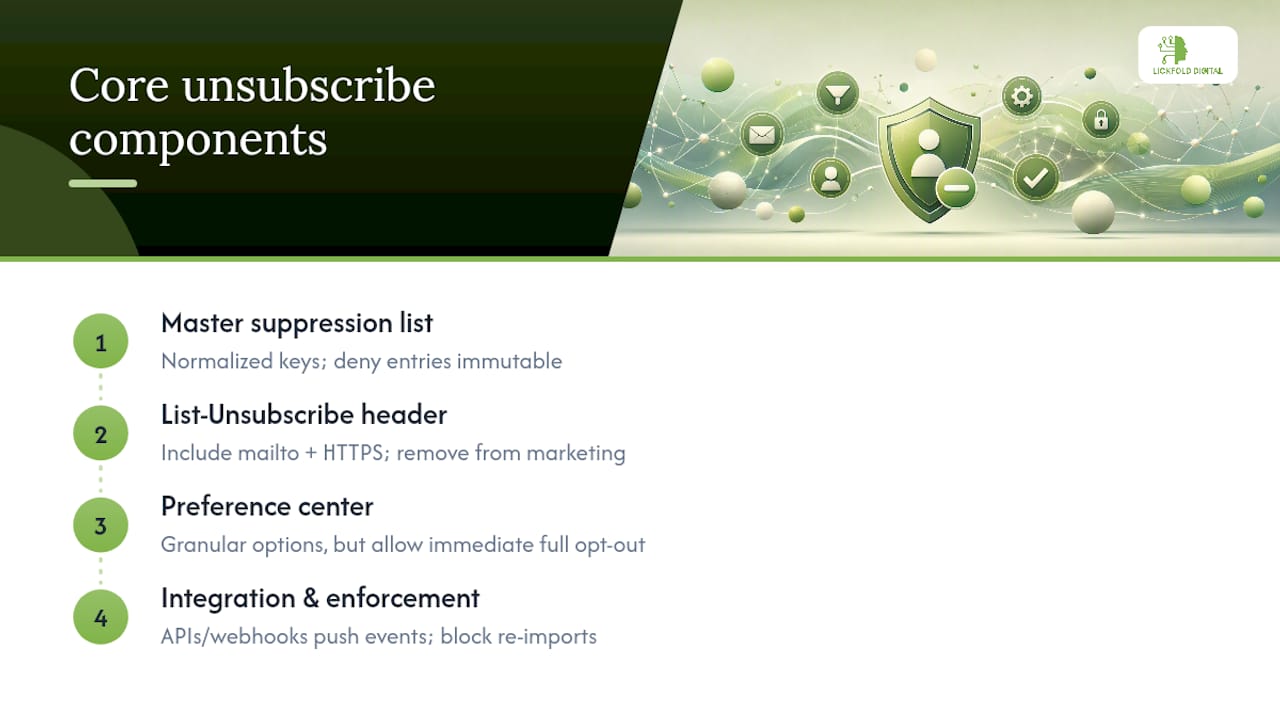
Your List-Unsubscribe header should include both a mailto and an https URL where your sending platform allows it, since inbox providers vary in which format they’ll render as a one-click control. Adobe Journey Optimizer’s opt-out documentation recommends treating an opt-out as a full removal from future marketing audiences, not a flag that gets checked later.
Your preference center can offer granularity, frequency toggles, and topic-level choices, but none of that should slow down someone who just wants out entirely.
A preference center is a convenience layer. It is never allowed to become a speed bump between a recipient and the exit.
Wire all three into APIs and webhooks that push suppression events to your CRM, ESP, and outreach platform simultaneously, and block re-imports at the point of ingest, not after the damage is done.
Email vs. SMS vs. Push: Do Opt-Outs Carry Across Channels?
They don’t, at least not automatically, and that trips up more B2B teams than any single email bug. Each channel has its own opt-out mechanics:
- Email relies on List-Unsubscribe headers and footer links; rendering varies by inbox, and Gmail’s subscription management feature can surface or act on subscription status differently than Outlook or Apple Mail.
- SMS uses keyword replies like STOP or UNSUBSCRIBE, governed by carrier and CTIA expectations rather than CAN-SPAM.
- Push opt-outs happen at the device level and should map to a profile attribute and token removal, not to your email suppression list.
Whatever channel triggers the request, log the channel, the identifier or token, a timestamp, the source system, and confirmation evidence. That log is what saves you during an audit or a deliverability investigation.
How to Implement Unsubscribe Handling, Step by Step
- Add a List-Unsubscribe header to your sending templates, including both mailto and https variants so more inbox providers can present a one-click control to the recipient.
- If you send through Amazon SES, look at ListManagementOptions and the
{{amazonSESUnsubscribeUrl}}placeholder for a managed subscription page. Amazon’s SES documentation confirms recipients who click these links are unsubscribed from the specified list automatically. - Build a landing page that calls your suppression API the moment it loads, records the event and source, and shows immediate confirmation. Adobe’s email opt-out documentation is explicit that the click itself shouldn’t be the only recorded event; the landing page must trigger the actual database update.
- Classify every message correctly as marketing or transactional before you send, so an opt-out never accidentally blocks a legitimate invoice or password reset.
- Run pre-send checks against your suppression list on every campaign, and set an automated rule that rejects any re-import of a suppressed address.
Testing and Auditing Your Suppression Pipeline
Set up an end-to-end test at least quarterly: send to a dedicated test address, click unsubscribe, then confirm the suppression appears in every single system your team uses to send email, not just the one where the click occurred.
- Run pre-send sanity checks that sample a handful of addresses and confirm suppression status before a large Email Campaign fires.
- Alert on failed suppression writes, propagation lag between systems, or import collisions where a suppressed address slips back in.
- Retain proof of every opt-out: timestamp, source system, and a snapshot of the confirmation page, in case a complaint or audit ever requires evidence.
Pro Tip: Treat every unsubscribe click as the start of a workflow whose first action is suppression, never a preference update that waits around for confirmation.
What B2B Outreach Teams Get Wrong About Opt-Outs
Running parallel outreach tools is where unsubscribe compliance in B2B usually breaks down. A sales rep’s sequencing tool, a marketing ESP, and a cold outbound platform each keep their own contact state unless you force them to check a single source of truth.
- One canonical suppression list matters more than any single tool’s built-in unsubscribe feature, because the failure point is always the handoff between systems.
- Dedicated warm-up accounts and active reputation management reduce the odds that a suppressed contact gets caught in a new sequence launched by a different team member.
- Human review of replies before they reach sales catches “please remove me” requests that a keyword filter would miss entirely.
- Never delete a suppression record to “give someone a second chance.” Require a documented, explicit re-opt-in instead.
Decentralized contact data is the single most common reason a suppressed prospect gets emailed again. Synchronizing suppression state in real time is the fix, not another spreadsheet reconciliation.
Why Unsubscribe Discipline Is a Growth Decision, Not a Legal Chore
Teams that treat opt-outs as a compliance checkbox eventually pay for it in deliverability. The senders who protect their reputation long term are the ones who process unsubscribes faster than the law requires and refuse to let a single decentralized tool undo that discipline. Lickfold Digital builds this into every outbound infrastructure it manages, from warm-up accounts to human-reviewed reply handling, because a clean suppression list is what keeps an outbound program sending for years instead of months.
— Duarte
Let Lickfold Digital Handle the Infrastructure Behind Every Send
Lickfold Digital gives B2B teams something a stitched-together stack of ESPs and sequencing tools rarely delivers: one outbound infrastructure where suppression, warm-up, and reputation management live under a single system instead of three disconnected dashboards.
That matters because the core problem with unsubscribe compliance isn’t the footer link, it’s synchronization across every tool your team uses to send outbound. Lickfold Digital’s platform pairs dedicated warm-up accounts with ongoing reputation monitoring and human qualification of replies, so a suppressed contact doesn’t resurface in a new sequence three weeks later because a different rep imported a stale list. If your outbound program has outgrown a patchwork of point tools and manual suppression checks, see how Lickfold Digital structures a compliant, deliverability-safe outbound pipeline for your next campaign.
Sources
- CAN-SPAM Act: A Compliance Guide for Business | Federal Trade Commission
- Manage opt-out | Adobe Journey Optimizer