
LinkedIn Outreach Limits in 2026: Safe Caps for Marketers
LinkedIn Outreach Limits in 2026: Safe Caps for Marketers
For safe LinkedIn outreach in 2026, treat a moderate number of connection invites per rolling 7-day window and messages per week as your conservative operational baselines, then adjust upward only as account trust grows. LinkedIn does not publish a single fixed cap. Instead, it uses a reputation-graded system in which your practical headroom depends on acceptance rate, account age, and behavioral signals. If you see a limits modal, stop automation immediately, withdraw your oldest pending invites to bring the queue under a safe threshold, and switch to manual sends until your metrics recover.
Three signals tell you where you stand right now:
- Social Selling Index (SSI): A higher SSI score correlates with better account standing and, anecdotally, more outreach headroom. Check yours at linkedin.com/sales/ssi.
- Pending-invite count: Community practitioners keep this well under 500–700, even though the observed ceiling sits around 1,500. A bloated pending queue is one of the fastest ways to trigger a restriction.
- Rolling 7-day window: LinkedIn tracks sends over the past seven days, not a Monday-to-Sunday calendar week. Spreading invites evenly across each day matters more than the weekly total alone.
According to empirical guidance from outreach operators in 2026, free users should treat a moderate number of messages per week as a conservative ceiling, while paid users can push toward a somewhat higher range per week without triggering anti-spam flags.
Key Takeaways
LinkedIn does not publish fixed outreach caps — your practical headroom is reputation-graded, and the teams that protect their acceptance rate consistently outperform those chasing raw send volume.
| Point | Details |
|---|---|
| Conservative weekly baseline | Treat ~100 connection invites and ~100 messages per week as safe starting points, adjusting by account trust. |
| Pending-invite hygiene | Keep pending invites under 500–700 and withdraw stale invites every 2–3 weeks to protect account standing. |
| Acceptance rate is the signal | Below 20% acceptance means cut volume and revise copy, not push harder. |
| Automation must have human checks | Set hard daily caps (15 invites/day), randomized delays, and require human approval for all message templates. |
| Lickfold automates compliance | Lickfold enforces rate-limiting, pending-invite hygiene, and human-in-loop review at the platform level. |
Table of Contents
- What are the current LinkedIn outreach limits by account tier?
- How do connection request limits actually work in practice?
- How many LinkedIn messages can you safely send per day?
- What is the Commercial Use Limit and how does it affect your searches?
- What are the specific limits for Sales Navigator users?
- What happens when LinkedIn restricts your account?
- Practical rules for running safe outreach without getting flagged
- A practical automation safety checklist and rate-limiter example
- The trade-off most outreach teams get wrong
- How Lickfold keeps your LinkedIn outreach compliant at scale
- Sources
What are the current LinkedIn outreach limits by account tier?
The table below reflects conservative operational thresholds observed by practitioners and researchers in 2026. LinkedIn does not publish these as official guarantees. Treat them as working baselines, not hard rules, and expect your actual headroom to shift based on account reputation.
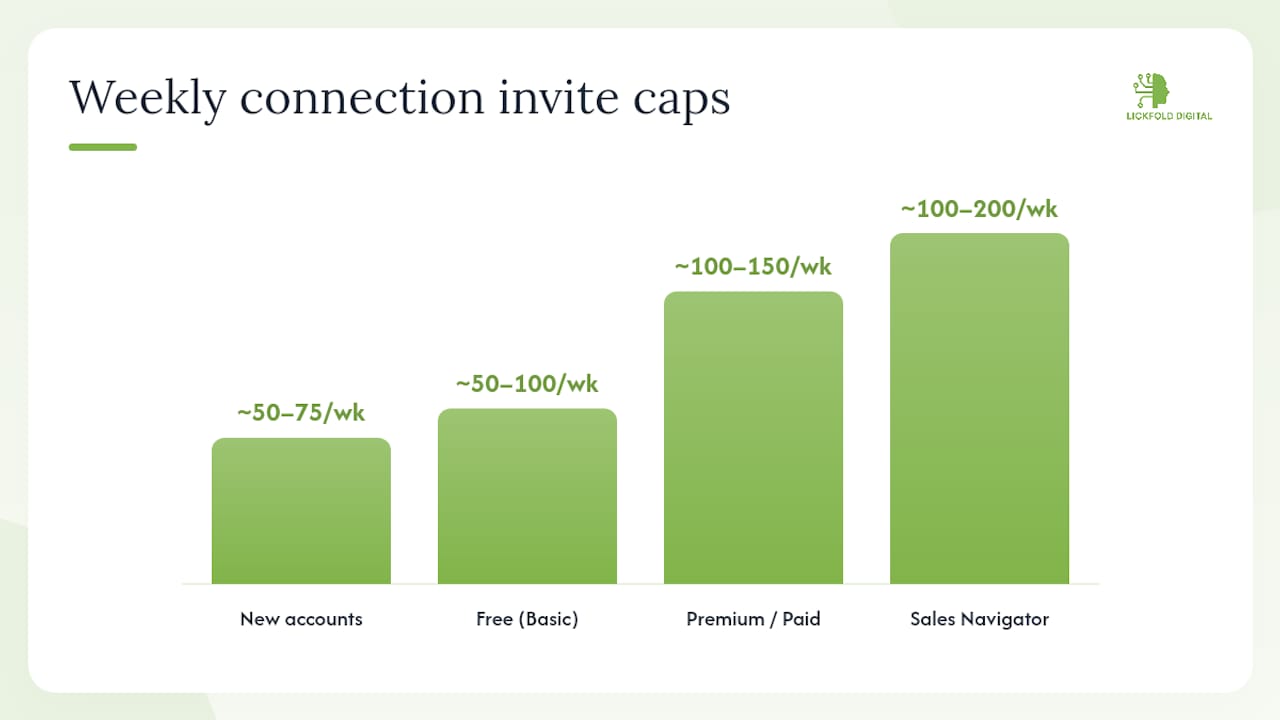
Last updated: 2026. All figures are empirical/community-observed ranges, not LinkedIn-published caps. LinkedIn tracks activity on a rolling 7-day window.
| Limit Type | Free (Basic) | Premium / Paid | Sales Navigator |
|---|---|---|---|
| Connection invites per week | ~50–100 | ~100–150 | ~100–200 (trusted accounts) |
| Connection invites per day | ~10–15 | ~15–20 | ~20–25 |
| Direct messages per week | ~80–100 | ~120–150 | ~120–150 + InMail |
| InMail credits per month | 0 | 5–15 (varies by plan) | 50 (accrues, capped at 150) |
| Personalized invite notes/month | ~5 (observed) | Unlimited | Unlimited |
| Pending invite ceiling (observed) | ~1,500 | ~1,500 | ~1,500 |
| 1st-degree connections (hard cap) | 30,000 | 30,000 | 30,000 |
| Search results per month | Limited (CUL applies) | Expanded | Expanded + commercial exception |
A few points worth noting:
- New accounts sit at the lower end of every range (~50–75 invites/week) until they build a track record of high acceptance rates. Observed ranges confirm that established accounts tend to send at moderate weekly invite volumes, while trusted accounts with strong SSI and acceptance history can approach a higher weekly number.
- Premium does not automatically unlock higher connection-request caps. The reputation signal matters more than the subscription tier for invite volume.
- The 30,000 first-degree connection hard cap is a permanent ceiling. Once you hit it, you cannot accept new connections without removing existing ones.
How do connection request limits actually work in practice?
The rolling 7-day window is the mechanism most outreach teams misunderstand. LinkedIn does not reset your invite count every Monday. It looks back at the last seven days continuously, so a burst of 80 invites on a single Tuesday counts against you through the following Monday.
Account reputation shifts your ceiling. A new account sending a moderately high number of invites in week one is a red flag. The same volume from a mature account with a good acceptance rate is generally safer. Research confirms that new accounts should expect roughly 50–75 invites per week, established accounts around 100, and trusted accounts up to 200.
Safe daily pacing matters as much as the weekly total. Spread invites across the day rather than sending them all at 9 AM. A community-tested safe daily range for most accounts is a low to moderate number of invites, sent at irregular intervals.
Pending-invite hygiene is non-negotiable. Community guidance recommends keeping pending invites under 500–700, well below the observed 1,500 ceiling. Withdraw invites older than 2–3 weeks on a rolling basis. One important nuance: withdrawing an invite does not restore your weekly send quota; the historical send count remains tracked. The historical send count stays in the rolling window regardless of withdrawals. Withdrawals only reduce your pending count, not your consumed capacity for the week.
The 300-character note limit on connection requests is a hard constraint. Two brief templates that work within it:
- “Hi [Name], I noticed your work on [specific project/post]. I’m exploring [relevant topic] and thought connecting made sense. Happy to share what we’re seeing.” (under 200 characters)
- “[Name], your recent piece on [topic] resonated. I work with [relevant audience] on similar challenges. Would love to connect.” (under 150 characters)
Pro Tip: Before sending a connection request, view the prospect’s profile, engage with one of their recent posts, and wait 24–48 hours. This warm-up sequence signals genuine interest to LinkedIn’s algorithm and consistently raises acceptance rates compared to cold, immediate invites.
How many LinkedIn messages can you safely send per day?
Direct messages to 1st-degree connections and InMail to non-connections are fundamentally different products with different risk profiles.
Standard direct messages go to people already in your network. LinkedIn does not publish a hard daily cap, but observed safe baselines put free accounts at roughly 80–100 messages per week and paid accounts at 120–150 per week before anti-spam signals activate. That works out to roughly 15–20 messages per day for free accounts and 20–25 for paid, assuming you spread sends across working hours.
InMail is a paid credit system. Standard Premium plans include 5–15 credits per month depending on the plan. Sales Navigator seats receive 50 credits per month, which accrue up to a 150-credit cap. Open Profile members can receive InMail from anyone at no credit cost, which makes them high-value targets for outreach teams watching credit burn.
Performance benchmarks worth tracking:
- Aim for 30%+ connection acceptance rate. Below 20% is a signal to revise your targeting or note copy, not to send more volume.
- Target a 10%+ response rate on initial messages. Cold outbound on LinkedIn rarely exceeds 15–20% even with strong personalization, so calibrate expectations accordingly.
Pro Tip: Have a human review and approve AI-drafted messages before they send. Limit cold outbound messages per prospect sequence to three touches maximum, spaced at least 5–7 days apart. More than that and you are burning goodwill faster than you are generating pipeline.
For teams coordinating LinkedIn with email, a personalized email outreach guide can help you balance channel volume without overloading either.
What is the Commercial Use Limit and how does it affect your searches?
The Commercial Use Limit (CUL) is LinkedIn’s throttle on search activity for free accounts. When LinkedIn detects that a free account is using search in a pattern consistent with commercial prospecting (high-frequency searches, repeated profile views of non-connections), it restricts the number of search results visible for the rest of that calendar month. The limit resets on the first of each month.
Free accounts under CUL restrictions will see a prompt telling them they’ve reached the monthly search limit. Paid tiers, including Premium and Sales Navigator, receive expanded search result counts and are largely exempt from the CUL for commercial prospecting use cases.
Safe profile-viewing patterns matter here. Viewing 50–100 profiles in a single session looks automated. Spreading profile views across a workday, mixing them with other platform activity, and keeping daily view counts in the 20–30 range reduces CUL risk for free accounts.
What happens when search is throttled:
- Search results become truncated, showing only a handful of results per query
- Profile view counts and “Who viewed your profile” data may become restricted
- The restriction lifts automatically at the monthly reset, not before
Warning: Mass profile scraping and high-frequency profile visits in short bursts are among the fastest ways to trigger both CUL restrictions and broader account flags. LinkedIn’s detection systems look at velocity, not just volume.
Sales Navigator removes most CUL friction by design. Navigator seats get access to larger search result windows and are treated as commercial users by default, so the monthly throttle that hits free accounts does not apply in the same way.
What are the specific limits for Sales Navigator users?
Sales Navigator changes the math on several limits, but not all of them.
Where Navigator genuinely helps:
- Search result windows are significantly larger, with access to full LinkedIn member databases rather than throttled free-tier results
- InMail credits start at 50 per month and accrue up to 150, giving teams a meaningful non-connection messaging budget
- Saved lead lists can hold up to 10,000 leads per list, with multiple lists available per seat
- Saved searches run automatically and surface new matching profiles, reducing manual prospecting time
- Commercial Use Limit exceptions mean Navigator users can prospect at scale without hitting monthly search resets
Where Navigator does not help as much as people expect:
Connection request caps are still reputation-graded. A Navigator seat on a new account still starts at the lower end of the invite range. The subscription tier does not override the behavioral trust signals LinkedIn tracks. Trusted Navigator accounts with strong acceptance rates can approach 200 invites per week, but that headroom is earned, not purchased.
Pro Tip: Use Navigator’s analytics dashboard to track your acceptance rate and pending invite count weekly. Treat those two metrics as your leading indicators, not lagging ones.
For teams building out targeted outreach campaigns, Navigator’s saved search and lead list features reduce the manual overhead of list management considerably.
What happens when LinkedIn restricts your account?
LinkedIn applies restrictions in layers, and the type of restriction determines both the recovery path and the timeline.
Soft weekly-invitation lock: The most common restriction. LinkedIn stops accepting new connection requests from your account for the remainder of the rolling 7-day window. Symptoms: the “Connect” button still appears but clicking it returns an error or a limits modal. This typically lifts within 3–7 days as the rolling window clears older sends.
Identity verification lock: Triggered when LinkedIn suspects automated or inauthentic behavior. Symptoms: a prompt to verify your identity via phone number or ID document. Recovery requires completing the verification step. Timeline: usually resolved within 24–48 hours after verification, though some accounts face a review period of up to a week.
Hard suspension: The most serious outcome, typically triggered by repeated policy violations, mass messaging complaints, or scraping activity. Symptoms: inability to log in, an email from LinkedIn stating the account has been restricted. Recovery requires submitting an appeal through LinkedIn’s Help Center. Timelines vary widely, from a few days to permanent, depending on the severity of the violation.
Recovery checklist for a soft lock:
- Stop all automation immediately.
- Log in manually and check your pending invite count.
- Withdraw invites older than 2–3 weeks until the queue is under 500.
- Do not send any new invites for at least 5–7 days.
- Resume at 10 invites per day maximum, spread across working hours.
- Monitor acceptance rate daily for two weeks before scaling.
For identity verification locks, complete the verification step first, then follow steps 4–6 above. For hard suspensions, contact LinkedIn Support directly through the Help Center. Support cannot speed up the removal of a soft invitation restriction, but they can clarify the status of a suspension appeal.
Watch these signals as you recover: SSI score stabilizing, pending count dropping, and the “Connect” button functioning normally without errors.
Practical rules for running safe outreach without getting flagged
The operational rules that keep accounts healthy are not complicated. The teams that get restricted are almost always the ones who ignored the early warning signs or pushed volume past what their acceptance rate justified.
Rate-limiting rules:
- Start at 15–25 invites per day for any account, regardless of age or tier
- Cap hourly bursts at a low number of invites maximum
- Use randomized delays between actions (45–90 seconds between profile views, 2–5 minutes between invite sends)
- Schedule sends only during working hours in the prospect’s time zone, not 24/7
Personalization rules:
- Reference something specific in the prospect’s profile, recent post, or company news in every note
- Never use the same note template for more than 20–30 sends without variation
- Keep notes under 200 characters even though the limit is 300. Shorter notes with a specific hook outperform longer generic ones.
Monitoring metrics and alert thresholds:
- SSI score: if it drops more than 5 points in a week, pause and audit
- Acceptance rate: below 20% triggers a mandatory volume reduction
- Pending invite count: above 600 triggers a withdrawal session
- Search throttle warning: any CUL modal means stop prospecting searches for the rest of the month
Automation hygiene checklist:
- Human review required for all AI-drafted message templates before activation
- Throttle settings locked in software, not left to default
- Working-hours-only scheduling enforced at the tool level
- Weekly log audit to catch anomalous send spikes
For a broader look at how automation workflows incorporate human checks, the patterns apply directly to LinkedIn campaign design.
A marketing automation checklist from BabyLove Growth covers the same operational discipline for teams newer to automation, with step-by-step guidance on setting safe defaults.
A practical automation safety checklist and rate-limiter example
The following checklist and pseudocode reflect ethical automation guidance for LinkedIn outreach. These are illustrative examples, not production-ready scripts. Adapt them to your tooling and always test against your account’s current standing before scaling.
Research-backed safety checklist:
- Set a hard daily cap of 15 invites per day in your automation tool’s configuration. Do not rely on manual discipline to enforce this.
- Implement randomized delays between every action: 45–90 seconds between profile views, 2–5 minutes between invite sends, 10–15 minutes between message sends.
- Require human approval for every message template before the sequence activates. AI drafts are starting points, not final sends.
- Schedule all automated activity within working hours only (e.g., 8 AM–6 PM local time). Overnight sends are a strong bot signal.
- Log every action with a timestamp. Review logs weekly to catch volume spikes before LinkedIn does.
- Track acceptance rate per campaign. Pause any campaign where acceptance drops below 25% for two consecutive weeks.
Minimal rate-limiter pseudocode (illustrative only):
# LinkedIn outreach rate limiter — illustrative pseudocode
# Adapt to your environment; do not run as-is

DAILY_CAP = 15          # max invites per day
HOURLY_CAP = 5          # max invites per hour
MIN_DELAY_SEC = 120     # minimum seconds between sends
MAX_DELAY_SEC = 300     # maximum seconds between sends

invites_today = 0
invites_this_hour = 0

for prospect in prospect_list:
    if invites_today >= DAILY_CAP:
        log("Daily cap reached. Stopping.")
        break

    if invites_this_hour >= HOURLY_CAP:
        log("Hourly cap reached. Waiting 60 minutes.")
        sleep(3600)
        invites_this_hour = 0

    if not human_approved(prospect.message_template):
        log("Template not approved. Skipping.")
        continue

    send_invite(prospect, note=personalize(prospect))
    invites_today += 1
    invites_this_hour += 1

    delay = random_int(MIN_DELAY_SEC, MAX_DELAY_SEC)
    sleep(delay)
Community review data from platforms like G2 and Capterra corroborates these defaults. Vendor-reported safe settings for outreach tools commonly ship with a default cap around 20 invites per day, and vendor support documentation consistently warns that aggressive automation triggers LinkedIn’s detection systems. The pseudocode above is deliberately conservative, reflecting the 15/day figure that ethical automation research cites as a safe starting point.
The trade-off most outreach teams get wrong
The conventional wisdom in B2B outreach is that more volume equals more pipeline. Run the numbers on LinkedIn and that logic breaks down fast.
The math favors quality targeting and personalization over raw volume every time.
What most teams underestimate is how quickly a bloated pending queue compounds the problem. Every unaccepted invite sitting in your queue is a signal to LinkedIn that your targeting is off or your notes are not resonating. Let that queue grow past 700 and you are actively suppressing your own future headroom, not just waiting for a reset.
The teams that run the most durable LinkedIn outreach programs share one habit: they treat acceptance rate as the primary metric, not send volume. Volume is easy to measure and satisfying to report. Acceptance rate tells you whether the outreach is actually working.
The restriction that would have followed a continued push at 20/day would have cost far more pipeline than the two-week slowdown.
How Lickfold keeps your LinkedIn outreach compliant at scale
Running the operational checklist above manually across multiple accounts and campaigns is where most teams eventually break down. The rate-limiting, the pending-invite audits, the human review steps, the acceptance-rate monitoring — each one is manageable alone, but together they add up to a full-time job.
Lickfold’s AI-driven prospecting platform is built around exactly this operational stack. Rate-limiting and randomized delays are enforced at the infrastructure level, not left to individual discipline. Human-in-loop approval workflows sit between AI-drafted message templates and actual sends, so no template goes live without a qualified review. Pending-invite hygiene workflows run automatically, keeping queue counts in the safe range without manual audits. Dedicated warm-up email infrastructure and ongoing reputation monitoring extend the same discipline to the email channel, giving outreach teams a coordinated multi-touch approach that does not overload either platform.
For B2B teams that need compliant, scalable outreach without building and maintaining this infrastructure themselves, reach out to Lickfold to see how the platform maps to your current campaign setup.
Sources
- LinkedIn Connection Limit 2026: Complete Guide (Weekly, Daily, and Account-Specific) | Linked API
- LinkedIn connection request limits in 202…
- LinkedIn Connection Request Limits: Invites & 30,000 Cap (2026) | Taplio
- How to Automate LinkedIn Outreach (Ethically) with Python - DEV Community
- LinkedIn Limits in 2026 & Beyond (Updated Guide for Safe …
All numeric guidance in this article reflects empirical, community-observed ranges as of 2026. Re-check source dates and the LinkedIn Help Center before setting automation caps for any live campaign.