
Blacklist Monitoring for Ops Teams: Catch Listings Within Hours
Blacklist Monitoring for Ops Teams: Catch Listings Within Hours
Blacklist monitoring is the automated, recurring practice of checking your sending IPs and domains against DNS-based blocklists so you catch a listing within minutes or hours instead of days. If you own sending infrastructure or run large-scale outbound campaigns, you need it, full stop. Spamhaus alone drives blocking decisions at a significant share of mail providers, and a tool like HetrixTools or reputation management practices can catch a listing before your open rates collapse.
TL;DR:
- Continuous blacklist monitoring is essential for active sending domains and IPs, as it detects listings within hours, preventing deliverability drops.
- Checking multiple DNSBLs, validating SPF, DKIM, DMARC, and assessing reputation scores offer a fuller risk picture beyond single DNS queries.
- Regularly reviewing listing history and isolating high-risk assets reduces recurrence and limits damage from compromised sources.
- Immediate, verified delisting efforts after alerts are necessary to prevent longer-term reputation damage and deliverability decline.
- Outsourcing reputation management with SaaS or managed services can save engineering resources and improve overall email infrastructure stability.
Table of Contents
- One-Time Blacklist Check vs. Continuous Monitoring
- How Blacklist Monitoring Actually Works Under the Hood
- What to Monitor, and How Often
- How to Investigate a Listing and Get Delisted
- Choosing Between DIY Scripts, SaaS Monitors, and Full Platforms
- Putting Monitoring Inside a Real Deliverability Program
- What Actually Causes Blacklisting, and How to Prevent It
- Tools and Services Worth Knowing
- Best Practices When Listings Keep Coming Back
- When Blacklisting Actually Hits the Business
- Monitoring Isn’t Optional Anymore
- How Lickfold Digital Handles Reputation While You Focus on Pipeline
- Sources
One-Time Blacklist Check vs. Continuous Monitoring
A one-time blacklist check is a snapshot. You run an IP or domain through a checker, get a pass or fail, and move on. That’s fine for pre-purchase due diligence on a new IPv4 block, or for a one-off audit before a big campaign launch. It tells you nothing about what happens the following Tuesday.
Continuous monitoring is different. It queries the same blocklists on a schedule, tracks state changes, and pushes an alert the moment something flips from clean to listed. The gap between these two matters more than most teams assume.
- Snapshot checks fit onboarding, IP purchases, and pre-launch audits.
- Continuous monitoring fits any IP or domain actively sending production mail.
- Relying only on ad-hoc checks means you find out about a listing from bounce logs or a furious sales rep, usually 12 to 48 hours after it started.
That delay is the real cost. A listing that sits undetected for two days doesn’t just bounce a batch of emails. It can quietly suppress deliverability on unaffected sends too, since mailbox providers adjust sender reputation scores well before you notice the pattern.
How Blacklist Monitoring Actually Works Under the Hood
Every blacklist check, whether manual or automated, runs on the same core mechanism: a DNS-based blocklist (DNSBL, sometimes called an RBL) query. The monitoring tool reverses your IP address, appends the blocklist’s zone (something like 2.0.0.127.zen.spamhaus.org), and sends a DNS lookup. A returned A record means you’re listed; no record means you’re clean at that provider, as of that query.
Good monitoring goes well past that single lookup:
- DNSBL/RBL queries against dozens or hundreds of lists simultaneously, not just one.
- SPF, DKIM, and DMARC validation checks, since authentication failures often precede or accompany a reputation drop.
- WHOIS and registrant flags, which surface ownership changes or expired domains that mailbox providers treat as risk signals.
- AbuseIPDB-style reputation scores, layered on top of raw blocklist status for a fuller risk picture.
For teams managing more than a handful of addresses, bulk and CIDR scanning matters. Instead of checking IPs one at a time, a monitor can ingest an entire subnet (a /24 or /27 block) and flag which specific addresses inside it are dirty. AbuseBox, an open-source scanner, supports checks across 60+ DNSBLs with bulk and CIDR input, which makes it a workable option for teams that want this capability without a subscription.
Pro Tip: DNS answers get cached according to their TTL, sometimes for hours. If you just got delisted and a checker still shows you as blocked, you’re probably looking at a stale cache, not a failed delist. Query a different resolver or wait out the TTL before you panic.
One structural quirk worth knowing: not every blocklist behaves the same way operationally. Some, like Spamhaus’s PBL, list IPs by policy (dynamic ranges that shouldn’t send mail directly) rather than by observed abuse, so a “listing” there isn’t always a reputation failure. Reading the specific list’s methodology before you escalate saves a lot of wasted effort.
What to Monitor, and How Often
Not every asset carries the same risk, so treat your monitoring cadence as tiered rather than uniform.
- Sending IPs first. These are your highest-value assets. Anything actively pushing transactional or marketing mail belongs on the tightest scan schedule.
- Sending domains second. Domain-based blocks (increasingly common as providers move past pure IP reputation) can silently tank deliverability even when your IPs are clean.
- Third-party service IPs. If you route mail through an ESP, CRM, or outbound platform, monitor the ranges they use, since their reputation problems become yours.
- Full CIDR ranges. For anyone managing a subnet, scan the whole block, not just the addresses you know are active.
Cadence should scale with blast radius. Critical relays handling live production traffic warrant checks at frequent intervals; standard SMTP servers can run on moderately frequent intervals; archival or low-risk assets are fine on a daily scan, a tiering approach HetrixTools documents in its own scan configuration options.
Alert routing needs to match urgency to channel. A critical-tier listing should hit Slack or PagerDuty and page an on-call engineer immediately; a low-severity list hit on an archival IP can wait for a daily email digest. Retain historical scan data, not just current status. When you’re doing post-incident forensics on why a campaign tanked three weeks ago, timestamped history is the only thing that reconstructs the timeline.
How to Investigate a Listing and Get Delisted
The moment you get an alert, resist the urge to submit a delist request immediately. Verify first.
- Confirm across multiple sources. A single checker can return a false positive from a stale cache. Cross-check with Spamhaus’s own lookup tool and at least one other independent scanner before you act.
- Scope the listing. Is it the single IP, the whole domain, or a broader CIDR block? A CIDR-level listing usually means one bad actor inside a shared range poisoned everyone.
- Check root causes. Look for open relays, a compromised email account sending spam through your infrastructure, a hacked web host on the same IP, or malware on an endpoint that’s blasting outbound traffic.
Once you’ve scoped and diagnosed the issue, fix it before you request removal. Every list wants proof the underlying problem is resolved, not just a promise. Barracuda’s removal process, for example, expects a clear explanation of what caused the listing and what changed. Spamhaus documentation works the same way: submit through their portal, describe the remediation, and expect a review window rather than instant reversal.
| Step | What it involves | Common mistake |
|---|---|---|
| Verify | Cross-check 2+ independent sources | Trusting one tool’s cached result |
| Scope | Determine IP vs. domain vs. CIDR | Assuming it’s isolated to one address |
| Diagnose | Check for compromise, open relay, malware | Skipping root cause and requesting removal anyway |
| Delist | Submit provider-specific request with evidence | Submitting before the underlying issue is fixed |
| Verify recovery | Re-scan after TTL expiry across multiple lists | Declaring victory off one clean check |
Choosing Between DIY Scripts, SaaS Monitors, and Full Platforms
Three broad models exist, and picking the wrong one for your scale is the most common mistake teams make here.
Self-hosted scripts and open-source toolkits, like AbuseBox, give you full control and no recurring subscription cost. AbuseBox can scan 60+ DNSBLs with bulk and CIDR support, keep your data in-house, and run on your own schedule. The tradeoff is maintenance: you own the uptime, the scheduling reliability, and any updates when a blocklist changes its query format.
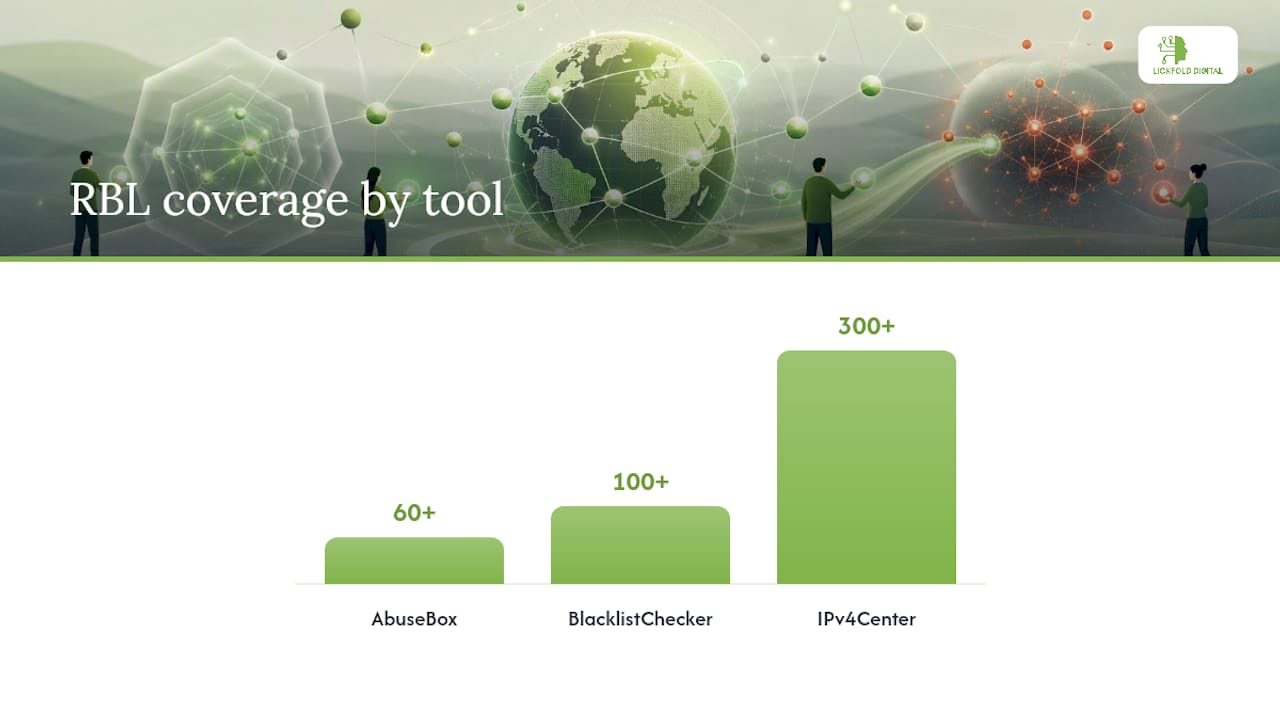
SaaS monitors trade some of that control for convenience. HetrixTools and similar services handle the scanning infrastructure, offer hourly checks, and plug into Slack, webhooks, or PagerDuty without you writing a line of cron. IPv4Center takes a similar approach, scanning against 300+ blacklist databases with real-time alerting and provider-specific remediation guidance baked in.
When evaluating any option, weigh these axes:
- Coverage. How many RBLs does it actually query? BlacklistChecker checks over 100 lists on both its free tier and its API/monitoring option, which is a reasonable baseline.
- Scan frequency. Minutes matter for production relays; daily is fine for cold storage.
- Automation depth. Does it just alert, or does it help route the delist request?
- API and webhook support. If you want monitoring inside a runbook, this is non-negotiable.
- Bulk/CIDR support. Essential once you’re past a handful of IPs.
- Retention and reporting. You need history for forensics, not just a live dashboard.
- Cost. Self-hosted is free but labor-intensive; SaaS scales with IP count.
A small team running two or three sending domains can often get away with a free checker like BlacklistChecker run on a schedule. A mid-size host managing dozens of IPs benefits from a dedicated SaaS monitor with tiered alerting. An enterprise sender managing full CIDR ranges across multiple regions typically needs both: automated SaaS coverage for speed, plus a self-hosted layer like AbuseBox for data control and audit independence.
Putting Monitoring Inside a Real Deliverability Program
Monitoring only pays off when it’s wired into the rest of your reputation strategy, not left as a dashboard nobody checks. Lickfold Digital treats blacklist status as one input inside a larger warm-up and reputation management process, because a listing rarely shows up in isolation. It tends to follow a spike in bounce rate, a sudden drop in engagement, or a change in sending volume that a dedicated warm-up account would have absorbed more gracefully.
The practical move is automating the alert but keeping a human in the loop before anything gets submitted for delisting. An automated Slack ping that fires a delist request without review risks submitting before the root cause is fixed, which most providers will simply reject anyway.
When a critical IP gets listed, pause outbound campaigns running through it immediately rather than letting them keep firing into a block. Rotating to a clean, pre-warmed IP is far safer than pushing through a dirty one and hoping engagement metrics recover on their own.
What Actually Causes Blacklisting, and How to Prevent It
Most listings trace back to a handful of repeatable causes. Compromised accounts are the most common: a single hijacked login sending spam through your legitimate infrastructure can get an entire IP or domain flagged within hours. Open relays, mail servers misconfigured to forward messages from unauthenticated senders, are a close second and a favorite target for spammers scanning the internet for exploitable infrastructure.
Sudden volume spikes without proper warm-up trip spam filters even when the content is legitimate. Sending a cold list of 50,000 contacts from a brand-new IP looks identical to a spam blast from a mailbox provider’s perspective, regardless of intent. Shared hosting environments carry their own risk: if your IP sits in a block with other tenants, one bad actor’s behavior can drag your reputation down with theirs.
Prevention starts with authentication. Properly configured SPF, DKIM, and DMARC records reduce the odds of a spoofing-related listing and give mailbox providers a clear signal that your mail is legitimate. Beyond that, gradual IP and domain warm-up, using dedicated sending accounts rather than shared infrastructure, and consistent list hygiene (removing hard bounces and unengaged contacts) close most of the remaining gap. None of this eliminates risk entirely, but it removes the causes that monitoring tools flag most often.
Tools and Services Worth Knowing
The monitoring landscape splits cleanly into commercial and open-source options, and most teams end up using at least one from each category.
On the commercial side, MXToolbox remains the default starting point for a quick manual lookup and offers a paid monitoring tier for ongoing checks. HetrixTools focuses specifically on scheduled monitoring with configurable alert channels and white-label reporting for teams managing client infrastructure. IPv4Center scans against 300+ blacklist databases with real-time alerts. BlacklistChecker covers one-time lookups across 100+ RBLs and provides an API for teams that want to build monitoring into their own systems.
For authoritative reference, Spamhaus is the list you check first when a listing appears, since its blocklists carry the most weight with major mailbox providers.
On the open-source side, AbuseBox gives self-hosting teams a single dashboard covering 60+ DNSBLs with bulk and scheduled scanning, at the cost of running and maintaining it yourself. Teams evaluating broader technical visibility tools sometimes pair blacklist monitoring with SEO and technical audit resources to keep domain health checks under one observability umbrella.
Best Practices When Listings Keep Coming Back
A single listing is an incident. A recurring one is a process failure, and treating it as anything else guarantees it happens again.
Start by tracking listing history over time rather than treating each event in isolation. If the same IP or domain gets flagged every few weeks, the root cause almost certainly hasn’t been fixed, only patched. Pull the retention data your monitoring tool keeps and look for a pattern: same time of month, same campaign type, same third-party integration.
Segment your sending infrastructure so one compromised source can’t take down everything. Isolating high-risk sends (cold outreach, large one-off campaigns) onto dedicated IPs separate from transactional mail limits the blast radius when something does go wrong.
Escalate internally, not just to the blocklist provider. Recurring listings usually point to a gap in access controls, a shared credential that keeps getting compromised, or a hosting environment that needs to change. Fix the infrastructure issue, then handle the delist, not the other way around. For campaign teams, this often means pausing outreach through the affected channel and reviewing deliverability fundamentals before resuming, rather than restarting the same campaign the moment the list clears.
When Blacklisting Actually Hits the Business
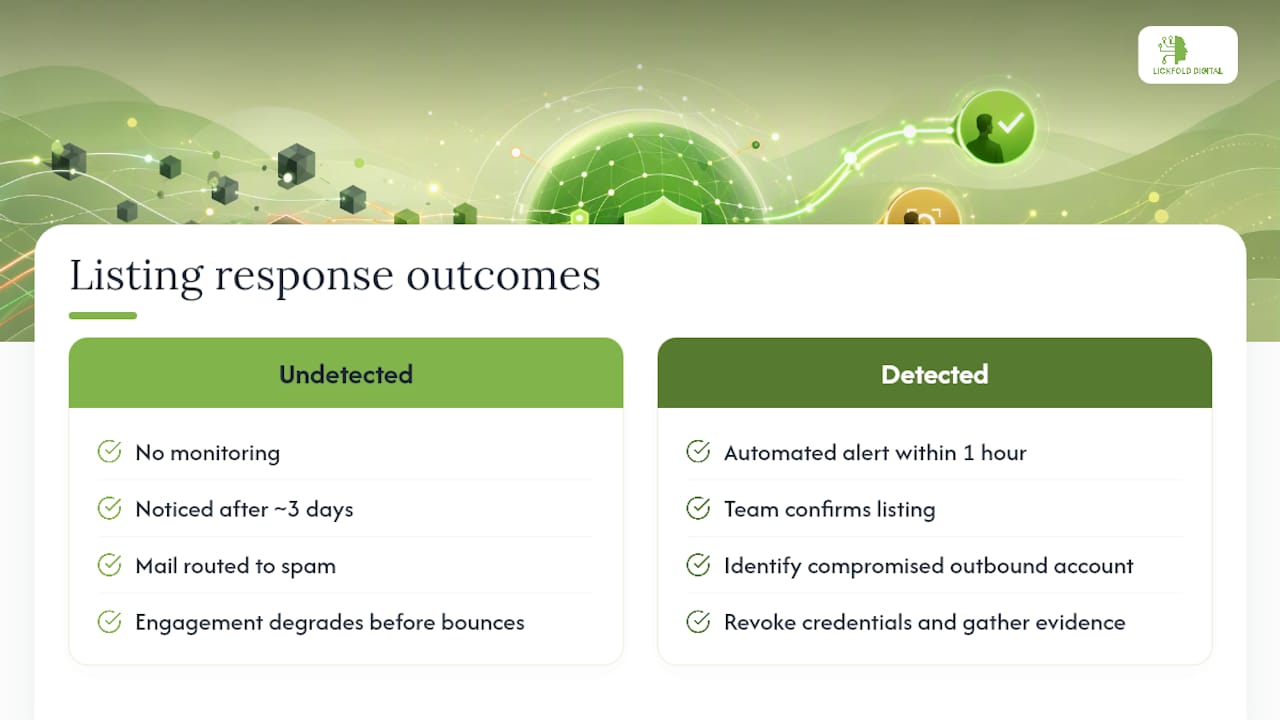
The clearest illustration of blacklisting’s cost isn’t abstract, it’s the sequence of failures that follows a listing that goes undetected. A sending domain lands on a mid-tier RBL. Nobody notices for three days because nobody was watching. Mailbox providers start routing a growing share of mail to spam folders even for recipients who never bounced, because engagement signals degrade before bounces spike. By the time someone checks, deliverability across the whole domain, not just the flagged IP, has taken a hit that takes weeks of clean sending to repair.
Contrast that with a listing caught inside an hour by an automated alert. The team confirms the listing, identifies a compromised outbound account, revokes its credentials, and submits a delist request with that evidence attached. Recovery happens within a day or two rather than weeks, because the root cause was fixed before the removal request went in, which is exactly what providers expect to see.
The pattern holds across scale. Teams sending API-triggered transactional mail face an added risk: a listing can silently start rejecting API calls, not just bouncing marketing sends, and that failure mode often goes unnoticed until customer support tickets pile up. Monitoring closes that gap by surfacing the problem at the infrastructure level before it becomes a customer-facing outage.
Monitoring Isn’t Optional Anymore
Reactive deliverability management, checking blacklist status only after something breaks, used to be tolerable when sending volumes were small and mailbox providers were more forgiving. Neither condition holds anymore. Provider algorithms weight recent reputation signals heavily, and a listing that sits for even a day compounds against you before you know it happened.
Start this week with three moves: put every actively sending IP and domain on a scheduled monitor, route critical alerts to a channel someone actually watches, and write down your delist checklist before you need it, not while you’re scrambling. Treat monitoring as infrastructure work owned alongside your ops or SRE team, not a marketing afterthought. The teams that get burned repeatedly are almost always the ones treating blacklist checks as something you do after a problem, not before one.
— Duarte
How Lickfold Digital Handles Reputation While You Focus on Pipeline
Running your own monitoring stack is doable, but it competes for engineering time against everything else on your roadmap. Some outbound platforms build infrastructure setup, dedicated warm-up accounts, and ongoing reputation management directly into their services, so the sending infrastructure behind your campaigns is watched and maintained as part of the service, not bolted on afterward.

If you’re running B2B outreach at any real volume, the choice usually comes down to this: build and maintain your own monitoring and warm-up process, or hand that operational weight to a team already running it across multiple client accounts every day. This reputation work can be paired with AI-driven prospecting and multi-touch outreach, plus human qualification before any reply reaches your sales team, so deliverability protection and pipeline generation run on the same system instead of two disconnected ones. If your outbound program needs both, talk to Lickfold Digital about setting up a managed campaign.