
Audit First Internal Linking Strategy: 3–5 Contextual Links
Audit First Internal Linking Strategy: 3–5 Contextual Links
An effective internal linking strategy means deliberately connecting your pages so crawlers and readers both find what matters most. The single highest-leverage move is combining pillar/cluster architecture with 3 to 5 contextual internal links per article. Before writing another link, run a quick audit to find orphaned pages and identify which existing pages already earn the most traffic and backlinks, since those are your best sources of link equity.
TL;DR:
- Prioritize linking from high-authority pages to orphaned or underperforming pages to maximize the transfer of existing link equity.
- Use 3 to 5 contextual internal links per article, placing the most valuable in the first third and varying anchor text to avoid over-optimization.
- Focus on building a clear pillar and cluster architecture with deep pages kept within three clicks of the homepage to improve crawlability and indexing.
- Conduct regular internal link audits to identify and fix orphaned pages, broken links, and excessive crawl depth, updating links as new content is published.
- Reserve automated link suggestions for detection and rely on human oversight for execution to prevent over-linking and pattern manipulation.
Table of Contents
- What Counts as an Internal Link?
- Why Do Internal Links Matter for SEO?
- Which Type of Internal Link Should You Use Where?
- How Do You Build an Internal Linking Strategy From Scratch?
- How Do You Audit Internal Links and Fix Common Problems?
- Internal Linking Best Practices Checklist
- Which Tools Handle Internal Linking Automation Well?
- Who’s Behind This Guidance?
- How Do You Decide Which Pages Deserve the Most Links?
- How Do You Avoid Link Dilution and Over-Optimization?
- What’s the Real Priority Here?
- Sources
What Counts as an Internal Link?
An internal link connects one page on your domain to another page on that same domain. That distinction matters because internal links are entirely within your control. You decide the anchor text, the placement, and the destination, unlike external links, where you’re at the mercy of who chooses to cite you.
Not all internal links carry equal SEO internal links weight. The industry generally sorts them into five buckets:
- Contextual links: placed inside body content, usually pointing readers to a related article or resource mid-sentence.
- Navigational links: your main menu, sidebar categories, and site-wide navigation elements.
- Breadcrumb links: the trail showing a page’s position in your site hierarchy (Home > Blog > Category > Post).
- Related-post links: automated widgets suggesting “you might also like” content at the end of an article.
- Footer and sidebar links: static links repeated across every page, often to cornerstone or legal pages.
Here’s the part most guides skip: these types don’t distribute value evenly. Contextual links in the main body pass more authority than footer or sidebar links, largely because search engines read editorial placement as a genuine endorsement rather than a template artifact. A link buried in a footer that appears on every one of your 10,000 pages looks nothing like a link a writer chose to place inside a relevant paragraph.
Why Do Internal Links Matter for SEO?
Crawlers discover new pages primarily by following links, and internal links are often the only path leading to a fresh post before it earns any external attention. A page with zero incoming internal links, an orphaned page, may never get crawled at all, regardless of how good the content is.
Beyond discovery, internal links distribute what’s often called link equity or internal PageRank. When an external site links to your homepage, that authority doesn’t sit there. It flows outward through your internal link structure to whatever pages your homepage links to, and then to whatever those pages link to. This is why using a high-authority page to boost an underperforming one works: you’re rerouting equity that’s already arrived at your site toward a page that needs it.
There’s a third mechanism that gets less attention: topical signaling. When you link a cluster of related articles to each other using consistent, descriptive anchor text, you’re drawing a map for search engines, and increasingly for AI systems and large language models trying to understand what your site is actually about and where its expertise lives.
Why this matters right now: a baseline of 3 to 5 contextual links per article keeps content genuinely connected without tipping into link spam, and that number shows up consistently across SEO practitioner guidance as the sweet spot between “too thin” and “overwhelming.”
None of this ignores the human reading your page. Clear internal linking cuts bounce rates, extends session time, and guides visitors toward conversion pages they’d never have found through search alone. Good internal linking best practices serve the crawler and the person at the same time, which is rarer than it sounds in SEO.
Which Type of Internal Link Should You Use Where?
Match the link type to the job. Editorial contextual links deserve first priority in any piece of content because they’re the links search engines trust most and readers actually click. When you mention a concept your site has already covered in depth, link it in the sentence where it naturally belongs, not tacked onto a bulleted list at the bottom.
Navigational links, breadcrumbs, and taxonomy pages exist to hold your site architecture together, not to pass concentrated authority to any one target. They matter for a silo structure SEO approach because they tell both users and crawlers where a page sits in the hierarchy, but don’t expect a breadcrumb trail to move rankings the way a well-placed contextual link can.
Related-post widgets and sidebar modules are useful for surfacing content people might otherwise miss, though they carry real risk. When every post on your site auto-generates the same five “related” links regardless of actual topical relevance, you dilute the signal those links are supposed to send.
A short rule worth keeping on a sticky note:
- Editorial, hand-placed links should always outnumber template-generated links on your most important pages.
- Automated related-post modules are fine for secondary content but should never be your only internal linking mechanism on pillar pages.
- Footer links should be reserved for pages that genuinely belong on every page, like your privacy policy or main service pages, not for anything you’re trying to rank aggressively.
How Do You Build an Internal Linking Strategy From Scratch?
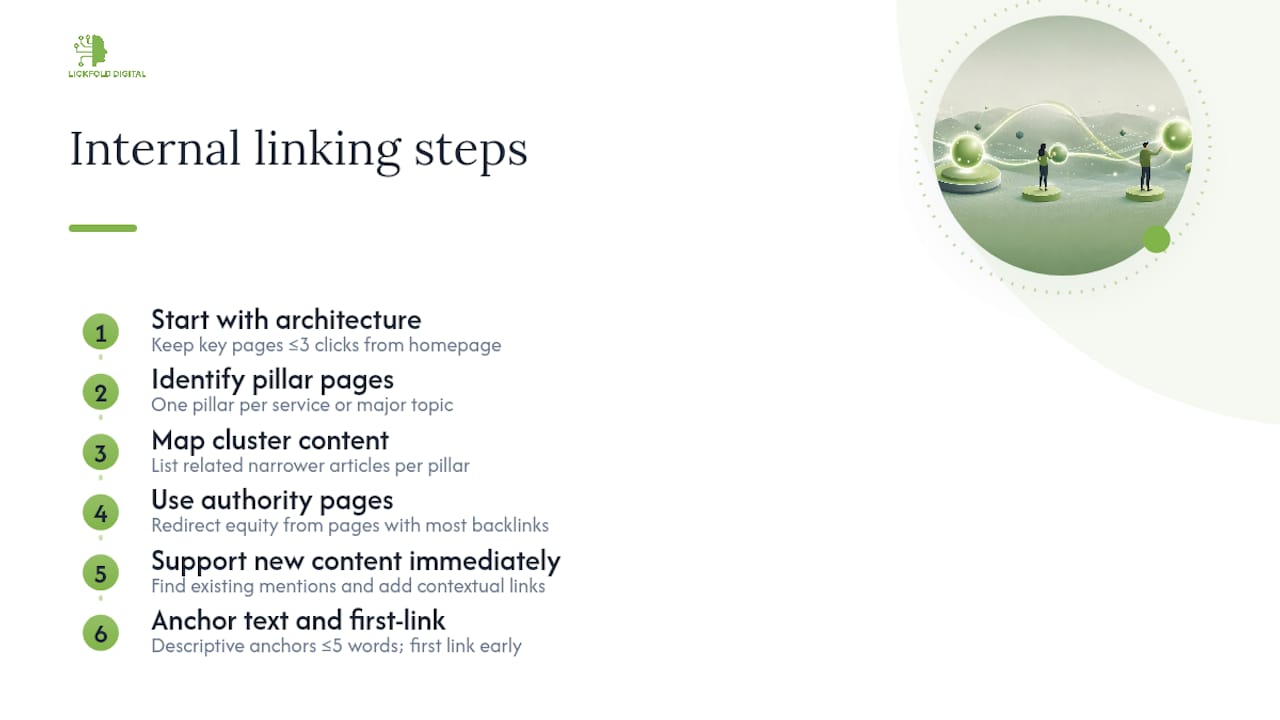
Start with architecture, not individual links. Sketch your site as a hierarchy and aim to keep your most important pages within three clicks of the homepage wherever that’s practically achievable. Deep pages buried six or seven clicks down rarely get crawled often and almost never get clicked by actual visitors.
1. Identify your pillar pages. These are the broad, comprehensive resources you want to rank for competitive head terms. Every service or major topic your business covers should have one clear pillar.
2. Map your cluster content. For each pillar, list the narrower, related articles that support it. A pillar on “B2B outbound sales” might have clusters covering outreach campaign structure, email deliverability, or lead qualification.
3. Find your authority pages. Pull a backlink report and identify which pages on your site already attract the most external links. Those pages are sitting on equity you can redirect. Linking from an authority page to a target that needs a ranking boost is one of the fastest internal SEO moves available, because you’re not waiting on new backlinks, you’re reallocating ones you already have.
4. Support new content immediately. The moment you publish, use your site’s search function or a site: search operator to find every existing page that mentions the new topic, then add a contextual link back. Don’t wait for the new page to earn links organically; it may take months.
5. Get your anchor text right. Descriptive, concise anchors (five words or fewer) tell users and crawlers exactly what they’ll find on the other end. Vary your anchor text across different pages linking to the same target, and never reuse the identical anchor for two different destination pages. That confuses the topical signal you’re trying to send.
6. Respect first-link priority. Search engines typically weight the first instance of a link to a given target more heavily than any repeat instance further down the same page. Practically, that means the most important internal link in an article should appear in your first or second paragraph, not buried in a “further reading” list at the bottom. This is an HTML-order issue, so check your source code, not just how the page looks visually.
Pro Tip: Run a fresh internal link pass any time you publish a new pillar page or do a major content refresh, then re-audit four to eight weeks later to confirm the new links actually moved rankings or traffic for the target page.
Cadence matters more than most teams assume. A one-time internal linking cleanup fades in value within a couple of content cycles as you publish new pages that never get folded into the existing structure. Treat internal linking as a recurring maintenance task, ideally tied to your publishing calendar, not a project you finish once and forget.
How Do You Audit Internal Links and Fix Common Problems?
An internal link audit starts with a full site crawl using a tool that maps every link on every page. From that crawl, you’re looking for four specific problems, and these are the ones that show up most consistently across audits: orphaned pages with no incoming internal links, broken links pointing to deleted or moved URLs, internal redirect chains that waste crawl budget, and pages buried too deep in your architecture to get crawled regularly.
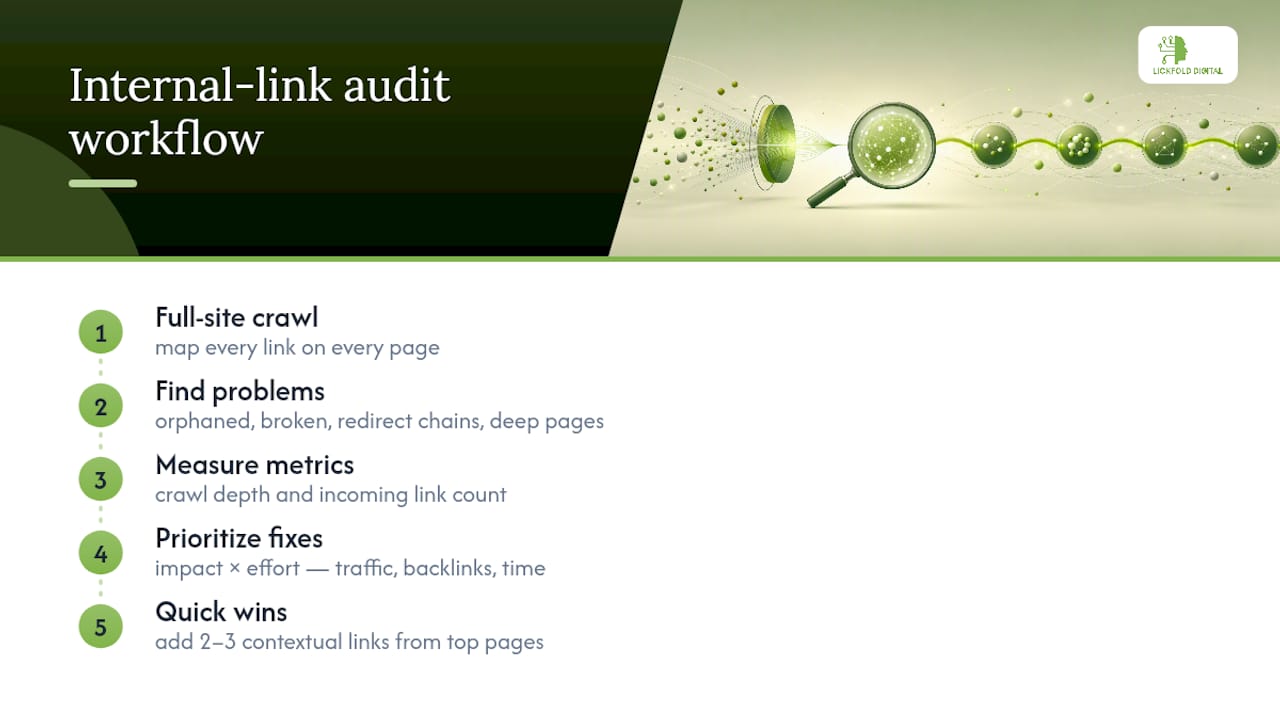
Two metrics deserve a permanent spot on your audit dashboard: crawl depth (how many clicks from the homepage a page sits) and incoming internal link count. A page with a crawl depth of five or more and only one incoming link is, functionally, half orphaned. It technically has a path in, but neither users nor crawlers are likely to find it.
Once you have your list of problems, prioritize by impact times effort, not by whatever’s easiest to fix first. Impact means traffic potential, conversion value, and how many external backlinks a page already has. Effort means how much editorial or engineering time a fix requires. A quick win is almost always adding two or three contextual links from your highest-traffic pages to an orphaned page that’s already ranking for decent keywords but getting no internal support.
Internal Linking Best Practices Checklist
Keep this list next to your content calendar. It’s the difference between an internal linking best practices approach that compounds over time and one that quietly rots.
- Do add 3 to 5 contextual links in every new article, prioritizing links from pages that already carry strong external backlinks.
- Do vary your anchor text and keep each anchor at five words or fewer.
- Do place your most valuable link within the first third of the article, where first-link priority and reader attention both peak.
- Do use dofollow internal links by default; reserve nofollow for genuinely low-value destinations like login pages or filtered URLs.
- Don’t deploy an automated plugin to mass-generate identical anchor text across thousands of pages without a human reviewing the output first.
- Don’t let related-post widgets substitute entirely for editorial linking on your priority pages.
The number that should guide your reviews: that 3 to 5 contextual links per article baseline isn’t arbitrary. Go much lower and you’re leaving equity and navigation value on the table; go much higher on a single page and you risk diluting the weight each individual link carries, plus you’re asking readers to make too many decisions about where to click next.
Track three numbers monthly: total incoming internal links per priority page, average crawl depth across your top 50 pages, and your count of orphaned pages. If orphan count is climbing month over month, your publishing process has a structural gap.
Which Tools Handle Internal Linking Automation Well?
For internal linking automation at scale, two tools dominate practitioner workflows. Semrush’s site audit produces an Internal LinkRank report along with orphan page lists, which is genuinely useful for spotting distribution problems across large sites. Screaming Frog gives you a raw crawl with link score and inlink counts per URL, which is more manual but lets you filter and cross-reference in ways dashboard tools don’t always allow.
Plugin-based suggestions, like the internal linking prompts built into some WordPress SEO plugins, can speed up the process of finding candidate links inside long-form content. Treat every suggestion as a draft, though, not a finished product. The suggestion engine doesn’t know your content strategy; it’s pattern matching on keywords.
Turning any of these reports into action follows a simple sequence: export the crawl data, filter by traffic or revenue value to find your priority pages, then work down that list adding contextual links rather than trying to fix every page at once.
Automation earns its place for detection: crawling thousands of pages, flagging orphans, and surfacing broken links is tedious, repetitive work software does well. Where automation gets dangerous is execution at scale. Plugins that mass-generate exact-match anchor text across hundreds or thousands of pages can create a pattern that looks unmistakably manufactured to both search engines and readers.
- Use automated tools for detection: crawling, orphan discovery, broken link reports, crawl-depth mapping.
- Use human editorial review for execution: choosing exact anchor text, exact placement, and exact target pages.
- Treat any bulk anchor-text change as a red flag requiring manual spot checks before it goes live.
If you’d rather not run this loop manually every quarter, teams that automate their SEO content production still need a human checkpoint before internal links go live at scale, which is the line worth holding regardless of which platform does the heavy lifting.
Who’s Behind This Guidance?
Internal linking guidance is only as good as the pattern it’s built on across real audits, not a single case study dressed up as a universal rule. Experts with experience in B2B outbound and SEO content work inside this problem regularly: building the pillar pages, cluster content, and technical audits that this article describes, and watching which links actually move a page from page two to page one.
The pages that move fastest after an internal link pass are almost never the newest ones. They’re the two-year-old articles nobody’s touched, sitting with decent backlinks and zero internal support, one contextual link away from a ranking jump.
If you’re running this process for a client or your own site, the evidence worth collecting isn’t hypothetical. Before-and-after ranking data on a specific page after adding contextual links, a screenshot of orphan-page counts dropping after a cleanup, or a client’s own account of traffic lift following a cluster build-out all carry more weight than a general claim about “best practices.” Ask for that data before you trust a case study, and keep your own records before and after any internal linking push so you can make the same argument later.
How Do You Decide Which Pages Deserve the Most Links?
Not every page deserves equal internal link support, and treating them that way is one of the most common mistakes in a silo structure SEO setup. Start by ranking your pages on two axes: commercial value and current authority. A pricing page or service page converting at a decent rate deserves more internal support than a five-year-old blog post that never ranked.
Pages that already have external backlinks but rank on page two of search results are often your best short-term opportunities. They’ve cleared the “does Google trust this domain” hurdle already; what they’re missing is internal signal telling search engines this particular page matters more than its current position suggests.
A practical rule: every time you publish new content, ask whether an existing high-authority page could reasonably link to it. If yes, add that link before the new page goes live, not months later when you remember. This keeps equity flowing toward fresh content immediately rather than making it wait for external links that may never come.
Watch for pages accidentally hoarding equity they don’t need. A wildly popular blog post that already ranks first for its target keyword doesn’t need five more internal links pointing at it; that equity is better spent supporting a page still fighting for position three or four. Redistribute deliberately rather than defaulting to “link to whatever’s already popular” out of habit. Reviewing pricing or service pages for where they sit in this hierarchy is a useful exercise even outside a full audit cycle.
How Do You Avoid Link Dilution and Over-Optimization?
Link dilution happens when a page accumulates so many outgoing links that no single one carries meaningful weight. There’s no universal cap, but if an article links to twenty different pages, readers and crawlers alike struggle to tell which link actually matters. Keep your contextual link count purposeful rather than exhaustive.
Over-optimization shows up most often in anchor text. If every internal link pointing at your pricing page uses the exact phrase “best SEO pricing plans,” that pattern reads as manufactured rather than editorial, and it’s the kind of signal that draws unwanted algorithmic scrutiny. Vary your phrasing naturally, the way you’d describe the page differently in different conversations.
A useful technique borrowed from topic cluster methodology is treating strict content silos as a starting point rather than a rigid rule. A combined approach, topic clusters with pragmatic cross-cluster links where genuinely relevant, tends to outperform strict siloing because it preserves topical focus without blocking useful authority flow between related subjects.
Finally, resist the urge to link every mention of a keyword phrase throughout an entire article. One well-placed contextual link per concept, ideally the first mention, does more work than five scattered instances of the same anchor. Repetition doesn’t add authority; it just adds noise.
What’s the Real Priority Here?
Most internal linking advice treats every page equally, and that’s the core error. An audit-first approach beats a template-first approach every time, because it forces you to spend link equity where pages already have external authority and traffic potential, not just wherever your CMS makes it easy to insert a related-posts widget.
The pillar/cluster model gets recommended constantly, and it’s genuinely sound. What gets skipped is the maintenance discipline: re-auditing after every major content push, tracking orphan counts as a real metric, and treating anchor-text variation as a safeguard rather than an afterthought.
If you do only one thing this quarter, run the audit before you write another article. Fix the orphaned pages sitting on decent backlinks first. Everything else, the pillar structure, the anchor text rules, the automation tooling, works better once that foundation is clean.
— Duarte
Sources
- Internal links for SEO: An actionable guide — Ahrefs
- Website structure and first-link priority — Search Engine Land
- Internal Linking — Backlinko